



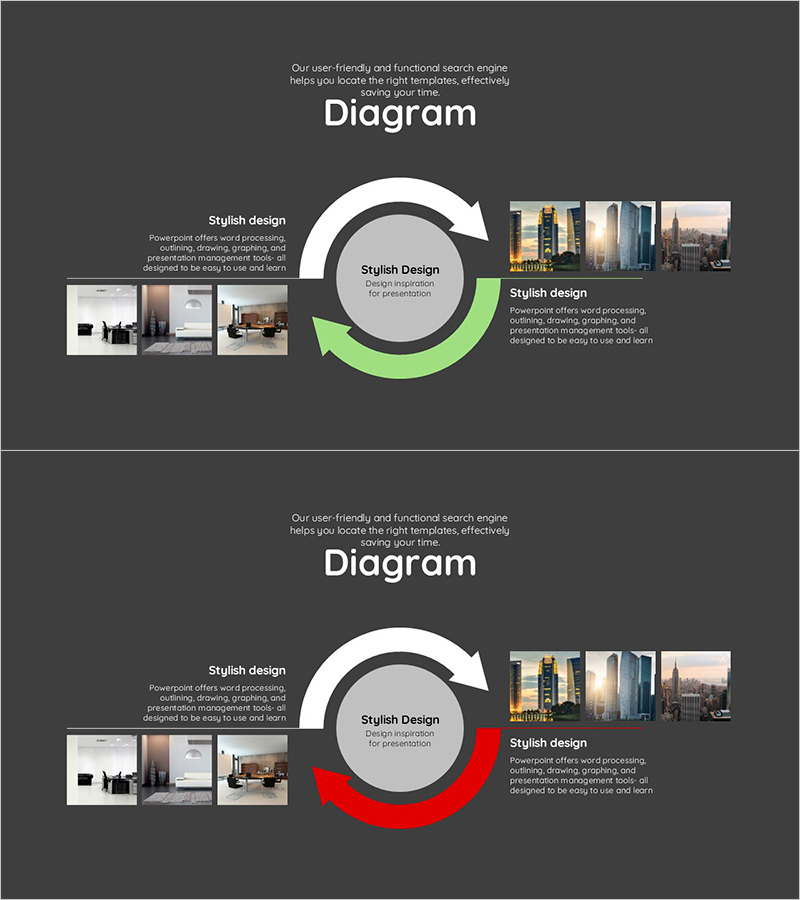
Interior Template Circulation Diagram - Target Market Strategy
RJ0300028_14
- Last Update 04/25/2025
- File Size 1.6MB
- # of Slides 2
- File Format PPTX
- Slide Ratio 16:9
- Color
Keywords
- #Content-Based Slides
- #Design-Based Slides
- #Marketing Plan and Strategy
- #Diagram
- #Target Market Strategy
- #Distribution Strategy
- #Flow
- #Circular Flow
- #16:9
- #circular diagram PowerPoint
- #cycle flow slide template
- #2-stage circular diagram
- #marketing strategy presentation
- #business process diagram PowerPoint
About the Product
A circular diagram PowerPoint slide designed for interior business strategy presentations. The two-stage circular flow diagram features a central concept with bidirectional arrows in green and red, effectively illustrating the relationship between target market strategy and distribution channels. The contrasting arrow colors distinguish opposing strategic directions, while left and right image zones accommodate photos to enhance visual impact. This 16:9 widescreen 2-slide set is ready to use for marketing strategy presentations, sales meetings, business proposals, and strategic planning discussions in the interior design and construction industries.
Usage Points
-
Main Usage
Visualizes the reciprocal relationship between target market strategy and distribution pathways. The center-focused circular structure with bidirectional arrows effectively communicates marketing feedback loops, customer journey cycles, and business strategy interactions in a clear, compelling manner.
-
How to Use
Enter your core strategy name in the central text box. Fill in stage-specific details in the text areas beside each arrow. Insert interior design photos, product images, or market analysis charts in the left and right image zones to strengthen persuasiveness. The green (growth/positive) and red (caution/change) colors emphasize the dual nature of your strategy.
-
Recommended For
Ideal for interior design company sales teams, construction and real estate marketing managers, retail distribution strategists, and business proposal writers. Effectively explains market entry strategies, customer acquisition and retention plans, and product launch feedback cycles.
-
Slide Structure
2-slide set. Each slide features a central circular hub (text input area), top bidirectional arrows (green and red), left image zone (3-4 photo placements), right image zone (3-4 photo placements), and bottom text description area. 16:9 widescreen format optimized for projector displays and online presentations.
Related Products
-
Travel Guide Business Global Map Market Analysis Slide
#Marketing Plan and Strategy #Diagram #Other
-
Distribution Strategy Circular Diagram – Simple Visual for Marketing Strategy
#Technical Approach #Marketing Plan and Strategy #Diagram
-
PowerPoint Slide for Asian Market Analysis
#Marketing Plan and Strategy #Diagram #Other
-
Visual Presentation Using Maps – Comprehensive Data Visualization
#Operational Plan #Marketing Plan and Strategy #Text Box
