



Interior Design Work System – Engaging Diagram Utilization
RJ0900025_7
- Last Update 10/07/2025
- File Size 0.5MB
- # of Slides 2
- File Format PPTX
- Slide Ratio 16:9
- Color
Keywords
- #Content-Based Slides
- #Design-Based Slides
- #Business Strategy
- #Operational Plan
- #Diagram
- #Production Plan
- #Business Processes
- #Flow
- #Spread
- #Circular Flow
- #Centralized Diagram
- #16:9
- #radial diagram PowerPoint
- #center hub diagram slide
- #6-node icon diagram
- #interior design work system PPT
- #organizational structure diagram PowerPoint
About the Product
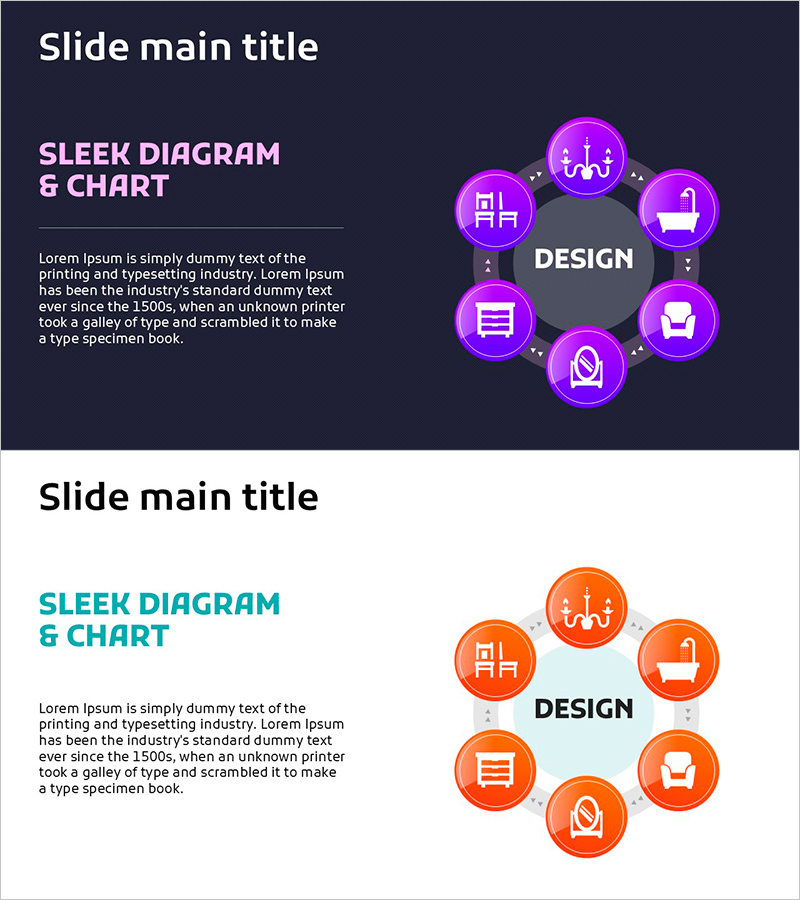
A radial diagram PowerPoint slide that visualizes interior design work systems with a central hub-and-spoke structure. Six icon nodes radiate outward from the central 'Design' concept, representing different operational areas such as space planning, construction, and management. The design features magenta gradient circular nodes, white icons, and dotted connector lines that clearly express hierarchical relationships. Provided in two versions—dark background and light background—for flexible presentation scenarios. The 16:9 widescreen PPTX format allows immediate editing and customization for your specific needs.
Usage Points
-
Main Usage
Ideal for expressing organizational functions and business areas that radiate outward from a central concept. Perfect for visualizing interior design operations, construction projects, organizational structures, business processes, and service ecosystems where multiple domains branch from a core function.
-
How to Use
Use this slide in the 'Organization Overview', 'Business Areas', or 'Operational Structure' sections of your presentation. Edit the node icons and text labels to match your organization or project, and select the background color that aligns with your presentation theme. The dotted connector lines make relationships immediately clear to your audience.
-
Recommended For
Recommended for architecture and interior design firms preparing company profiles, construction project proposals, design studio portfolios, organizational restructuring presentations, and business process improvement reports. Ideal for planners, designers, and project managers who need to communicate complex operational relationships clearly.
-
Slide Structure
Six circular nodes with icons are arranged in a 360-degree radial pattern around the central 'Design' text, connected by dotted directional lines. Two background versions are included—dark background with magenta gradient and light background with orange gradient—allowing you to choose based on your presentation context.
Related Products
-
Game and Hobby Diagram – Visualizing Organization and Strategy
#Business Strategy #Operational Plan #Diagram
-
Healthcare System Process Diagram – Efficient Workflow
#Business Introduction #Operational Plan #Diagram
-
Research Phase Process Slide Design - Business Strategy
#Business Strategy #Operational Plan #Diagram
-
Circular Process Diagram – Designing Efficient Workflows
#Operational Plan #Technical Approach #Diagram
