



Diagram Slide for Visualizing Fintech App Process
RJ0400058_9
- Last Update 06/02/2025
- File Size 0.2MB
- # of Slides 2
- File Format PPTX
- Slide Ratio 16:9
- Color
Keywords
- #Content-Based Slides
- #Design-Based Slides
- #Product/Service Introduction
- #Technical Approach
- #Diagram
- #Other
- #Product/Service Introduction
- #System Architecture Diagram
- #Flow
- #Linear Flow
- #Mockup
- #16:9
- #fintech app mockup PowerPoint
- #app process flow presentation
- #smartphone mockup slide
- #app UI PowerPoint template
- #fintech process diagram
- #mockup slide design download
About the Product
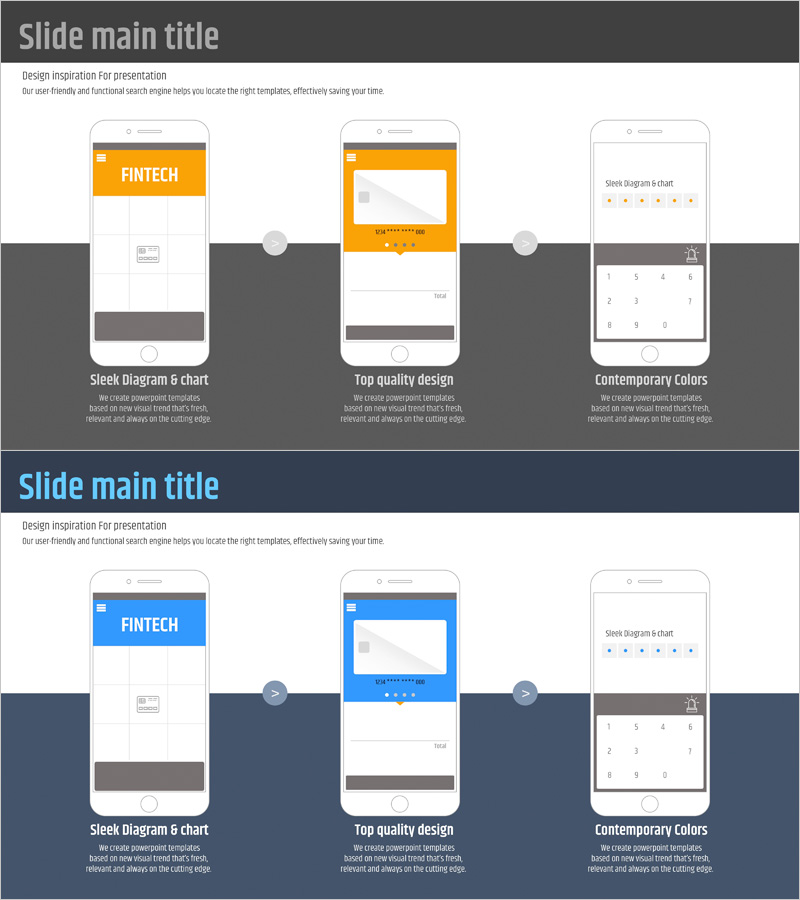
A mockup slide that visualizes the fintech application user journey through a 3-step process flow. Three smartphone interface mockups are connected by directional arrows to illustrate the app's key functional progression intuitively. The design uses orange and blue dual-tone colors to differentiate each stage, with 'FINTECH' text and icon in the header area for clear subject identification. Composed of 2 slides in 16:9 widescreen format, ready for immediate use in fintech, financial app, and digital service presentations. All elements are fully editable in PowerPoint PPTX format.
Usage Points
-
Main Usage
Optimized for explaining fintech, financial app, and digital service user journeys and app feature flows step-by-step. Smartphone mockups simulate real app interfaces, while arrow connections clarify interactions between stages. Effectively communicates core app processes to investors, customers, and team members.
-
How to Use
Place in the 'Service Overview' or 'Technology Architecture' section of company profiles, product brochures, or investor pitch decks. Customize by inserting actual app screenshots into mockup areas or adding feature names as text. Add step-by-step animation effects during presentation for enhanced impact.
-
Recommended For
Primary audience includes executives, marketing teams, and sales teams at fintech startups, mobile app developers, and digital banking service companies. Also suitable for app-based service presentations by consulting firms, SI vendors, and educational institutions.
-
Slide Structure
Layout features a header area (FINTECH text with background color) and central content zone. Three smartphone mockups are positioned left, center, and right, each containing an app screen area (white background) and bottom navigation bar. Connecting arrows with gray circular nodes visualize the flow between mockups. Two slide variations provided: orange and blue color schemes.
Related Products
-
Simple Car Diagram for Service Introduction PowerPoint
#Product/Service Introduction #Diagram #Other
-
App-Based Personal Workout Booking System – Intuitive Diagram
#Product/Service Introduction #Diagram #Other
-
Introduction to Mobile Phone Service Configuration – Eye-Catching Diagram
#Product/Service Introduction #Diagram #Other
-
Five Color PowerPoint Template with Infographic Elements
#Technical Approach #Diagram #Service Components
