



Gear Shape Diagram for Visualizing Business Processes – Innovation and Efficiency
RJ0300061_22
- Last Update 05/05/2025
- File Size 0.2MB
- # of Slides 2
- File Format PPTX
- Slide Ratio 16:9
- Color
Keywords
- #Content-Based Slides
- #Design-Based Slides
- #Product/Service Introduction
- #Operational Plan
- #Diagram
- #Development Plan
- #Business Processes
- #Flow
- #Multidirectional Flow
- #16:9
- #gear diagram PowerPoint
- #business process visualization slide
- #system integration diagram
- #interlocking gear slide template
- #process flow diagram PowerPoint
About the Product
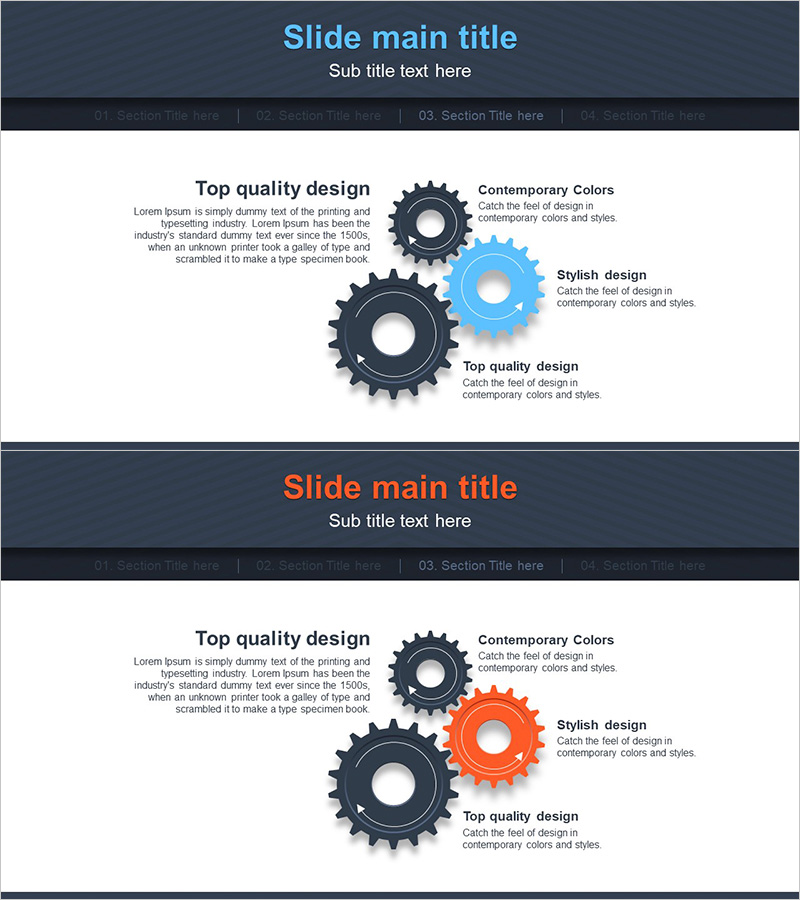
A PowerPoint slide featuring interlocking gear shapes to visualize business processes and system integration. Three gears in dark gray, light blue, and orange tones mesh together to represent interconnected workflow stages, with text boxes positioned beside each gear for detailed descriptions. The 2-slide set includes color variations (blue accent and orange accent) for flexible presentation contexts. Ideal for operations planning, system architecture, and cross-departmental collaboration presentations.
Usage Points
-
Main Usage
The interlocking gear structure intuitively represents interconnected business processes, system integration, and cross-departmental workflows. Text areas beside each gear allow you to add stage descriptions, department names, and responsibilities, simplifying complex operational structures.
-
How to Use
Use this slide when presenting operations planning, system architecture, or cross-functional collaboration processes. Input department names, process stages, or system modules into each gear, and use color variations (blue or orange) to highlight key elements and enhance audience comprehension.
-
Recommended For
Operations managers, project managers, system architects, and organizational development specialists can use this slide in internal meetings, executive reports, and external proposal presentations. Particularly effective for topics involving multi-department collaboration, system integration, and process improvement.
-
Slide Structure
2-slide set with dark gray background. Each slide displays 3 interlocking gears (large, medium, small) with 3 text boxes vertically aligned on the right side. First slide features blue accent color; second slide features orange accent for visual variation.
Related Products
-
Multidirectional Arrow Diagram – Effective Operational Planning
#Operational Plan #Diagram #Business Processes
-
Development Plan Cycle Diagram – Efficient Workflow
#Product/Service Introduction #Operational Plan #Diagram
-
Process Flow and Derivative Insight – Efficient Operational Planning Diagram
#Operational Plan #Technical Approach #Diagram
-
Increasing Sales through Marketing Strategy – Effective Process Description
#Operational Plan #Marketing Plan and Strategy #Diagram
