



Multidirectional Arrow Diagram – Effective Operational Planning
RJ0300055_17
- Last Update 05/03/2025
- File Size 2.8MB
- # of Slides 2
- File Format PPTX
- Slide Ratio 16:9
- Color
Keywords
About the Product
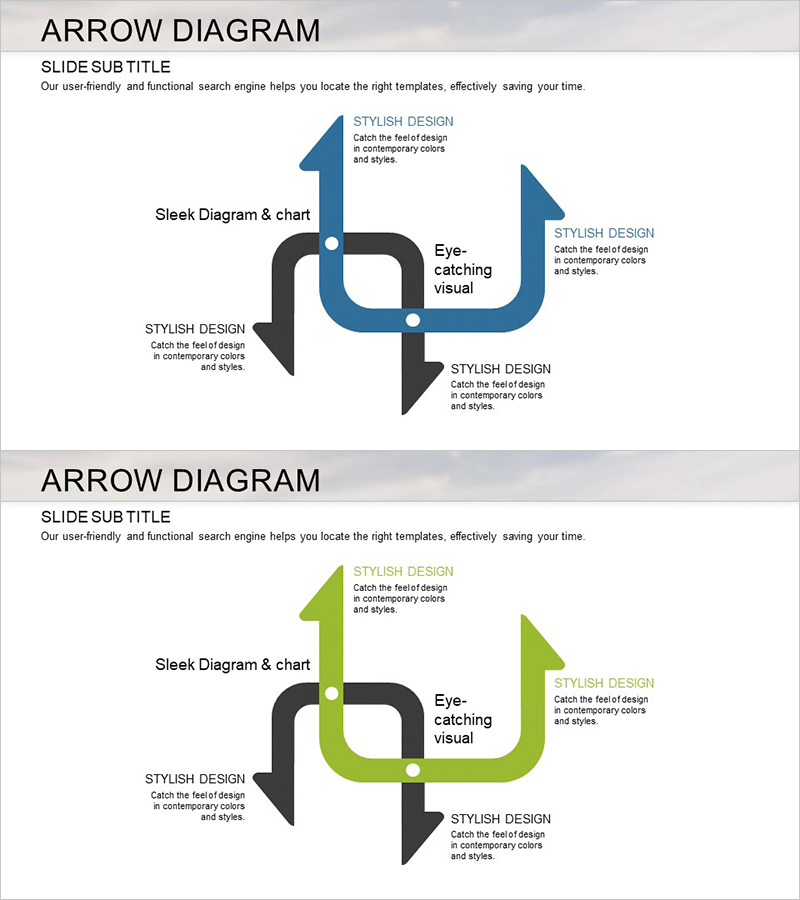
A multidirectional arrow diagram PowerPoint slide designed to visualize operational workflows and business strategies. Four arrows in dark gray and steel blue extend outward from a central connection point in all directions, with dedicated text areas for each direction to clearly represent parallel processes, multiple strategies, and cross-functional workflows. The 2-slide set includes both blue-tone and lime-green-tone color versions, optimized for 16:9 widescreen format. Fully editable PPTX format allows immediate customization for meetings, reports, and strategic presentations.
Usage Points
-
Main Usage
Represents parallel processes, multiple strategies, and interdependent workflows using a central hub structure, enabling executives and teams to grasp complex operational systems at a glance. Perfect for executive briefings, strategy meetings, and organizational restructuring announcements.
-
How to Use
Set the central connection point as your core concept and assign strategies, departments, processes, or goals to each of the four directional arrows. Double-click text areas to edit content and select the color version (blue or lime-green) that matches your presentation theme.
-
Recommended For
Ideal for executives, strategy managers, project managers, and organizational development professionals explaining operational plans, business strategies, organizational structures, and cross-departmental collaboration frameworks. Particularly effective when presenting multiple elements that have equal importance and mutual influence.
-
Slide Structure
Central circular connection point with four arrows extending in cardinal directions (up, down, left, right). Each arrow terminates in a text input area, with connecting lines and circular junction points emphasizing integration. Includes two color variants: blue-tone (dark gray + steel blue) and lime-green-tone versions.
Related Products
-
Increasing Sales through Marketing Strategy – Effective Process Description
#Operational Plan #Marketing Plan and Strategy #Diagram
-
Gear Shape Diagram for Visualizing Business Processes – Innovation and Efficiency
#Product/Service Introduction #Operational Plan #Diagram
-
Business Service Differentiation Strategy – Diagram for Successful Operations
#Product/Service Introduction #Operational Plan #Diagram
-
Process Flow and Derivative Insight – Efficient Operational Planning Diagram
#Operational Plan #Technical Approach #Diagram
