



Square Frame Presentation Template – Business Introduction and Tech Status
RJ0200010_23
- Last Update 03/31/2025
- File Size 0.5MB
- # of Slides 2
- File Format PPTX
- Slide Ratio 16:9
- Color
Keywords
- #Content-Based Slides
- #Design-Based Slides
- #Product/Service Introduction
- #Business Introduction
- #Diagram
- #Features
- #Technological Status
- #Cluster
- #Closed Cluster Diagram
- #16:9
- #nested diagram PowerPoint
- #square frame presentation template
- #hierarchical structure slide
- #organizational chart PPT
- #diagram PowerPoint slide design
About the Product
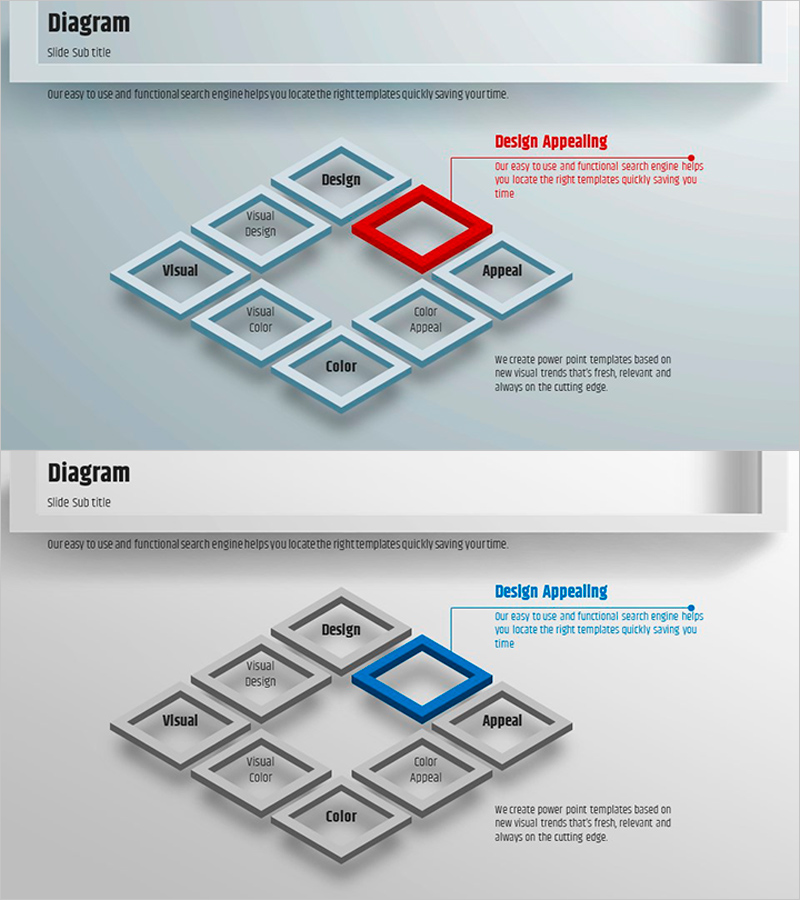
A 3D nested square diagram PowerPoint slide that visualizes hierarchical relationships with depth and clarity. The central highlighted element (red or blue) anchors the design, surrounded by six supporting items arranged in a balanced layout. Light gray background with blue and gray square frames creates visual hierarchy, with ample text areas for detailed descriptions. Ideal for business introductions, technology status reports, organizational structures, and strategic frameworks. Ready-to-use presentation template for corporate, technical, and marketing contexts.
Usage Points
-
Main Usage
Visualizes hierarchical relationships and organizational structures using 3D nested square frames. The central highlighted element emphasizes the core concept, while six surrounding items support with detailed information. Effectively communicates multi-level information architecture and strategic frameworks.
-
How to Use
Use in business introduction slides to present company core values and business divisions, or in technology status presentations to explain key technologies and system components. Suitable for organizational charts, marketing strategy frameworks, product feature hierarchies, and operational structures. Simply input your content into the pre-designed text areas.
-
Recommended For
Executives and business managers presenting organizational structures or business portfolios; technology teams visualizing system architecture or technology stacks; marketing teams presenting strategic frameworks. Ideal for investor pitches, company profiles, business plans, and product introduction presentations.
-
Slide Structure
2-slide set. First slide features red central highlight; second slide features blue central highlight for color variation. Each slide contains 7 text input areas: 1 central element + 6 surrounding elements (3 top, 3 bottom). 3D gradient square frames provide depth and visual hierarchy.
Related Products
-
Visual Overview of Key Architectural Concepts – Representation of Core Technologies
#Product/Service Introduction #Business Introduction #Diagram
-
Cluster Diagram Slide for Main Menu Strategies
#Product/Service Introduction #Business Introduction #Diagram
-
Science Square Closed Diagram – Product and Service Introduction
#Product/Service Introduction #Business Introduction #Diagram
-
Work Life Icons Enhancing Slide Template
#Product/Service Introduction #Business Introduction #Diagram
