



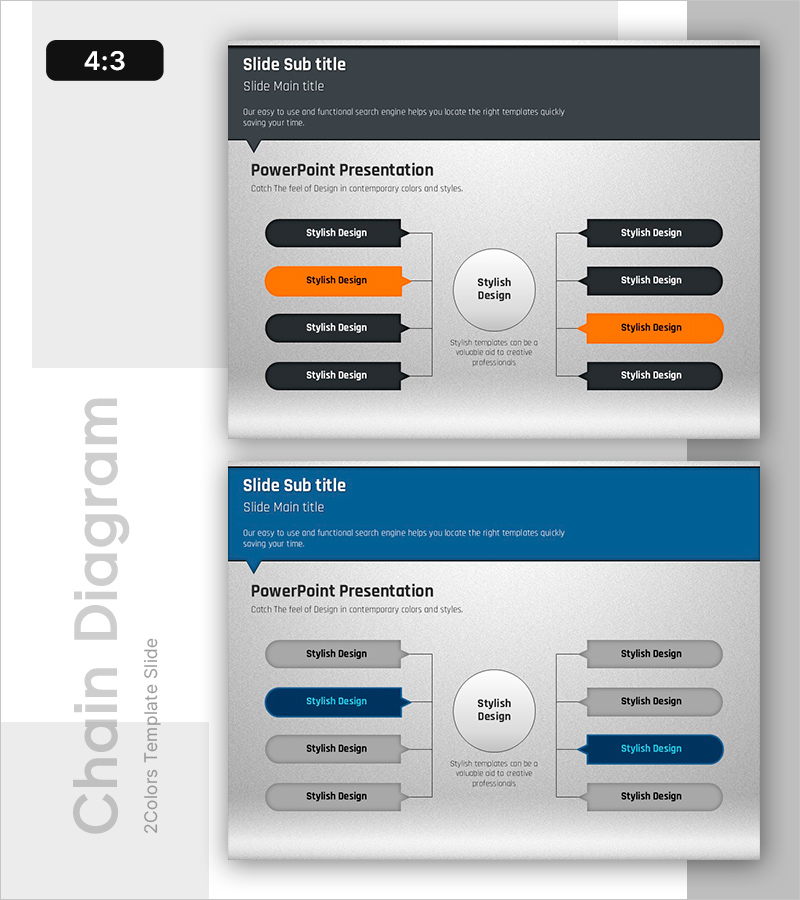
Business Areas and Sectors Diagram – Visualizing Business Domains
RB0800008-1_23
- Last Update 03/18/2025
- File Size 1.7MB
- # of Slides 2
- File Format PPTX
- Slide Ratio 4:3
- Color
Keywords
- #Content-Based Slides
- #Design-Based Slides
- #Company Introduction
- #Business Introduction
- #Diagram
- #Business Areas
- #Business Areas
- #Cluster
- #Closed Cluster Diagram
- #Chain Diagram
- #4:3
- #radial connection diagram PowerPoint
- #hub and spoke diagram slide
- #business domain visualization
- #node connection diagram
- #organizational structure PowerPoint
- #how to create connection diagram in PowerPoint
About the Product
A radial connection diagram PowerPoint slide with eight nodes radiating from a central hub, ideal for visualizing business domains and organizational relationships. The design features a black and orange two-tone color scheme with directional arrows connecting each node to the center, creating a clear hierarchical and relational structure. This 4:3 aspect ratio, 2-slide set is ready to download and customize for company presentations, business introductions, and strategic planning documents. Perfect for illustrating business areas, departmental structures, and interconnected concepts in professional presentations.
Usage Points
-
Main Usage
Designed to visualize how multiple business domains, departments, or strategic initiatives connect to and branch from a central concept or core business. The radial structure effectively communicates hierarchical relationships while emphasizing the interconnectedness of all elements around the central hub.
-
How to Use
Insert this slide into company overview presentations, business introduction decks, organizational restructuring announcements, and strategic planning documents. Simply replace the placeholder text in each node and center hub with your specific business areas, departments, or strategic pillars. All text and colors are fully editable.
-
Recommended For
Executive presentations on business strategy, departmental heads reporting on domain-specific performance, marketing teams explaining market segmentation, HR teams presenting organizational structures, and business development teams showcasing service offerings. Suitable for C-suite communications and cross-functional team briefings.
-
Slide Structure
Header section with title and subtitle, central circular hub, left-side four nodes (black, orange, black, black), right-side four nodes (black, black, orange, black). Each node connects to the center via directional arrows with editable text fields inside each node and the central hub.
Related Products
-
Visualizing PC Data Analysis Business Area PPT – Cluster and Connection
#Company Introduction #Business Introduction #Diagram
-
Domain Structure Diagram – Clear Visualization for Business Introduction
#Company Introduction #Business Introduction #Diagram
-

Social Network Main Business Structure
#Company Introduction #Business Introduction #Diagram
-
Pentagonal Star Business Area Diagram – Visual Appeal and Insight
#Company Introduction #Business Introduction #Diagram
