



Instrument Components Connection Diagram – Visualizing Service Composition
RB0300045_5
- Last Update 03/11/2025
- File Size 0.6MB
- # of Slides 2
- File Format PPTX
- Slide Ratio 4:3
- Color
Keywords
- #Content-Based Slides
- #Design-Based Slides
- #Product/Service Introduction
- #Technical Approach
- #Diagram
- #Composition
- #Service Components
- #Cluster
- #Chain Diagram
- #4:3
- #radial diagram PowerPoint
- #connection diagram slide template
- #component visualization
- #5-node diagram
- #service structure chart PPT
- #how to create radial diagram in PowerPoint
About the Product
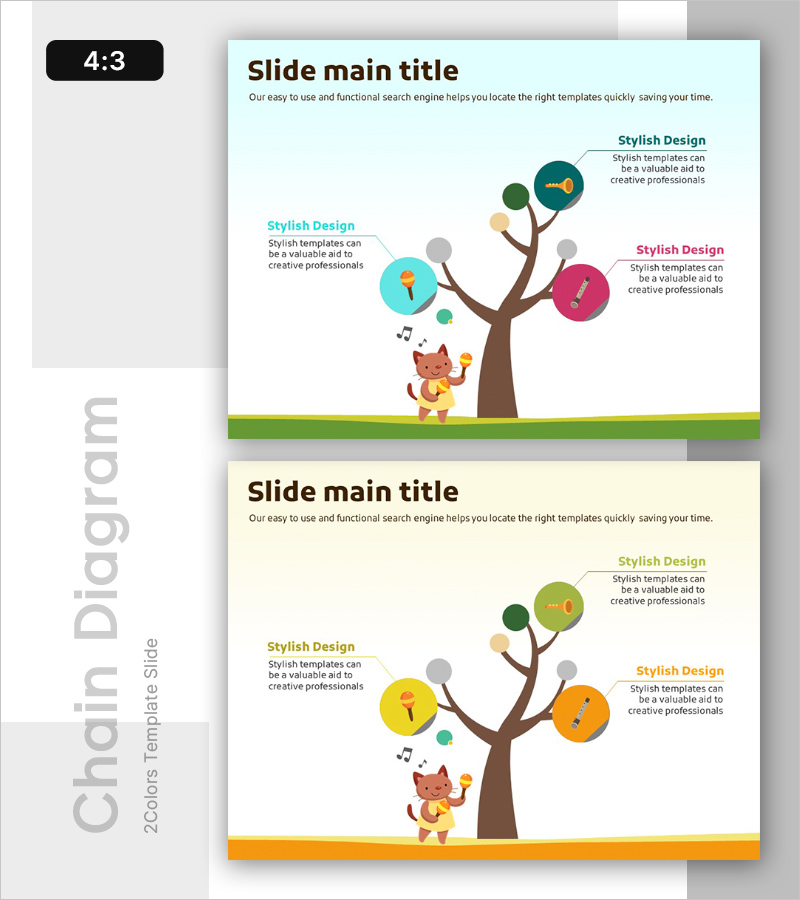
A radial connection diagram PowerPoint slide featuring five peripheral nodes branching from a central hub element. The design uses multi-color circular nodes in cyan, gray, brown, magenta, and orange, connected by brown branch-style lines to intuitively represent service composition, organizational hierarchy, product features, or process classification. Provided in 4:3 aspect ratio with 2 slides including a color variant version. Each node accommodates text and icons for immediate customization and use in presentations, planning documents, and training materials to clearly communicate core concepts and their subordinate elements.
Usage Points
-
Main Usage
Visualizes five subordinate elements, functions, or categories branching hierarchically from a central concept or theme. Effectively communicates service composition, product feature classification, organizational structure, process stages, marketing channels, and other business relationships through a clear radial expansion structure.
-
How to Use
Enter the core topic (service name, product name, organization name) in the central circular node. Add detailed items, features, or descriptions in the five surrounding nodes. Customize icons to match your category and add text explanations. Insert into presentation slides, planning documents, or training materials.
-
Recommended For
Ideal for marketing, planning, and strategy professionals explaining service composition, product portfolios, or channel strategies. Useful for HR and organizational development teams visualizing organizational structure and role classification. Suitable for educators and trainers clearly communicating concept hierarchies and subordinate elements to learners.
-
Slide Structure
2-slide set: Slide 1 features cyan, gray, brown, magenta, and orange multi-color node version. Slide 2 presents yellow and orange tone variant. Both slides display 5 circular nodes arranged radially around a central brown branch-style connector, with text description areas positioned to the right of each node.
Related Products
-
Visualizing Power Plant Locations – Key Insights for the Energy Business
#Product/Service Introduction #Technical Approach #Diagram
-
Decoding the 3 Embedded Keywords - Concept Visualization through Diagram
#Product/Service Introduction #Technical Approach #Diagram
-
Vibrant Color Box PPT Composition Contents
#Product/Service Introduction #Technical Approach #Diagram
-
New Drug Ingredient Analysis Diagram – Conveying Trust Through Visuals
#Product/Service Introduction #Diagram #Features
