



Gardening Flow Connection Diagram – Service Setup Plan
RJ0600083_21
- Last Update 08/28/2025
- File Size 1.3MB
- # of Slides 2
- File Format PPTX
- Slide Ratio 16:9
- Color
Keywords
- #Content-Based Slides
- #Design-Based Slides
- #Technical Approach
- #Diagram
- #Service Implementation Plan
- #System Architecture Diagram
- #Flow
- #Cluster
- #Linear Flow
- #Chain Diagram
- #16:9
- #diagram PowerPoint slide
- #flow connection diagram
- #multi-directional process
- #service architecture diagram
- #system structure slide
- #how to create flow diagram in PowerPoint
About the Product
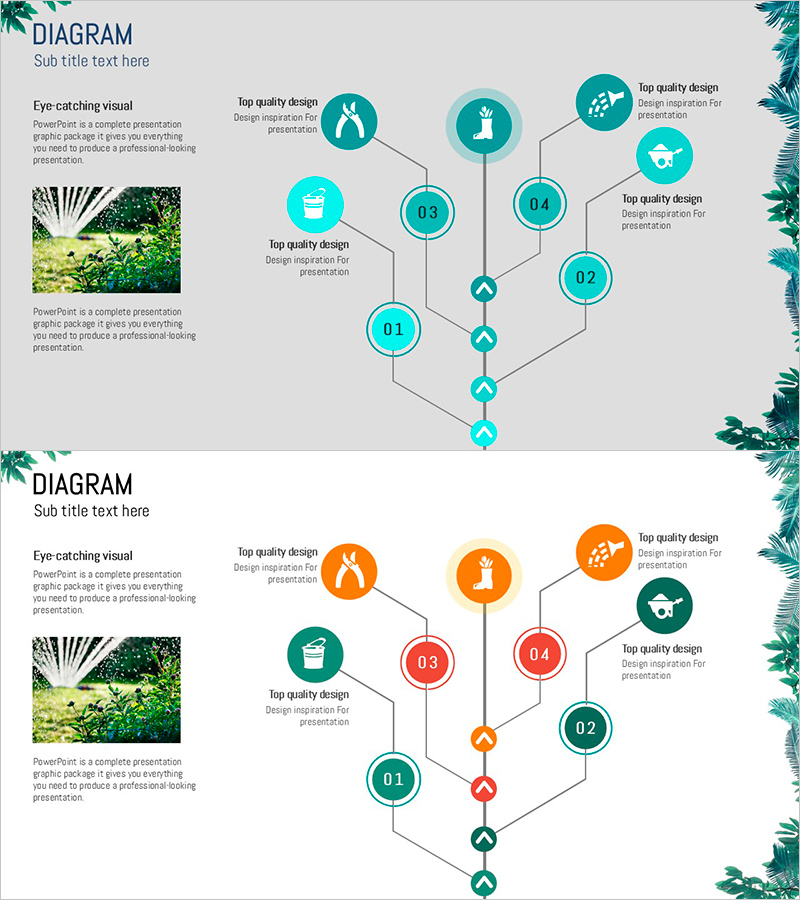
A multi-directional flow connection diagram PowerPoint slide designed to visualize gardening and service setup processes. The structure features central nodes 01–04 with radial expansion to surrounding nodes, each accommodating icons and descriptive text. The design combines teal circular nodes, gray connecting lines, and diamond-shaped junction points. Two color variations (teal and orange) are provided for flexible brand customization. Ideal for presentations on system architecture, service workflows, organizational relationships, and complex multi-stage processes that require clear hierarchical and lateral connections.
Usage Points
-
Main Usage
Illustrates service setup workflows, system architecture flows, cross-organizational relationships, and multi-stage operational processes using a central hub model. Each node accommodates icons and text to clearly convey step-by-step roles and interactions between components.
-
How to Use
Enter stage names or department titles in the central nodes 01–04, and populate the radial nodes with detailed items or functional responsibilities. Customize icon graphics and node colors to match corporate branding. During presentation, highlight each node sequentially to enhance audience comprehension of the overall system structure.
-
Recommended For
System architecture presentations for IT, telecommunications, and financial firms; process explanations by service planning teams; organizational restructuring and collaboration framework discussions; multi-channel marketing strategy development; educational curriculum integration frameworks.
-
Slide Structure
Comprises 4 central circular nodes (01–04) + 4 radial circular nodes + 5 diamond-shaped junction points + gray connecting lines. Each node includes icon placement and text input areas. Delivered as 2-slide set with teal and orange color scheme variations.
Related Products
-
Circular Flowchart – Systematic Representation for Technical Services
#Technical Approach #Diagram #Service Implementation Plan
-
System Architecture Slide – Visuals for Efficient Service Build
#Technical Approach #Diagram #Service Implementation Plan
-
Sleek Presentation Template Emphasizing Business Context
#Business Strategy #Operational Plan #Technical Approach
-
System Framework and Action Plan – Strategic Design Based on Diagrams
#Technical Approach #Diagram #Service Implementation Plan
