



Football Game Process for Victory – Strategic Operational Planning
RJ0600037_6
- Last Update 06/30/2025
- File Size 0.6MB
- # of Slides 2
- File Format PPTX
- Slide Ratio 16:9
- Color
Keywords
- #Content-Based Slides
- #Design-Based Slides
- #Product/Service Introduction
- #Operational Plan
- #Diagram
- #Program Introduction
- #Business Processes
- #Cluster
- #Closed Cluster Diagram
- #16:9
- #process diagram PowerPoint
- #4-step sequential slide
- #icon box presentation
- #operational planning template
- #step-by-step process slide download
About the Product
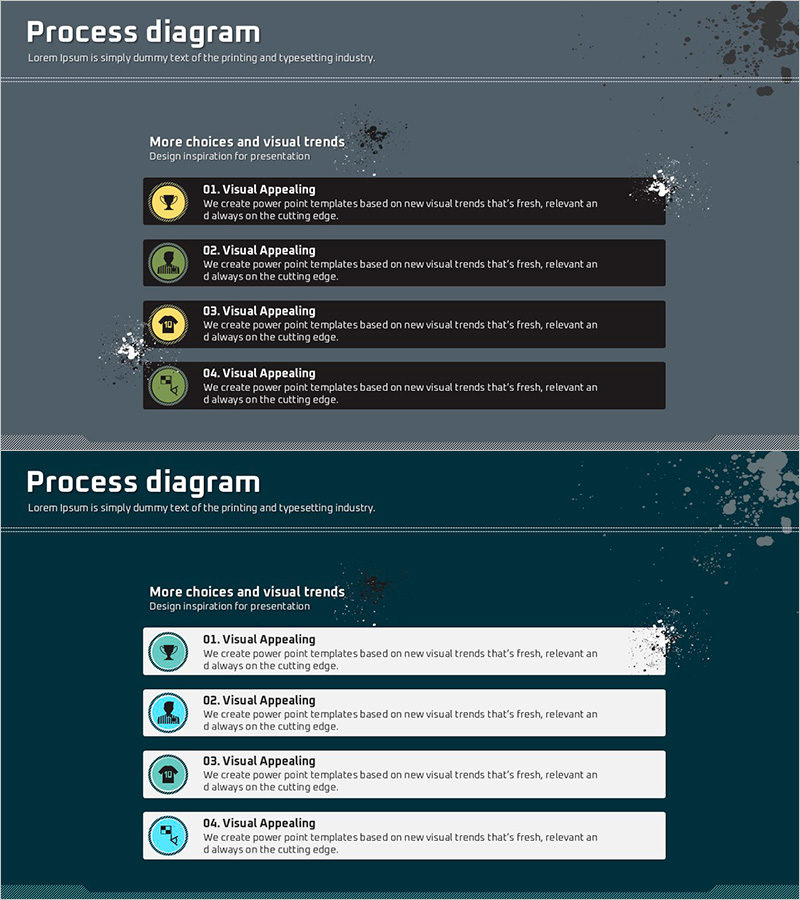
A process diagram PowerPoint slide that presents four sequential steps with icon-based boxes and text fields. This slide design combines circular icons with structured text boxes to clearly visualize operational planning, strategy execution, and project progress. The gray background with teal accent colors emphasizes professionalism, and two color variations (gray tone and teal tone) are provided to match your presentation's overall style. Each box includes editable title and description areas, making this PPT template ready to use immediately for business presentations.
Usage Points
-
Main Usage
Designed to present operational planning, project progress, and strategy execution stages in sequential order. Each step is clearly distinguished by icons and text, enhancing audience comprehension and engagement with your presentation.
-
How to Use
Enter step names (e.g., Visual Appealing, Strategy Development) in the title area of each box, and add detailed content in the description text field. Icons can be customized to match each step's characteristics. Select the color variation that aligns with your overall presentation theme.
-
Recommended For
Ideal for business plan presentations, operational strategy explanations, project management reports, process improvement proposals, and educational seminars. Recommended for executives, project managers, consultants, and training professionals who need to explain step-by-step progress.
-
Slide Structure
2-slide set. Slide 1: Gray background with 4 icon boxes arranged sequentially from left to right, each containing editable title and description areas. Slide 2: Identical structure with teal background variation. Each box is independently editable, with connecting arrows emphasizing workflow progression.
Related Products
-
Stylish Design Presentation Template – Setting New Standards for Data Delivery
#Product/Service Introduction #Operational Plan #Diagram
-
Introduction to Banking Services Programs – Design of Trust and Cooperation
#Product/Service Introduction #Operational Plan #Diagram
-
Introduction to Business Process – Flow of Business Activities
#Product/Service Introduction #Operational Plan #Diagram
-

Halloween Icon Diagram – Ideal for Product/Service Introductions with Cluster Design
#Product/Service Introduction #Diagram #Product/Service Introduction
