



Positioning Diagram – Market Analysis and Strategy
RJ0400050_27
- Last Update 05/31/2025
- File Size 0.1MB
- # of Slides 2
- File Format PPTX
- Slide Ratio 16:9
- Color
Keywords
- #Content-Based Slides
- #Design-Based Slides
- #Market and Competitor Analysis
- #Marketing Plan and Strategy
- #Graph
- #Other
- #Market Analysis
- #Positioning
- #16:9
- #positioning diagram PowerPoint slide
- #market analysis PowerPoint template
- #2-axis positioning chart
- #competitive analysis PPT
- #marketing strategy diagram
About the Product
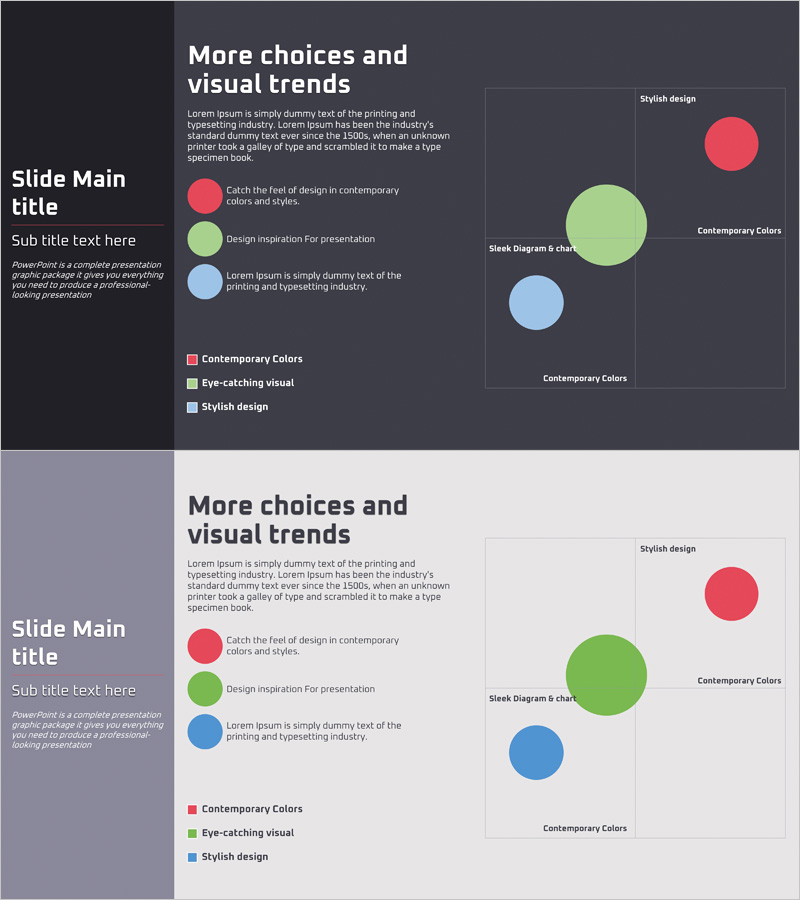
A two-axis positioning diagram PowerPoint slide that visualizes market analysis and competitive positioning at a glance. The dark background features three colored circles (red, green, blue) representing brand positions, with a legend and descriptive text area on the left and a large chart space on the right. This presentation template is optimized for marketing strategy development, helping teams define target markets and competitive positioning. The PPTX format includes 2 ready-to-edit slides for immediate use in business presentations.
Usage Points
-
Main Usage
Visualize your company's market positioning relative to competitors during marketing strategy planning. The two-axis structure allows you to compare brands across two key dimensions (price vs. quality, features vs. value) and clearly show where your product stands, providing data-driven insights for strategic decisions.
-
How to Use
Enter analysis criteria and competitor names in the left legend area, then adjust the size and position of circle elements on the right chart to reflect actual market data. Use this slide in investor presentations, executive briefings, and marketing team meetings to communicate complex market information intuitively and persuasively.
-
Recommended For
Marketing managers, strategy planning teams, business development professionals, and executives presenting market analysis. Particularly effective for new product launch planning, market entry strategy, and competitive benchmarking presentations where clear positioning communication is critical.
-
Slide Structure
Two-slide set with a dark background version and light background alternative. Each slide divides into a left text area (title, legend, 3-4 lines of description) and right chart area (2-axis coordinate system with 3 colored circle elements), enabling straightforward data entry and customization.
Related Products
-
Distribution Positioning Diagram – Insights for Market Analysis
#Market and Competitor Analysis #Marketing Plan and Strategy #Graph
-
Positioning Area Graph – Essential Slide for Market Analysis
#Market and Competitor Analysis #Marketing Plan and Strategy #Diagram
-
Price Quality Positioning Map – Market and Competitor Analysis
#Market and Competitor Analysis #Marketing Plan and Strategy #Diagram
-

STP Strategy Positioning Map – Market Analysis and Marketing Plan
#Market and Competitor Analysis #Marketing Plan and Strategy #Graph
