



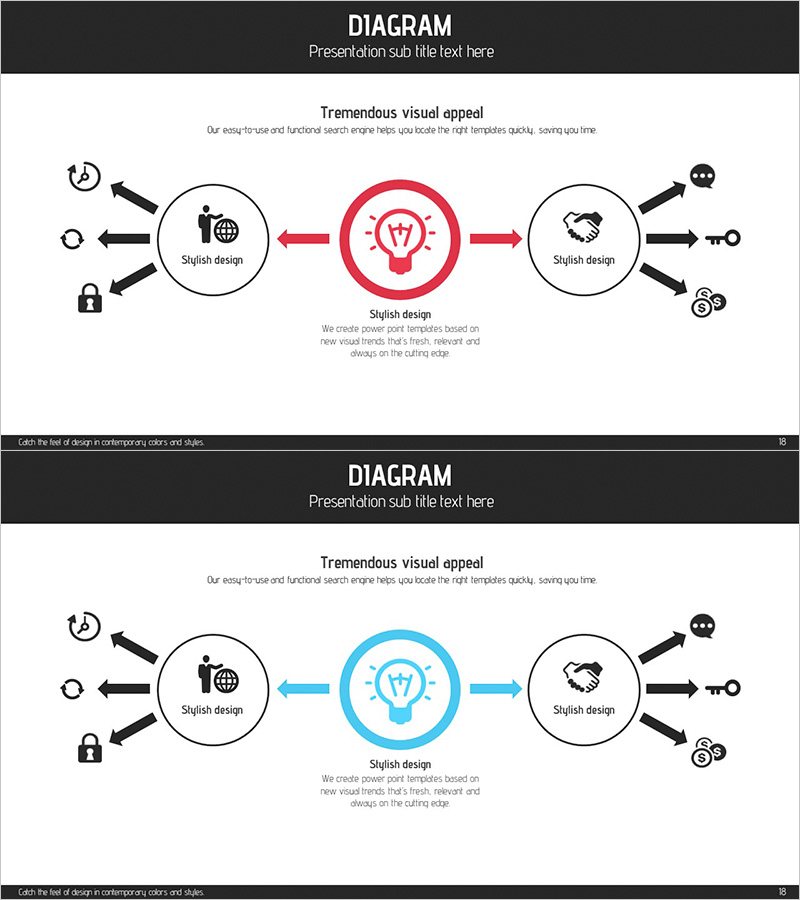
Business Marketing Strategy Diffusion Diagram
RJ0300068_17
- Last Update 05/07/2025
- File Size 1.4MB
- # of Slides 2
- File Format PPTX
- Slide Ratio 16:9
- Color
Keywords
- #Content-Based Slides
- #Design-Based Slides
- #Product/Service Introduction
- #Operational Plan
- #Diagram
- #Differentiation Strategy for Products/Services
- #Business Processes
- #Flow
- #Converging Flow Diverging Flow
- #16:9
- #radial diffusion diagram PowerPoint
- #center hub diagram slide
- #business strategy diagram template
- #marketing process PPT
- #3-node radial diagram PowerPoint
About the Product
A 3-node radial diffusion diagram PowerPoint slide designed to visualize business strategy and marketing processes. The structure radiates from a central concept outward to left and right nodes, making it ideal for explaining strategy implementation, product differentiation, and operational workflows. The dual-tone red and blue color scheme distinguishes priority levels, while icons placed within each node enhance information clarity. The 2-slide set provides the same diagram in two color variations (red-emphasized and blue-emphasized), allowing you to select based on presentation context. Arrows and circular nodes clearly express cause-and-effect relationships and sequential flow, with ample text input areas for immediate editing and deployment.
Usage Points
-
Main Usage
Visualizes how a core concept expands outward into multiple directions—ideal for strategy, process, and differentiation narratives. With a central node and four surrounding nodes (two on each side), it effectively represents cause-to-effect, input-to-output, and core-to-detail expansion structures.
-
How to Use
Use during business strategy presentations to explain how a core value proposition cascades into marketing, operations, and product strategies. Effective for depicting organizational roles radiating from a central department, or illustrating how a key product differentiator branches into specific features and benefits.
-
Recommended For
Marketing strategists, product managers, C-suite presenters, management consultants, and educators who need to communicate business strategy, organizational roles, and process flows persuasively to audiences.
-
Slide Structure
Central circular node (red or blue emphasized) with four outer circular nodes positioned at top-left, bottom-left, top-right, and bottom-right. Arrows (red or blue) connect the center to each outer node. Each node contains an icon and text input area. Both slides maintain identical structure with different color emphasis.
Related Products
-
Academic Solutions Multidirectional Diagram
#Product/Service Introduction #Business Vision and Strategy #Diagram
-
Mountaineering PPT Promotion Direction Diagram - Challenge and Success
#Product/Service Introduction #Business Strategy #Diagram
-
Business Service Differentiation Strategy – Diagram for Successful Operations
#Product/Service Introduction #Operational Plan #Diagram
-

Diet Consulting and Strategies PowerPoint Slide – Practical Approach
#Product/Service Introduction #Operational Plan #Diagram
