



Academic Solutions Multidirectional Diagram
RJ0500007_22
- Last Update 06/09/2025
- File Size 1.2MB
- # of Slides 2
- File Format PPTX
- Slide Ratio 16:9
- Color
Keywords
- #Content-Based Slides
- #Design-Based Slides
- #Product/Service Introduction
- #Business Vision and Strategy
- #Diagram
- #Differentiation Strategy for Products/Services
- #Business Strategy
- #Flow
- #Converging Flow Diverging Flow
- #16:9
- #bidirectional arrow diagram
- #divergence convergence PowerPoint slide
- #two-way flow diagram
- #mutual interaction template
- #contrast color PPT
- #process flow slide design
About the Product
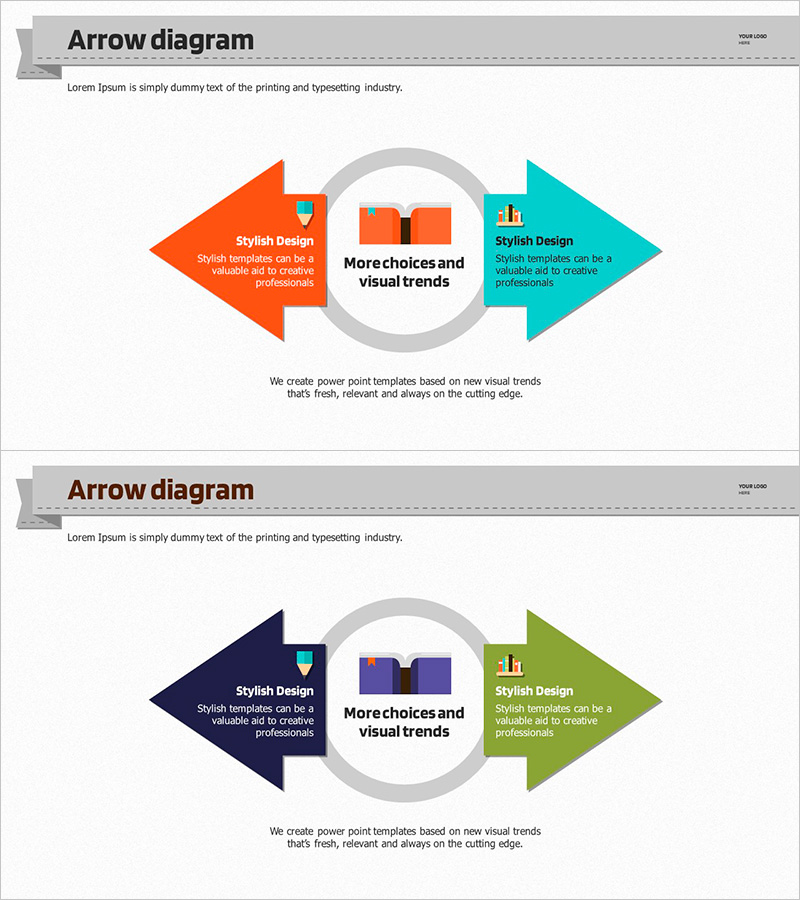
A PowerPoint slide featuring left-right bidirectional arrows that visualize mutual interaction and two-way flow. The design centers on a circular node with orange and teal arrows in symmetric arrangement, each arrow containing editable text and icon areas. Two slide variations are provided: the first with orange-teal color scheme, the second with navy-lime combination. This template is ideal for presentations on mutual relationships, two-way communication, alternative comparisons, and input-output processes. Delivered in 16:9 widescreen PPTX format, fully editable in all PowerPoint versions.
Usage Points
-
Main Usage
Visualizes bidirectional interaction, two-way communication, alternative comparison, and input-output relationships. The symmetric arrow arrangement around a central circular node creates balanced visual structure, with dedicated text and icon areas in each arrow for clear information delivery.
-
How to Use
Enter the first concept, process, or alternative in the left arrow; place the second concept, result, or alternative in the right arrow. Add your main topic or connection point in the central circular node. Customize colors and add icons to match your document style and branding.
-
Recommended For
Executives, planners, consultants, educators, and researchers presenting strategy development, process explanations, relationship analysis, and bidirectional communication. Suitable for business proposals, strategy reports, educational materials, and academic presentations.
-
Slide Structure
Two-slide set. Each slide features a central circular node with two symmetric bidirectional arrows (left and right). Slide 1 uses orange (left) and teal (right) colors; Slide 2 uses navy (left) and lime (right). Both arrows contain editable text boxes and icon placement areas.
Related Products
-
Preparation for Strategy – Multidirectional Flow Diagram
#Product/Service Introduction #Business Vision and Strategy #Diagram
-
Multi-Directional Strategy for Achieving Success – A Template for Business Future
#Product/Service Introduction #Business Vision and Strategy #Diagram
-

Idea Presentation Template Wide – Dynamic Business Strategy
#Product/Service Introduction #Business Vision and Strategy #Diagram
-
Visualizing Sports Strategies with Multidirectional Arrow Diagram
#Product/Service Introduction #Business Vision and Strategy #Diagram
