



Simple PowerPoint Wide Template Diagram5 – Client and Partner Presentation
RJ0200065_23
- Last Update 04/17/2025
- File Size 0.5MB
- # of Slides 2
- File Format PPTX
- Slide Ratio 16:9
- Color
Keywords
- #Content-Based Slides
- #Design-Based Slides
- #Company Introduction
- #Business Strategy
- #Diagram
- #Customers and Partners
- #Implementation Framework
- #Cluster
- #Closed Cluster Diagram
- #16:9
- #text box PowerPoint slide
- #4-item closed diagram
- #client partner presentation
- #business slide template
- #comparison layout PPT
About the Product
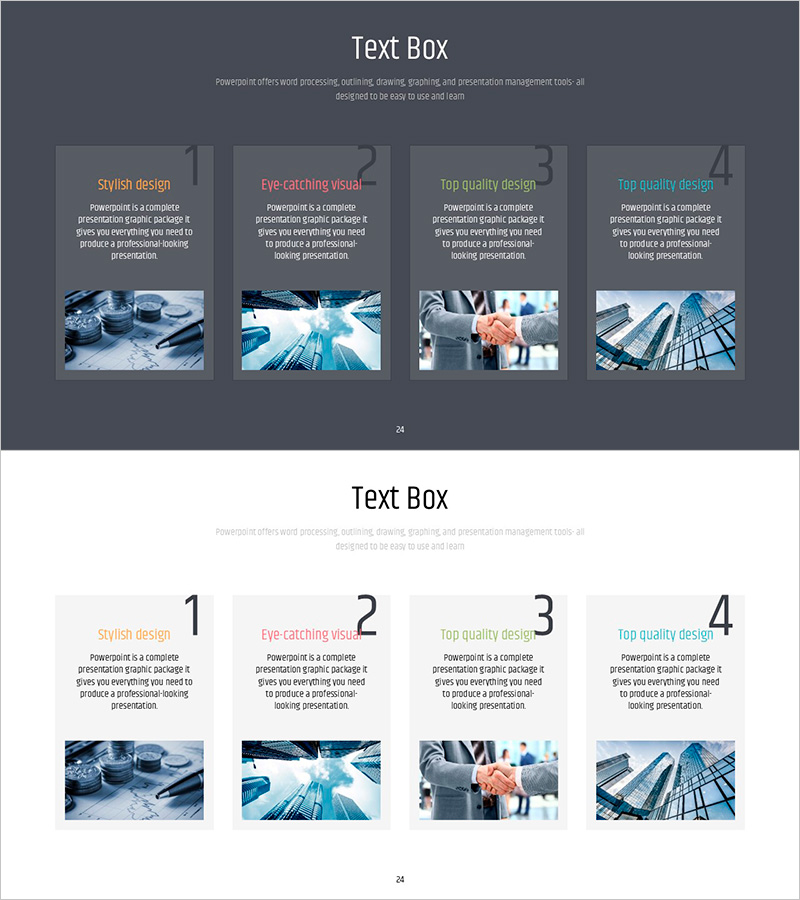
A PowerPoint slide template featuring four-item closed text boxes optimized for client and partner presentations. The dark gray background uses four accent colors—orange, red, green, and cyan—to distinguish each item, with clearly separated image and text areas. Two layout variations are provided: card-style and numbered format, allowing flexible presentation options. Each item accommodates an image and descriptive text, making it ideal for business strategy presentations, client relationship management, and partnership introductions. Ready to use with customizable colors and content areas.
Usage Points
-
Main Usage
Visually distinguish and present clients, partners, or collaborators by displaying each organization's characteristics and roles. The four independent items convey equal importance while combining images and text to maximize information delivery impact.
-
How to Use
In the card-style layout on dark background, place item images at the top and descriptive text at the bottom. In the numbered layout, use color-coded numbers to indicate sequence for step-by-step introductions or comparative analysis. Customize colors and images to match your presentation theme.
-
Recommended For
Sales and marketing professionals showcasing client portfolios, executives explaining strategic partnerships, business development teams visualizing partner networks. Highly effective for B2B presentations in consulting, finance, manufacturing, and related industries.
-
Slide Structure
Two-slide set: Slide 1 features dark gray background with card-style four-item layout (image top, text bottom). Slide 2 uses light background with numbered four-item layout (color-coded numbers, image left, text right). Each item distinguished by orange, red, green, and cyan accent colors.
Related Products
-
Building Photos and Company Overview – Cluster Diagram Usage
#Company Introduction #Diagram #Company Overview
-
Partner Brand Logo Diagram – Connecting with Clients
#Company Introduction #Diagram #Customers and Partners
-
Efficient Business Strategy Presentation through the Work System Box
#Business Strategy #Operational Plan #Diagram
-
Key Business Program Introduction Slide – Effective Delivery of Business Strategy
#Product/Service Introduction #Business Strategy #Diagram
