



Triangle Pattern Template Diagram – Visualizing Business Strategy
RJ0200016_6
- Last Update 04/02/2025
- File Size 6.2MB
- # of Slides 2
- File Format PPTX
- Slide Ratio 16:9
- Color
Keywords
- #Content-Based Slides
- #Design-Based Slides
- #Business Strategy
- #Business Management
- #Diagram
- #Implementation Framework
- #Implementation Plan
- #Flow
- #Cluster
- #Linear Flow
- #Closed Cluster Diagram
- #16:9
- #hexagon diagram PowerPoint
- #cluster diagram slide
- #4-item comparison template
- #business strategy visualization
- #organizational structure PPT slide
About the Product
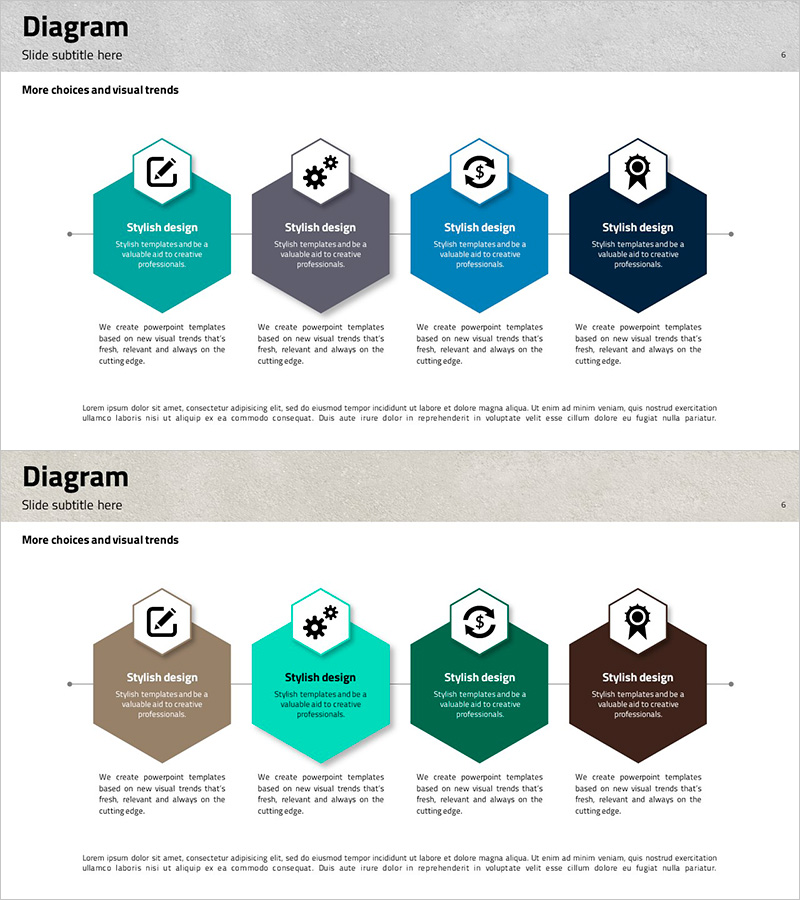
A hexagon cluster diagram PowerPoint slide optimized for business strategy development and organizational structure analysis. Four independent hexagon nodes are arranged radially around a central concept, each containing an editable icon and text area. The design features four color variants—teal, gray, blue, and navy—for clear visual differentiation and immediate use in presentations, planning documents, and reports. The 2-slide set provides color variation options to match your presentation tone. Each hexagon node supports customizable icons, titles, and descriptive text, making it ideal for comparing strategic elements, organizational roles, competitive factors, or marketing mix components.
Usage Points
-
Main Usage
Visually compare and analyze four key elements of a business strategy, clearly expressing relationships and roles between items. Suitable for organizational structures, competitive analysis, marketing mix frameworks, strategic pillars, and any 4-part conceptual breakdown.
-
How to Use
Enter title and description text in each hexagon node, and replace icons as needed. Select the color variant slide (teal, gray, blue, or navy) that matches your document tone. To add more nodes, duplicate existing shapes and adjust positioning. All elements are fully editable.
-
Recommended For
Ideal for executives, strategy managers, marketing planners, consultants, and educators presenting business strategies, organizational changes, market analysis, or product positioning. Recommended for executive reports, strategic planning documents, marketing proposals, and educational seminars.
-
Slide Structure
2-slide set. Each slide features four hexagon nodes arranged radially around a central concept. Each node includes an editable icon, title field, and description text area. Slide 1 displays mixed color variants (teal, gray, blue, navy); Slide 2 provides alternative color scheme options for flexibility.
Related Products
-
Slide Highlighting Four Core Values – Business Strategy
#Business Strategy #Marketing Plan and Strategy #Diagram
-

Visualizing Product Development Planning Process with Diagram Slide
#Business Strategy #Operational Plan #Diagram
-
Food Truck Sales Strategy – The First Step to Successful Business Operations
#Business Management #Operational Plan #Diagram
-
Project Facility System Diagram – Efficient Operation Planning
#Business Strategy #Operational Plan #Diagram
