



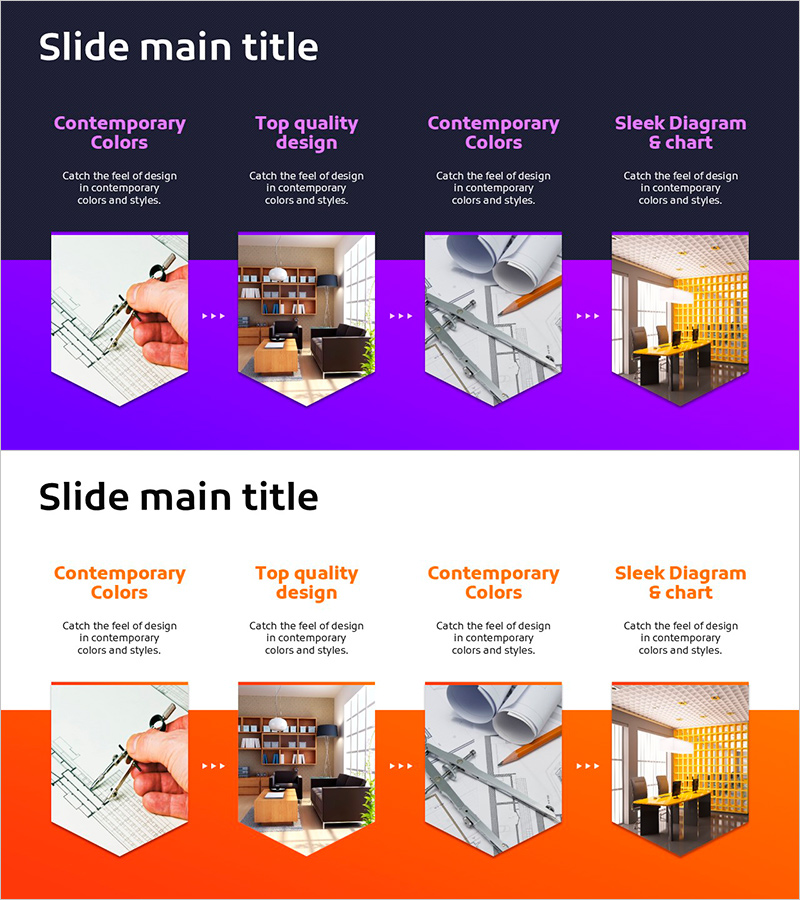
Visualizing Product Development Planning Process with Diagram Slide
RJ0900025_18
- Last Update 08/23/2025
- File Size 1.2MB
- # of Slides 2
- File Format PPTX
- Slide Ratio 16:9
- Color
Keywords
- #Content-Based Slides
- #Design-Based Slides
- #Business Strategy
- #Operational Plan
- #Diagram
- #Implementation Framework
- #Production and Technology Development Strategy
- #Flow
- #Cluster
- #Linear Flow
- #Closed Cluster Diagram
- #16:9
- #closed-form cluster diagram PowerPoint
- #process flow diagram slide
- #4-node connected diagram
- #product development planning PPT
- #relationship diagram PowerPoint slide
- #how to create cluster diagram in PowerPoint
About the Product
A closed-form cluster diagram PowerPoint slide that visualizes the product development planning process through interconnected stages. The design features a central concept with four related nodes connected in a circular structure, clearly expressing mutual relationships and cyclical flow. Available in two color variations—vibrant purple and bright orange—each node accommodates both imagery and text content. This PPT slide is ready to use for operational planning presentations, process explanations, and strategic initiatives.
Usage Points
-
Main Usage
Optimized for visually representing the stages of product development planning and the interdependencies between each stage. The closed-form structure with four nodes connected to a central concept emphasizes cyclical flow and integrated processes.
-
How to Use
Input key product development stages (planning, design, development, validation, etc.) into each node, and insert relevant visual assets into the image areas. Add descriptive text to clarify the objectives and deliverables of each stage for maximum presentation impact.
-
Recommended For
Ideal for product planning teams, development leads, and operations managers presenting process explanations, strategic planning, and progress reports. Effective for executive briefings, team meetings, investor pitches, and other professional business contexts.
-
Slide Structure
Two-slide layout. First slide features a purple background with a 4-node closed-form cluster diagram; second slide uses an orange background with identical structure. Each node includes an image area (pentagon frame) and text input field, with connecting lines radiating from the center to each node.
Related Products
-
Project Facility System Diagram – Efficient Operation Planning
#Business Strategy #Operational Plan #Diagram
-
Diagram of Agricultural Process – Operational Planning through Cyclic Flow
#Business Strategy #Operational Plan #Diagram
-
Diagram Slide Visualizing Propulsion Systems and Plans – Clear Strategies and Implementation Guidance
#Business Strategy #Technical Approach #Diagram
-

Visualizing Systematic Learning Methods
#Business Strategy #Diagram #Implementation Framework
