



Rhombus Presentation Template Infographic – Business Strategy Presentation
RJ0200011_27
- Last Update 03/31/2025
- File Size 0.4MB
- # of Slides 2
- File Format PPTX
- Slide Ratio 16:9
- Color
Keywords
- #Content-Based Slides
- #Design-Based Slides
- #Business Strategy
- #Diagram
- #Text Box
- #Implementation Framework
- #Flow
- #Multidirectional Flow
- #Rectangle Text Box
- #16:9
- #rhombus diagram PowerPoint
- #business strategy slide template
- #4-step process flow diagram
- #diamond shape infographic PPT
- #strategic planning presentation slide
About the Product
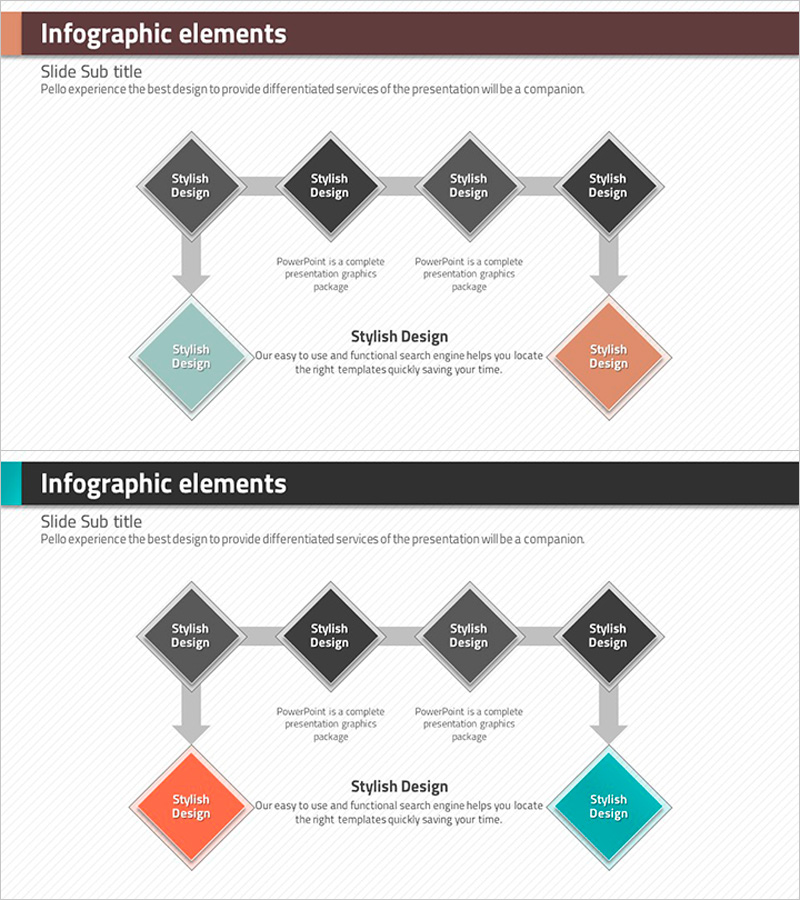
A PowerPoint slide featuring a rotated rhombus diagram that visualizes business strategy execution and process flow across four sequential stages. Four diamond-shaped nodes connected by directional arrows create a clear progression pathway, with left-right divergence highlighting core strategy and implementation branches. The color palette—dark gray, turquoise, and coral—differentiates each stage's priority and impact. Ample text input areas accommodate company objectives, departmental goals, project timelines, and strategic initiatives. The 2-slide set includes header design variations optimized for 16:9 widescreen presentations, enabling immediate customization for executive briefings and strategic planning documents.
Usage Points
-
Main Usage
Illustrate multi-stage business strategy execution, project implementation roadmaps, departmental goal hierarchies, and marketing campaign phases in a structured 4-step visual format. Enables executives and team members to grasp sequential business processes and strategic priorities at a glance.
-
How to Use
Input stage names, responsible departments, objectives, and budgets into each rhombus node. Add comprehensive strategy descriptions in the central text area. Use the turquoise and coral nodes to emphasize contrasting strategic branches, or arrange all four nodes as sequential progression steps.
-
Recommended For
Ideal for executives, strategy teams, project managers, and marketing professionals presenting business plans, strategic reports, quarterly goal reviews, and organizational restructuring proposals. Particularly effective for visualizing multi-phase decision structures and parallel execution strategies.
-
Slide Structure
Header section (brown and dark gray background) with title input area; center features four rotated rhombus nodes (dark gray, turquoise, dark gray, coral) connected by directional arrows in sequential flow; bottom center includes descriptive text area. Both slides maintain identical structure with header color variations.
Related Products
-
Renewable Energy Business Report and Review Plan – A Template for Effective Strategic Presentation
#Business Strategy #Business Management #Text Box
-
Completion of Cosmetic Order Slide Template – Business Strategy and Operations Plan
#Business Strategy #Operational Plan #Text Box
-
Circular Circle Diagram - Visualizing Business Strategy
#Business Strategy #Operational Plan #Diagram
-
Flow Diagram Slide for Examination of Trial Witnesses
#Business Strategy #Market and Competitor Analysis #Diagram
