



Touch Wide Slide Template - Diagram6
RJ0200008_20
- Last Update 03/30/2025
- File Size 3.4MB
- # of Slides 2
- File Format PPTX
- Slide Ratio 16:9
- Color
Keywords
About the Product
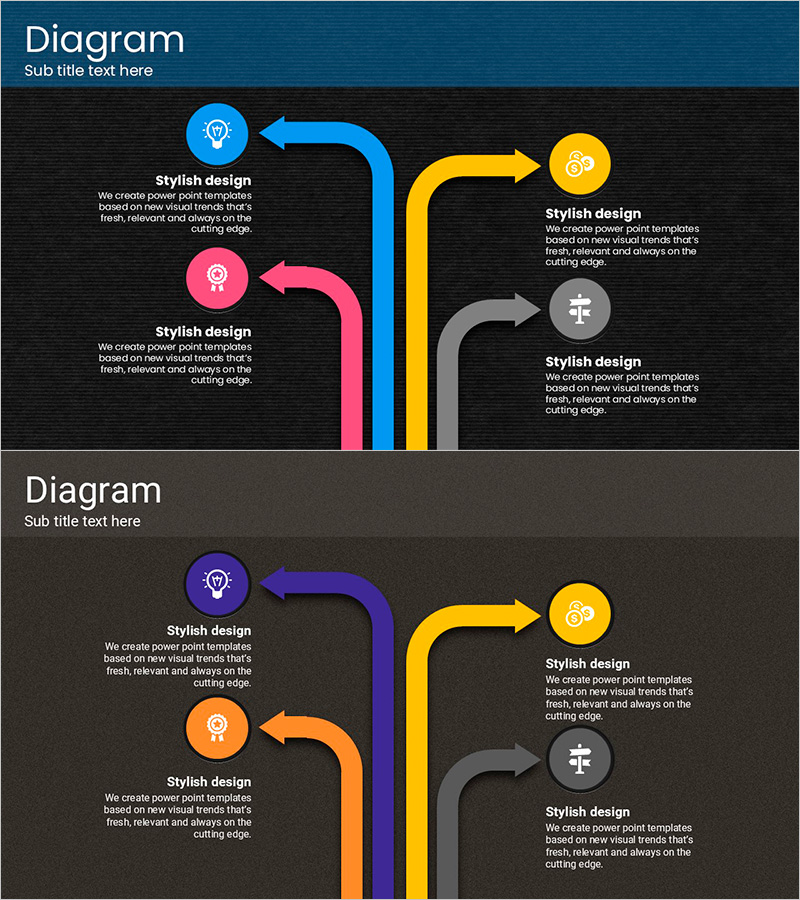
A multi-directional flow diagram PowerPoint slide featuring four nodes connected by converging arrows in blue, pink, yellow, and gray. This design visualizes product characteristics, program stages, and process flows with clarity and visual impact. Each node includes an icon placeholder and text area, making it ready for immediate use in product presentations, program overviews, and process documentation. The 16:9 widescreen format spans 2 slides, accommodating diverse content needs.
Usage Points
-
Main Usage
Communicate product features, program stages, or business processes across four distinct items using a converging arrow structure. The central convergence emphasizes integration while individual colors highlight each component's unique role. Ideal for presenting parallel concepts that ultimately connect to a unified outcome.
-
How to Use
Replace node icons with relevant symbols and add descriptive text in each text area. Customize arrow colors and node positions to match your presentation theme. Insert into product introduction or program overview slides to enhance audience comprehension of multi-component systems.
-
Recommended For
Product managers, marketing professionals, program planners, and educators explaining product features, program structures, or process workflows. Best suited for presentations requiring parallel comparison of four related elements that converge toward a common goal.
-
Slide Structure
2-slide set. First slide features dark background with 4 circular nodes (blue, pink, yellow, gray) and converging arrows pointing inward. Second slide uses alternate color scheme (purple, orange, yellow, gray) with identical structure. Each node includes icon placeholder and text area. 16:9 widescreen format.
Related Products
-
Multi-directional Diagram of Traffic Accidents - Safety Management and Prevention Effect
#Product/Service Introduction #Risk Management and Regulatory Compliance #Diagram
-
Rhombus Infographic Template for Business Area Introduction – Efficient Flow
#Product/Service Introduction #Business Introduction #Diagram
-
Introducing Healthy Condiments with a Multidirectional Arrow Diagram – Emphasizing Product Features
#Product/Service Introduction #Operational Plan #Diagram
-
Optimizing Time Management Strategies – Flow Diagram for Work Efficiency
#Product/Service Introduction #Diagram #Features
