



Global Business PowerPoint Template – Key Clusters for Project Progress
RJ0200004_19
- Last Update 03/29/2025
- File Size 0.9MB
- # of Slides 2
- File Format PPTX
- Slide Ratio 16:9
- Color
Keywords
- #Content-Based Slides
- #Design-Based Slides
- #Business Vision and Strategy
- #Business Strategy
- #Operational Plan
- #Diagram
- #Text Box
- #Business Vision
- #Financial Outlook & Expected Impact
- #Organizational Structure and Staffing Plan
- #Cluster
- #Combination Diagram
- #16:9
- #3-circle overlapping diagram PowerPoint
- #Venn diagram PowerPoint slide
- #cluster diagram template
- #business strategy visualization slide
- #intersection relationship diagram PowerPoint
About the Product
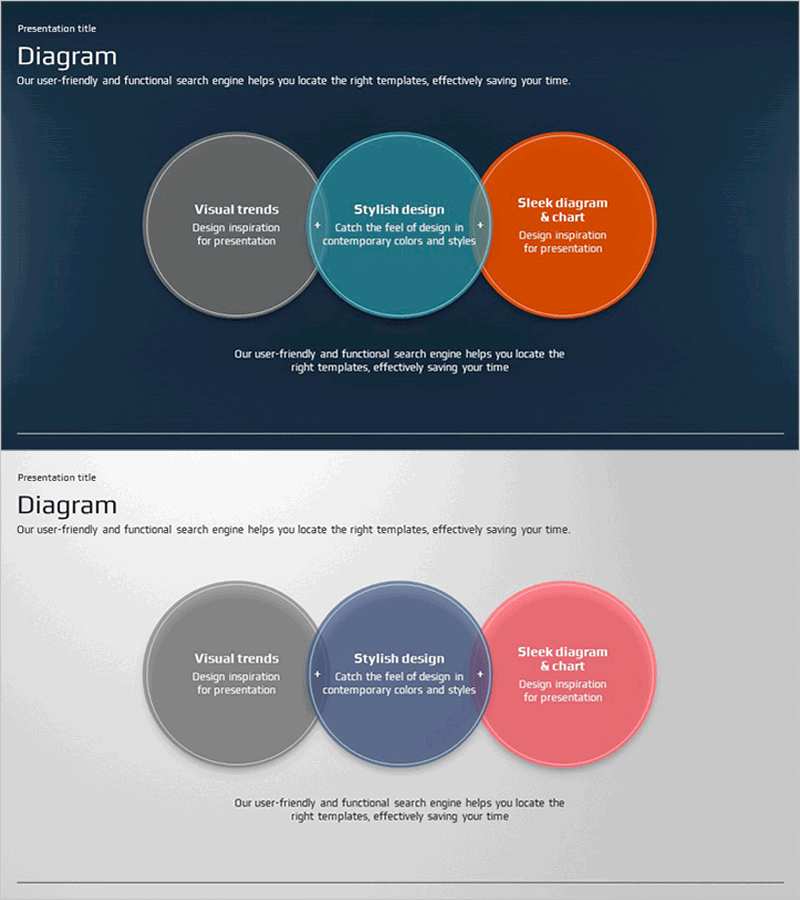
A Venn diagram-style PowerPoint slide featuring three overlapping circular nodes that express intersection relationships. Set against a dark navy background, the three circles are distinguished by gray, teal, and orange colors, each containing core concepts with the central intersection area emphasizing an integrated message. This presentation slide is optimized for visually organizing business strategies, operational plans, and project progress. The 16:9 widescreen format includes 2 slides ready for immediate editing.
Usage Points
-
Main Usage
Visually represents the intersection relationships between three core concepts to emphasize an integrated message. Used in business strategy development to clarify interactions between multiple elements and in operational planning to define collaboration areas across departments.
-
How to Use
Enter strategy elements, department names, or objectives in each circular node, and input integrated goals or key outcomes in the central intersection area. The color differentiation intuitively conveys each area's role, making it suitable for executive presentations, company-wide strategy meetings, and strategic planning workshops.
-
Recommended For
Recommended for executives, strategy managers, project managers, and organizational development professionals explaining enterprise strategy, cross-departmental collaboration structures, and project progress. Particularly effective for executive presentations and organizational communications where multi-stakeholder interactions must be clearly defined.
-
Slide Structure
2-slide composition with the first slide featuring a dark navy background and three overlapping circular nodes in gray, teal, and orange forming an intersection, each with text input areas. The second slide uses a light gray background with the same diagram structure to accommodate various presentation scenarios.
Related Products
-
Market Reaction Effect Overlay Diagram
#Business Vision and Strategy #Business Strategy #Operational Plan
-
Construction Project Objectives Overlapping Diagram – Business Vision and Strategy
#Business Vision and Strategy #Operational Plan #Diagram
-
Yellow Green Circular Diagram – Business Vision and Strategy
#Business Vision and Strategy #Operational Plan #Diagram
-
Principal Recovery Rate Diagram
#Operational Plan #Financial Plans and Performance #Diagram
