



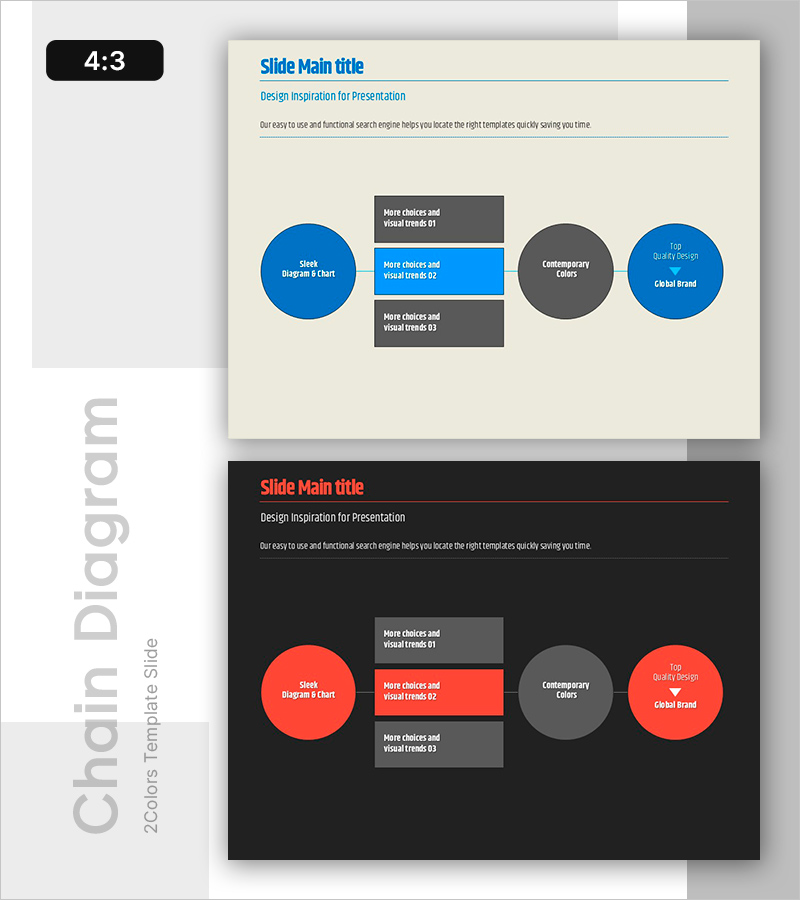
Simple System Diagram – Operations Planning and Service Configuration
RB0800003_17
- Last Update 03/17/2025
- File Size 0.1MB
- # of Slides 2
- File Format PPTX
- Slide Ratio 4:3
- Color
Keywords
- #Content-Based Slides
- #Design-Based Slides
- #Operational Plan
- #Technical Approach
- #Diagram
- #Business Processes
- #Service Architecture Diagram
- #Cluster
- #Chain Diagram
- #4:3
- #radial diagram PowerPoint
- #connection diagram slide
- #operations planning template
- #organizational structure diagram
- #business process visualization
About the Product
A radial connection diagram PowerPoint slide that visualizes operations planning and service configuration with a central hub-and-spoke structure. Four circular nodes radiate from the central concept, clearly representing key functional areas of an organization. Designed with a cream background, blue and gray circular nodes, and rectangular text boxes for immediate use in business presentations. Two-slide set includes both light and dark tone versions to adapt to different presentation environments.
Usage Points
-
Main Usage
Visually represents core concepts that branch into key functional areas such as operations planning, service configuration, and business processes. Effectively communicates central relationships in executive reports, strategy presentations, and organizational structure explanations.
-
How to Use
Enter the core concept (e.g., Operations Strategy) in the central circular node. Distribute key areas (Technology, Customer Service, Brand, Color Selection, etc.) across the four surrounding nodes. Add supplementary details in the rectangular text boxes to expand on each functional area.
-
Recommended For
Recommended for operations managers, planning teams, and technical staff who need to present operations planning, technology explanations, service architecture diagrams, and business process definitions. Suitable for strategy presentations, organizational restructuring explanations, and new service launch presentations.
-
Slide Structure
Radial hub-and-spoke layout with one large central circular node (core concept) connected to four surrounding circular nodes (functional areas). Connection lines link the center to each outer node. Three rectangular text boxes are positioned around each node for supplementary information. Includes both light and dark tone color versions.
Related Products
-

Shopping Mall Payment Diagram – Harmony of Teal and Orange
#Operational Plan #Technical Approach #Diagram
-

IT Intra Business Process Diagram – Intuitive Representation of Technical Efficiency
#Operational Plan #Technical Approach #Diagram
-
Business Schedule and Process Diagram – Travel Business
#Operational Plan #Technical Approach #Diagram
-

Business Strategy Connected Diagram – Workflow and Technical Execution
#Operational Plan #Technical Approach #Diagram
