



Retirement Vision Step Diagram – Visualizing Business Strategy
RB0700029_5
- Last Update 03/17/2025
- File Size 0.2MB
- # of Slides 2
- File Format PPTX
- Slide Ratio 4:3
- Color
Keywords
- #Content-Based Slides
- #Design-Based Slides
- #Business Vision and Strategy
- #Diagram
- #Business Vision
- #Business Strategy
- #Structure
- #Pyramid Chart
- #4:3
- #inverted pyramid diagram PowerPoint
- #5-level hierarchy structure slide
- #business strategy visualization
- #decision-making process diagram
- #organizational structure PowerPoint template
About the Product
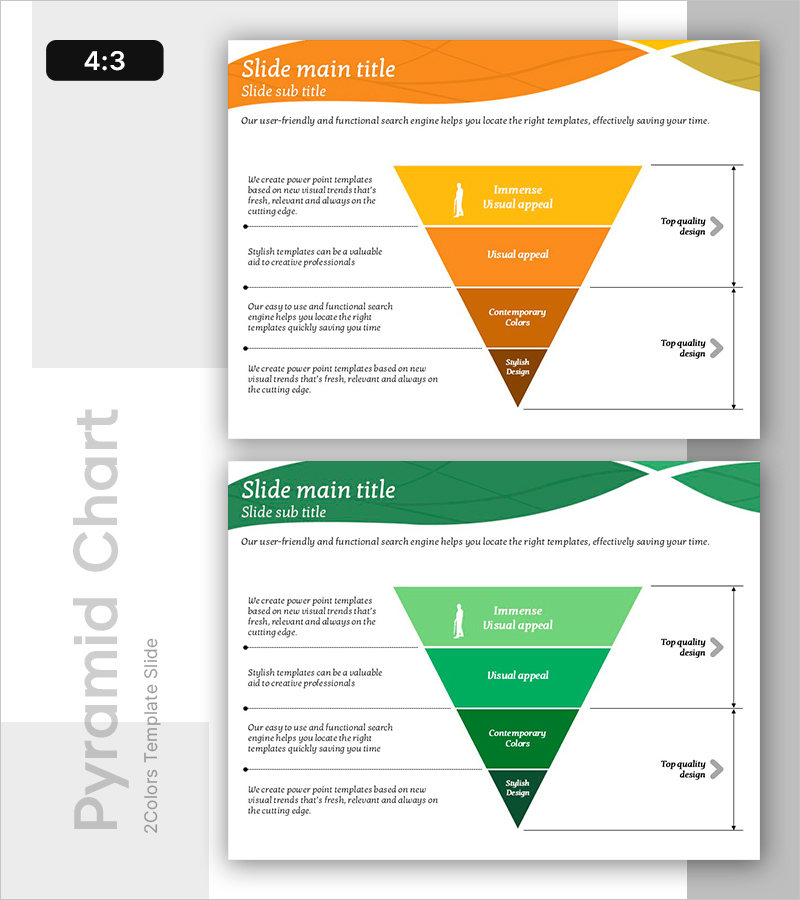
A 5-level inverted pyramid diagram PowerPoint slide that visualizes top-down decision-making structures and hierarchical priorities. The structure flows from 'Immense Visual Appeal' at the top to 'Stylish Design' at the bottom, making it ideal for business strategy, marketing funnels, and organizational decision processes. Provided in orange and green color schemes with clear text areas and icon placement at each level. The 2-slide 4:3 format is ready for immediate editing and works seamlessly in strategy presentations, business reports, and planning documents.
Usage Points
-
Main Usage
Visualizes top-down decision-making structures, hierarchical priorities, marketing funnels, and organizational processes. The top-to-bottom flow enables clear communication from core strategy to execution details, making it perfect for business strategy presentations, marketing planning, and organizational restructuring announcements.
-
How to Use
Enter strategy items, priority levels, or decision criteria into each level's text box. Use the orange version for marketing and strategy materials, and the green version for sustainability, growth, or environmental initiatives. Add icons or connecting arrows to emphasize relationships between levels.
-
Recommended For
Ideal for executives, strategy managers, marketing directors, and organizational development professionals presenting to leadership teams, boards, or department meetings. Perfect for business plans, marketing strategies, organizational restructuring proposals, and strategic reports where hierarchical decision-making needs clear visualization.
-
Slide Structure
5-level inverted pyramid with 'Immense Visual Appeal' (yellow) at top, followed by 'Visual Appeal' (orange), 'Contemporary Colors' (orange), 'Stylish' (brown), and 'Stylish Design' (dark brown) at bottom. Each level includes left-side text description area and right-side arrow indicator for clear information hierarchy. Both slides maintain identical structure with color variations (orange and green versions).
Related Products
-
Business Strategy Circular Diagram - Connect Vision and Goals
#Business Vision and Strategy #Diagram #Business Vision
-
Legal Response Strategy Based on Genetic Information – Business Vision and Cluster
#Business Vision and Strategy #Diagram #Business Vision
-
Three Key Strategies – Visualizing Business Vision and Strategy
#Business Vision and Strategy #Diagram #Business Vision
-
Keyword Connection Diagram – Visualizing Business Vision and Strategy
#Business Vision and Strategy #Diagram #Business Vision
