



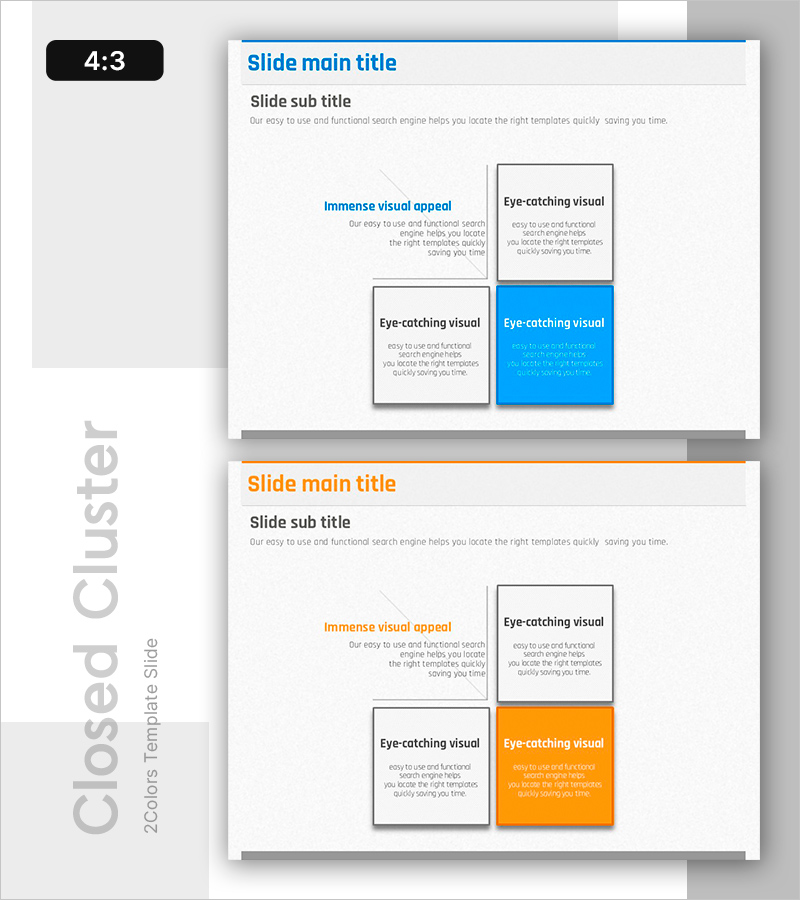
Execution Plan for Creative Learning Programs – Effective Workflow Diagram
RB0700006_7
- Last Update 03/15/2025
- File Size 0.7MB
- # of Slides 2
- File Format PPTX
- Slide Ratio 4:3
- Color
Keywords
- #Content-Based Slides
- #Design-Based Slides
- #Business Management
- #Operational Plan
- #Diagram
- #Execution Plan
- #Business Processes
- #Cluster
- #Spread
- #Chain Diagram
- #Decentralized Diagram
- #4:3
- #2x2 cluster diagram PowerPoint
- #closed cluster slide template
- #four-section comparison diagram
- #project management PowerPoint slide
- #matrix diagram template download
About the Product
A 2×2 closed cluster diagram PowerPoint slide template with four distinct zones for organizing and comparing information. The upper-left text area introduces the main concept, while the upper-right and lower-left gray boxes present supporting details. The lower-right blue box highlights key content to draw audience attention. Each zone is visually connected yet independent, making it ideal for comparative analysis, information hierarchy, and structured presentations. Perfect for project management, brainstorming sessions, creative program execution plans, and strategic decision-making presentations.
Usage Points
-
Main Usage
Organize and compare four related concepts, items, or data points simultaneously using the four-zone closed cluster structure. The blue-emphasized lower-right box directs audience focus to key messages, while gray boxes maintain supporting information hierarchy and clarity.
-
How to Use
Enter your main topic or question in the upper-left text area. Fill the upper-right and lower-left gray boxes with comparative analysis or supporting details. Use the lower-right blue box for your most important message or conclusion. The color differentiation helps audiences quickly understand information priority and relationships.
-
Recommended For
Project managers, business strategists, marketing professionals, educators, and consultants presenting brainstorming results, strategic plans, decision-making frameworks, cost-benefit analyses, SWOT comparisons, or creative program execution timelines.
-
Slide Structure
Four-zone closed cluster layout: upper-left text area (main concept), upper-right gray box (supporting detail 1), lower-left gray box (supporting detail 2), lower-right blue box (key emphasis). Clear borders separate each zone while blue accent color creates visual focus.
Related Products
-
Blue Green Sequence Diagram
#Business Management #Operational Plan #Diagram
-
Navigation Program App Process and Implementation Plan - Enhancing Business Performance
#Business Management #Operational Plan #Diagram
-
Business Process Procedure Diagram – Effective Business Management
#Business Management #Operational Plan #Diagram
-
Diagram Illustrating the Internet Shopping Process
#Business Management #Operational Plan #Diagram
