



Construction Technology Connection Diagram – Product/Service Introduction
RB0100036_8
- Last Update 03/05/2025
- File Size 0.6MB
- # of Slides 2
- File Format PPTX
- Slide Ratio 4:3
- Color
Keywords
- #Content-Based Slides
- #Design-Based Slides
- #Product/Service Introduction
- #Operational Plan
- #Diagram
- #Product/Service Introduction
- #Business Processes
- #Cluster
- #Closed Cluster Diagram
- #Chain Diagram
- #4:3
- #connection diagram PowerPoint
- #3-node relationship diagram
- #product service introduction slide
- #interconnection diagram PowerPoint
- #business process diagram template
About the Product
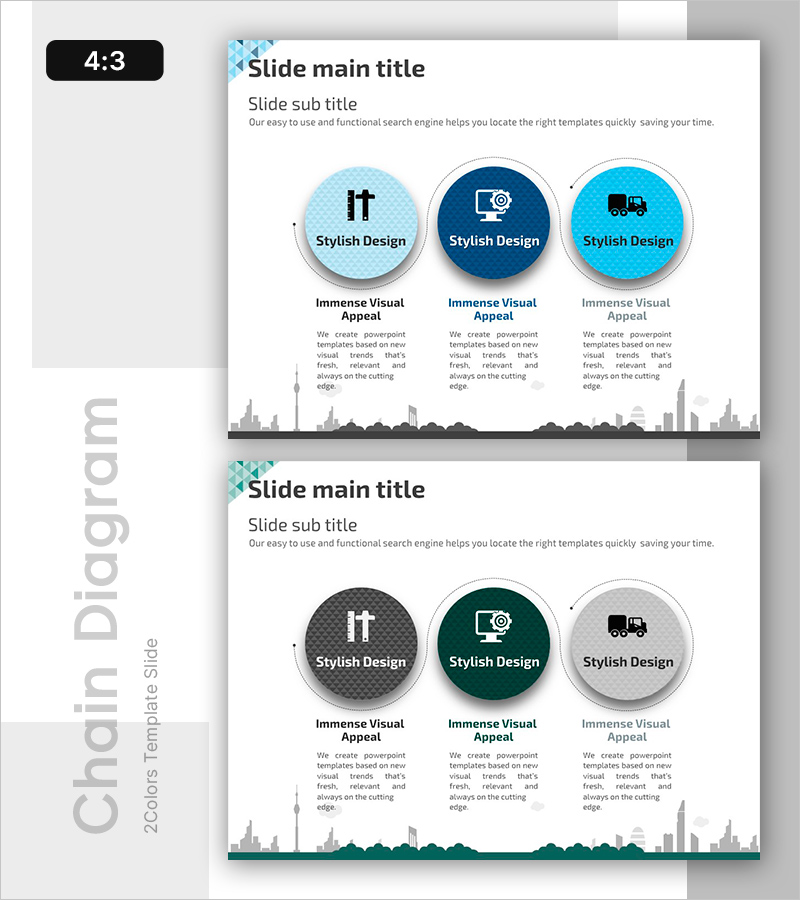
A relationship diagram PowerPoint slide featuring three circular nodes arranged in a triangular layout and connected by directional arrows. The nodes use three shades of blue—light blue, navy, and cyan—with icons and text labels to visualize interconnections between product, service, and technology elements. Each node includes a text area below for detailed descriptions, while a city skyline silhouette background creates a professional business presentation atmosphere. The 2-slide set provides color variations in blue and dark green tones, making it adaptable to different presentation contexts.
Usage Points
-
Main Usage
This diagram clearly expresses the interconnected relationships between three elements—product, service, and technology. It helps audiences intuitively understand how each component relates to and interacts with the others through visual representation.
-
How to Use
Use this slide when introducing products, explaining services, or presenting technology architecture. Replace the node text and icons with your own content, and fill in the description areas below each node with role-specific information. Choose between the two color variations—blue or green tone—based on your presentation theme.
-
Recommended For
Ideal for product managers, marketing professionals, technology leaders, and executive presentations. Particularly effective when introducing complex products, integrated solutions, or technology platforms where clearly communicating relationships between components is essential.
-
Slide Structure
2-slide set. Each slide features three circular nodes (approximately 80px diameter) arranged in a triangular pattern, connected by dotted directional arrows. Each node contains an icon (approximately 30px) and text label, with a description text box (capacity for approximately 100 characters) positioned below. A city skyline silhouette background provides visual context.
Related Products
-

Website Process Diagram – Effective Operational Planning
#Product/Service Introduction #Operational Plan #Diagram
-
The Process of Gardening - Business Strategy and Operational Planning
#Business Strategy #Operational Plan #Diagram
-
Preparation Procedure for the Wedding Hall – Roadmap for Weddings
#Business Strategy #Operational Plan #Diagram
-
Characteristics and Strategies of Mountain Temperature – Business Operations Plan
#Business Management #Operational Plan #Diagram
