



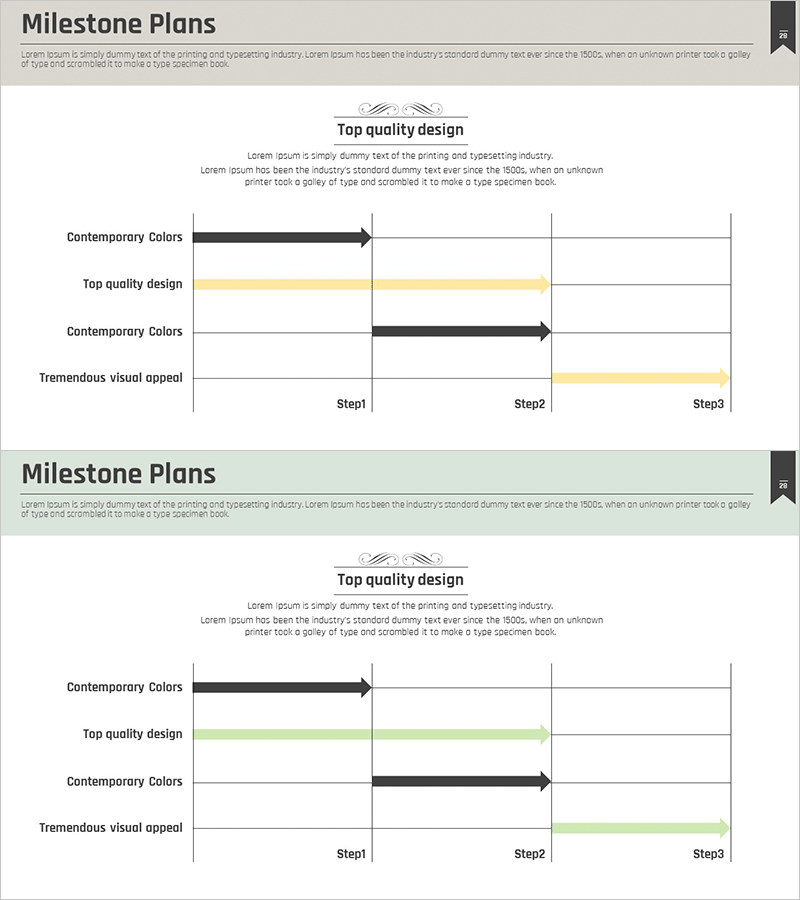
3-Step Main System Configuration Diagram – Business Strategy
RM0200006_27
- Last Update 02/02/2025
- File Size 0.3MB
- # of Slides 2
- File Format PPTX
- Slide Ratio 16:9
- Color
Keywords
- #Content-Based Slides
- #Design-Based Slides
- #Business Strategy
- #Business Management
- #Diagram
- #Roadmap
- #Implementation Plan
- #Flow
- #Linear Flow
- #16:9
- #3-step diagram PowerPoint
- #linear flow chart presentation
- #business strategy slide template
- #system configuration diagram
- #arrow diagram PowerPoint template
About the Product
A linear flow diagram PowerPoint slide that visualizes business strategy and system configuration across three sequential steps. Black arrows and yellow highlight bars create clear visual hierarchy for each phase, making it ideal for business plans, company presentations, and strategy reports. The 2-slide set features fully editable text fields for step names and descriptions, allowing quick customization for your specific needs. Formatted in 16:9 widescreen PPTX for seamless integration with modern presentation environments.
Usage Points
-
Main Usage
Clearly visualizes business strategy, system architecture, and process phases across three sequential steps. The contrast between black arrows and yellow highlight bars effectively communicates progression and priority, making it perfect for company presentations, business plans, and strategic initiatives where step-by-step execution is critical.
-
How to Use
Simply edit the text fields to add your step titles and descriptions. Arrow lengths and highlight bar colors can be adjusted to match your corporate branding. The diagram works well for roadmap presentations, organizational structure explanations, project timelines, and strategic planning documents. All elements are fully editable in PowerPoint.
-
Recommended For
Ideal for executives, planning teams, marketing departments, and project managers presenting strategy execution plans. Perfect for investor pitches, board presentations, team meetings, system implementation roadmaps, and business expansion strategies. Recommended for anyone needing to communicate phased initiatives clearly.
-
Slide Structure
Two-slide set with distinct color schemes. Slide 1 features three black arrows with one yellow highlight bar and four text input areas. Slide 2 includes two black arrows with one green highlight bar and corresponding text fields. Both slides use 16:9 widescreen format optimized for modern projectors and displays.
Related Products
-
Abstract Pattern Template Diagram – Blueprint for Business Strategy
#Business Strategy #Business Management #Diagram
-
Roadmap Design Template – Visualizing Business Development Plans
#Business Strategy #Business Management #Diagram
-

Dark 4-Step Investment Process PowerPoint – Timeline Cards
#Business Strategy #Business Management #Operational Plan
-
Conveyor Arrow Process Diagram
#Business Strategy #Business Management #Diagram
