



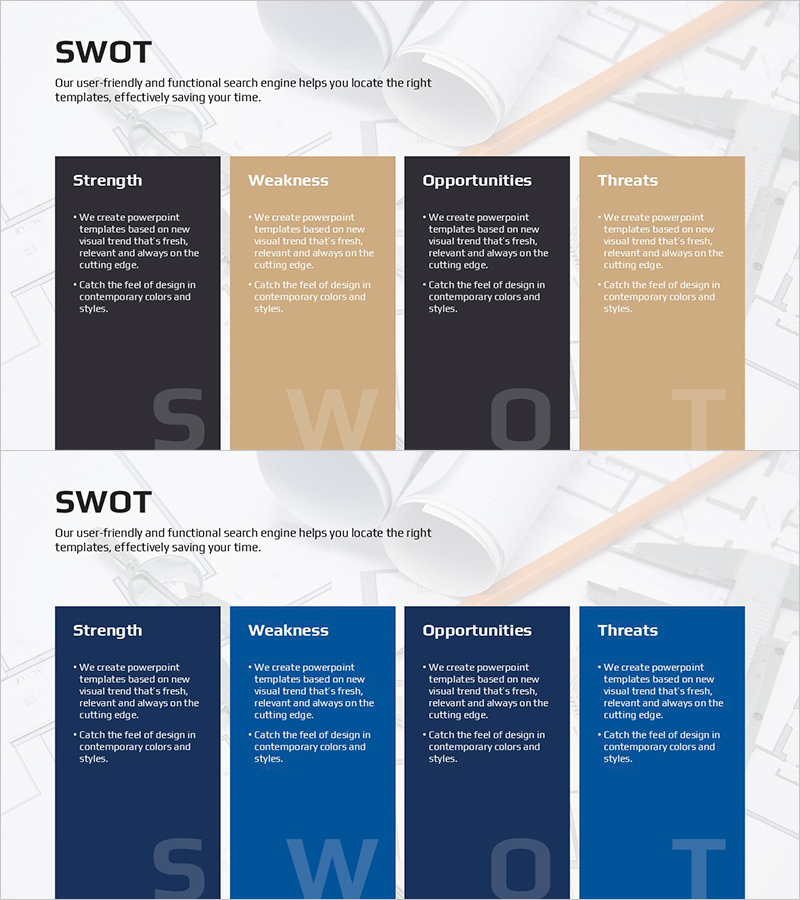
Powerful SWOT Analysis Template for Architecture
RJ0900031_8
- Last Update 08/25/2025
- File Size 0.4MB
- # of Slides 2
- File Format PPTX
- Slide Ratio 16:9
- Color
Keywords
About the Product
A professional SWOT analysis diagram PowerPoint slide designed for strategic planning and business evaluation. This cluster-type diagram clearly separates the four SWOT components—Strength, Weakness, Opportunities, and Threats—with dedicated text input areas for each section. The black and beige dual-tone color scheme creates a trustworthy and business-appropriate atmosphere ideal for corporate presentations. Two color variations (black & beige / navy & blue) are provided, allowing you to select the combination that best matches your company branding or presentation theme. This PowerPoint slide is ready to use across various industries including architecture, real estate, strategic planning, and marketing.
Usage Points
-
Main Usage
Visually organize and present Strength, Weakness, Opportunities, and Threats during corporate strategy development, business analysis, and project planning presentations. Each SWOT section provides ample text space to clearly articulate detailed analysis findings.
-
How to Use
Enter relevant content into each SWOT section (four boxes in black, beige, black, and beige) to display your company's internal strengths and weaknesses alongside external opportunities and threats at a glance. Modify the color combinations to represent multiple scenarios or departmental analyses.
-
Recommended For
Ideal for executives, strategy planning teams, marketing departments, consultants, and professionals in architecture and real estate industries presenting business strategies, new project proposals, and competitive analyses. Suitable for executive briefings, investor presentations, and internal strategy meetings.
-
Slide Structure
Two-slide set featuring the first slide with black and beige dual-tone SWOT 4-section diagram and the second slide with navy and blue dual-tone SWOT 4-section diagram. Each slide contains four independent text input areas and is optimized for 16:9 widescreen format.
Related Products
-
BUSINESS PLAN presentation template PUZZLE DIAGRAM1
#Business Vision and Strategy #Diagram #Business Strategy
-
Abstract Pattern Diagram 1 – Visualizing Service Development Plans
#Technical Approach #Diagram #Service Development Plan
-
Presentation Template for Business Strategy Using Arrow Diagram
#Business Strategy #Operational Plan #Diagram
-
Visualizing Marketing Strategy with Geometry Diagram
#Product/Service Introduction #Marketing Plan and Strategy #Diagram
