



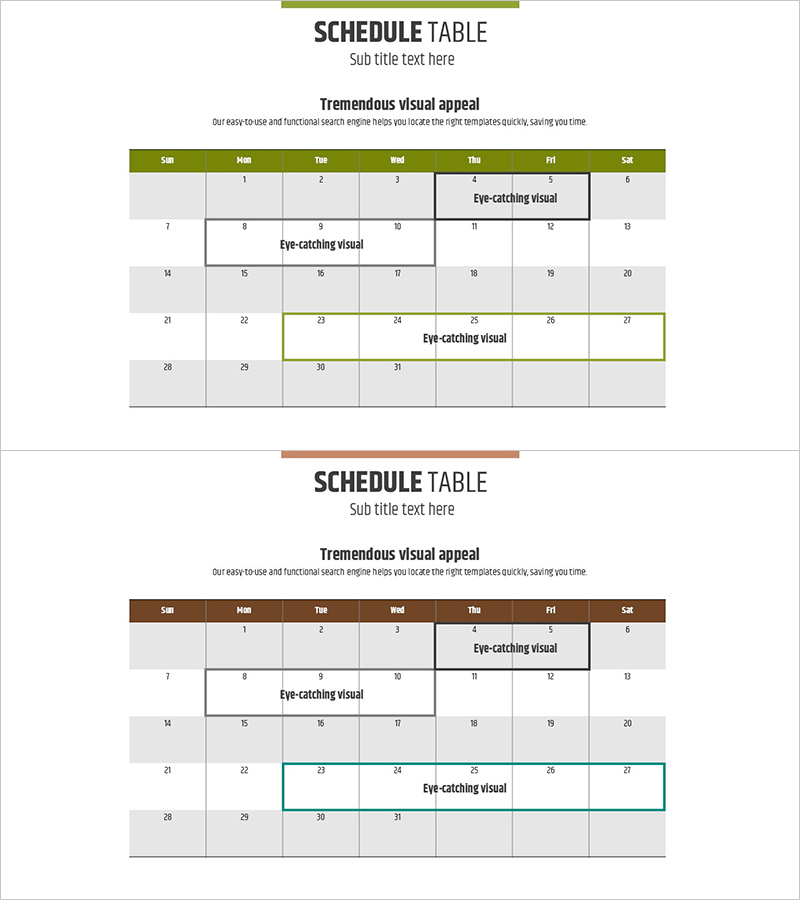
Green Brown Calendar – Effective Time Management
RJ0900012_16
- Last Update 08/19/2025
- File Size 0.1MB
- # of Slides 2
- File Format PPTX
- Slide Ratio 16:9
- Color
Keywords
About the Product
A table-based PowerPoint slide designed for weekly and monthly schedule management. This template features two color versions—green and brown—with a monthly calendar layout and a detailed weekly schedule format. Each cell is fully editable, making it ideal for project timelines, team schedules, training programs, and event planning. The 2-slide set is optimized for 16:9 widescreen presentations and provides an intuitive visual structure for immediate use in business presentations.
Usage Points
-
Main Usage
Organize and communicate weekly or monthly schedules visually to team members and stakeholders. Ideal for displaying project timelines, training schedules, meeting agendas, milestone planning, and resource allocation in a clear, structured table format.
-
How to Use
Enter dates, times, and task descriptions into each cell to create a comprehensive schedule overview. Choose the green version for growth-oriented messaging or the brown version for stability and trust, depending on your presentation context and audience.
-
Recommended For
Project managers, team leads, training coordinators, event planners, and HR professionals who need to present schedules and manage time allocation. Suitable for quarterly planning presentations, team meetings, educational seminars, and event scheduling briefings.
-
Slide Structure
Slide 1: Monthly calendar table with 7 rows and 7 columns (Sunday–Saturday headers, 31 date cells). Slide 2: Weekly detailed schedule with time-slot rows (7 AM–1 PM) or day-by-day breakdown for granular task entry. Both versions feature colored headers (green or brown) with light gray data cells for clear visual hierarchy.
Related Products
-

European Target Market Analysis Table – Essential Tool for Market Competitiveness
#Market and Competitor Analysis #Diagram #Other
-
Simple Schedule Planner - Efficient Business Management
#Business Management #Operational Plan #Diagram
-
Bar Graphs & Tables – New Dimension of Data Visualization
#Market and Competitor Analysis #Diagram #Graph
-
Blue Pink Circle Graph & Table Chart – Slide Highlighting Visual Appeal
#Product/Service Introduction #Operational Plan #Technical Approach
