



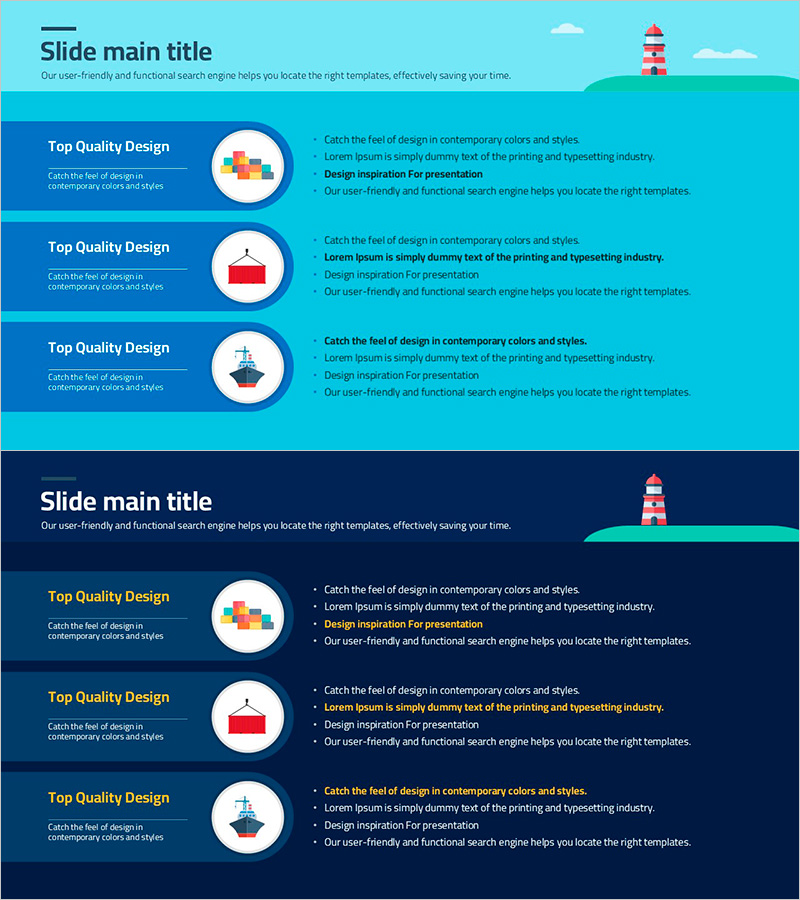
Transportation Cargo Plan Diagram
RJ0800029_18
- Last Update 08/07/2025
- File Size 0.3MB
- # of Slides 2
- File Format PPTX
- Slide Ratio 16:9
- Color
Keywords
- #Content-Based Slides
- #Design-Based Slides
- #Product/Service Introduction
- #Diagram
- #Product/Service Introduction
- #Features
- #Cluster
- #Closed Cluster Diagram
- #16:9
- #closed-loop diagram PowerPoint
- #transportation plan slide template
- #cargo flow diagram
- #logistics process PowerPoint
- #how to create transportation diagram in PowerPoint
About the Product
A closed-loop diagram PowerPoint slide that visualizes cargo transportation and logistics planning. Set against a bright turquoise background, it features three key stages represented by circular icons with accompanying descriptive text for each phase. This presentation template is ready to use for transportation planning, cargo management, and logistics process presentations, effectively communicating complex shipping flows in an intuitive manner. The set includes 2 slides in 16:9 ratio PPTX format.
Usage Points
-
Main Usage
Visualizes cargo transportation, logistics management, and supply chain planning processes in stages, clearly communicating workflow to audiences. The closed-loop structure emphasizes cyclical processes and integrated systems by showing the relationship and connection between each stage.
-
How to Use
Use in business plans, logistics strategy presentations, transportation company introductions, and supply chain optimization presentations to explain shipping flows. Customize the text within each circular icon to create tailored presentation materials for your specific content and audience.
-
Recommended For
Ideal for logistics managers, transportation company executives, supply chain professionals, business consultants, and project managers explaining transportation plans and cargo management processes. Effective for B2B presentations and internal meeting materials.
-
Slide Structure
Consists of 2 slides featuring a bright turquoise background with 3 circular icons arranged in a closed-loop diagram format. Each slide has a title at the top, blue text boxes on the left side, and circular icons with descriptive text on the right. Optimized for modern presentation environments in 16:9 widescreen format.
Related Products
-
Interior Service Overview Presentation Template - Innovation and Trust
#Product/Service Introduction #Diagram #Product/Service Introduction
-
Cluster Slide Visualizing Characteristics of Grass
#Product/Service Introduction #Diagram #Product/Service Introduction
-
Learning Icons and Order Text for Effective Information Delivery – Product Introduction
#Product/Service Introduction #Diagram #Product/Service Introduction
-
Introduction to Healthcare Business Services – Utilizing Cluster Diagram
#Product/Service Introduction #Diagram #Product/Service Introduction
