



Diagram Slide for Aerospace & Chemical Experiments
RJ0700019_27
- Last Update 07/27/2025
- File Size 1.2MB
- # of Slides 2
- File Format PPTX
- Slide Ratio 16:9
- Color
Keywords
- #Content-Based Slides
- #Design-Based Slides
- #Product/Service Introduction
- #Diagram
- #Product and Service Overview
- #Cluster
- #Closed Cluster Diagram
- #16:9
- #closed-form cluster diagram PowerPoint
- #aerospace industry slide template
- #chemical experiment presentation
- #hexagon icon diagram slide
- #industrial process visualization
- #how to create cluster diagram in PowerPoint
About the Product
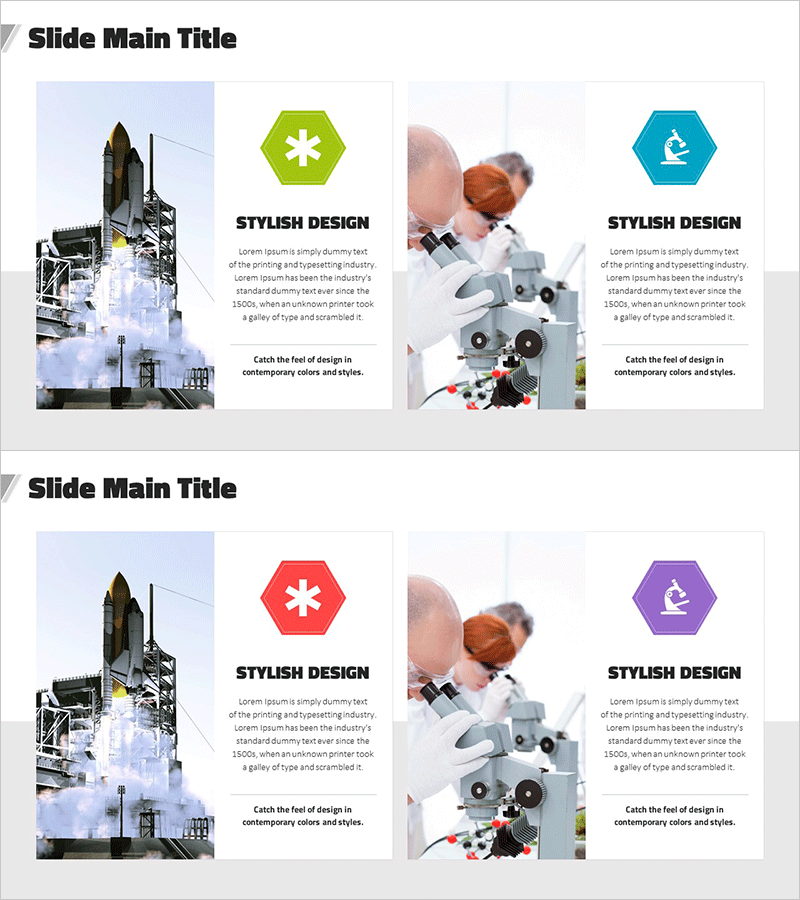
A professional closed-form cluster diagram PowerPoint slide designed for aerospace and chemical experiment presentations. Features three hexagonal icon sections in lime green and turquoise, clearly representing relationships and interactions within complex industrial processes. Industry-specific photography (construction equipment, laboratory apparatus) is strategically positioned alongside text areas, making it immediately applicable for technical presentations and industrial analysis reports. Provided in 16:9 PPTX format with fully editable colors and text fields for seamless customization.
Usage Points
-
Main Usage
Optimized for visualizing aerospace and chemical industry processes, system architectures, and interdepartmental relationships using a closed-form cluster structure. Emphasizes interconnections and integrated systems, making it ideal for technical presentations, industrial analysis reports, and research findings.
-
How to Use
Input your main topics into the three hexagon sections and replace industry photographs with relevant images from your field. Lime green and turquoise colors can be customized to match your corporate branding, and text blocks can be expanded for detailed explanations. Perfect for technical pitches, product introductions, and industry analysis slides.
-
Recommended For
Aerospace engineers, chemical researchers, industrial technology managers, technical sales teams, R&D departments, industrial consultants, and academic presenters. Particularly effective for explaining high-complexity technical processes in specialized industrial sectors.
-
Slide Structure
Two-slide set featuring closed-form cluster layouts with three hexagonal icons (lime green, turquoise, purple) as focal points. Left side contains industry-related photography areas; right side provides text description zones. Each hexagon functions as an independent input field for flexible content adaptation.
Related Products
-
Nature and Deer Reindeer Silhouette – A Presentation Template Capturing the Beauty of Life
#Product/Service Introduction #Diagram #Other
-
Diagram Slide to Show Natural Environmental Composition
#Product/Service Introduction #Corporate Social Responsibility #Diagram
-
Medical Program Introduction Diagram – Effective Cluster Structure
#Product/Service Introduction #Diagram #Program Introduction
-
Scientific Data Feature Diagram – Communicating Insights Effectively
#Product/Service Introduction #Diagram #Features
