



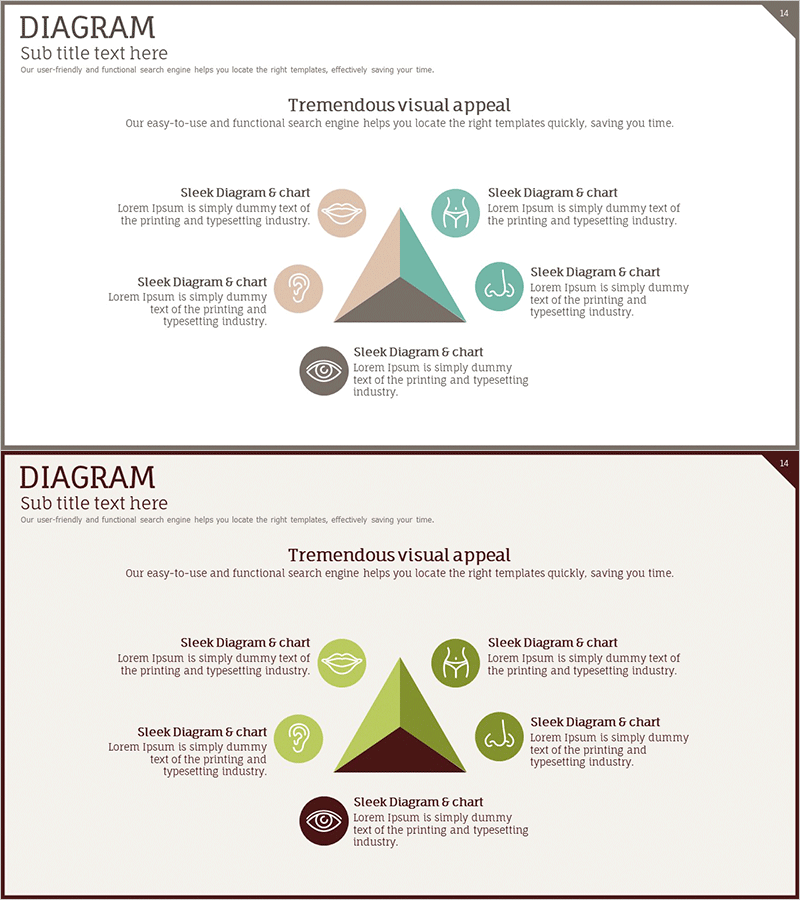
Plastic Surgery Area Diagram – Visualizing Business Areas with Clusters
RJ0700005_13
- Last Update 07/22/2025
- File Size 0.3MB
- # of Slides 2
- File Format PPTX
- Slide Ratio 16:9
- Color
Keywords
- #Content-Based Slides
- #Design-Based Slides
- #Company Introduction
- #Business Introduction
- #Diagram
- #Business Areas
- #Business Areas
- #Cluster
- #Closed Cluster Diagram
- #16:9
- #closed cluster diagram PowerPoint
- #central triangle diagram slide
- #5-node relationship diagram
- #business area visualization PPT
- #cluster diagram template download
About the Product
A closed-form cluster diagram PowerPoint slide featuring a central triangle surrounded by five circular nodes for visualizing business areas, product categories, or organizational functions. Each node includes an icon and text field to clearly distinguish information hierarchy and relationships. The slide deck provides two layouts with different color schemes—beige, teal, and gray tones on the first slide, and green, brown, and gray on the second—allowing customization to match your presentation topic and brand identity. Ideal for business presentations, organizational charts, and strategic planning documents.
Usage Points
-
Main Usage
Effectively communicates the relationship between a core concept and supporting elements through a closed-form structure. Ideal for explaining integrated business models, organizational hierarchies, or complete systems where all components connect to a central idea.
-
How to Use
Place your core concept (e.g., company name, core value) in the central triangle. Distribute supporting elements (e.g., business divisions, product lines, functions) across the five surrounding circular nodes. Edit icons and text fields to match your content, and adjust color schemes to reflect your brand identity.
-
Recommended For
Corporate introductions, organizational structure explanations, product portfolio presentations, business area analysis, marketing strategy pitches, consulting reports, and investor pitch decks. Particularly suitable for healthcare, beauty, pharmaceutical, and technology companies presenting business divisions.
-
Slide Structure
Two-slide layout. Each slide contains one central triangle, five circular nodes, and text input areas. The first slide uses beige, teal, and gray tones; the second offers green, brown, and gray variations, providing flexibility for different presentation contexts and audience preferences.
Related Products
-
Cluster Diagram Slide for Construction Field Introduction
#Company Introduction #Business Introduction #Diagram
-
Cluster Diagram Slide for Facilities Technology Area
#Company Introduction #Business Introduction #Diagram
-
Gaming Device Area Introduction – Business Fields and Design Clusters
#Company Introduction #Business Introduction #Diagram
-
Representative Ingredients Slide for Business Insights
#Company Introduction #Business Introduction #Diagram
