



How to use the Exercise Record Measurement App – Technical Approach
RJ0600086_28
- Last Update 07/13/2025
- File Size 6.4MB
- # of Slides 2
- File Format PPTX
- Slide Ratio 16:9
- Color
Keywords
About the Product
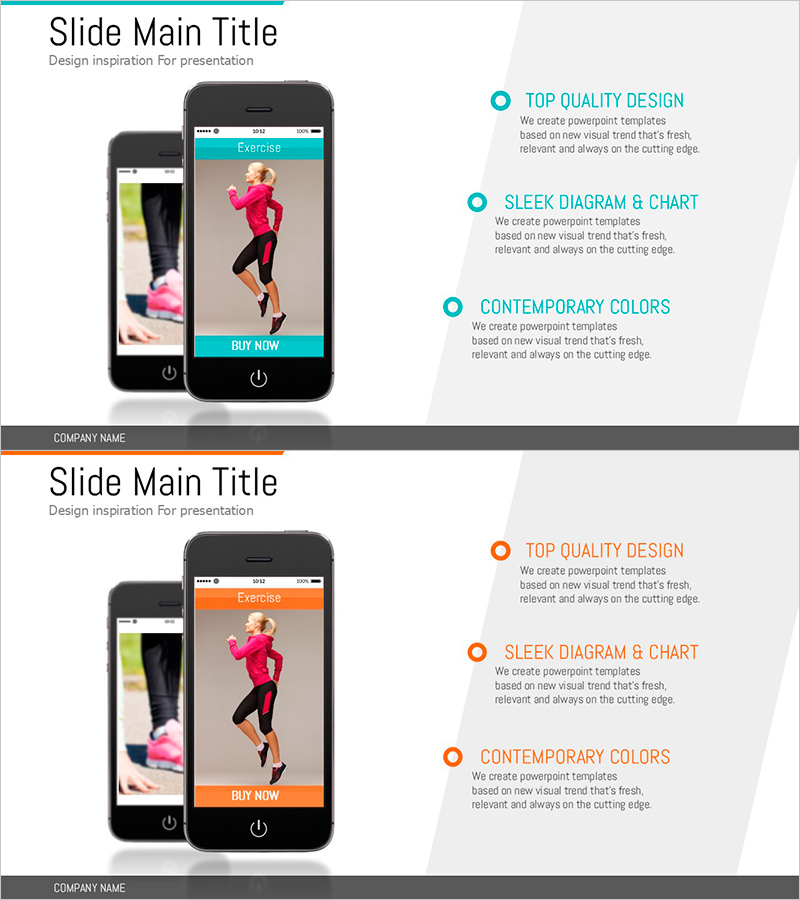
A 2-slide PowerPoint presentation explaining how to use an exercise tracking and measurement app. The layout features a mobile device image on the left side with three key features displayed on the right using circular icons and text alignment in a comparative format. The turquoise accent color combined with light gray background creates a contemporary visual style, optimized for product introduction and technical process explanation. Provided in editable PPTX format, this slide deck is ideal for app-based service pitches and technology solution presentations.
Usage Points
-
Main Usage
This slide is designed to explain mobile app usage and core features to investors, partners, and end users. The two-column structure with device image on the left and text explanation on the right allows simultaneous presentation of the app's actual interface and functionality.
-
How to Use
Insert actual app screenshots into the mobile device image area on the left side, then fill the three text boxes on the right with feature names and descriptions. Maintain the turquoise accent color or adjust to match your brand colors for use in technology presentations, product demos, and business briefings.
-
Recommended For
Recommended for app development companies, fintech, healthcare, and e-commerce businesses presenting investor relations (IR) materials, product launch announcements, and technology partnership meetings. Also suitable for startup pitch decks, technical solution proposals, and user training materials.
-
Slide Structure
The 2-slide set features a consistent layout with a mobile device image area on the left (1 element) and text area on the right (3 items). Three circular icons paired with text labels and descriptions create a hierarchical information structure that guides viewers through the app's key features step by step.
Related Products
-
From Financial Basics to Smart Spending Strategies – Financial Education and Practical Tips
#Product/Service Introduction #Technical Approach #Text Box
-
Eco-Oriented Meeting & Collaboration Map – A Guide for Business Innovation
#Technical Approach #Marketing Plan and Strategy #Diagram
-
AI-Based Data Analytics System for Health Fitness Experts
#Technical Approach #Diagram #Other
-
Air Operation Process – Understanding Operational Plans Through Diagrams
#Operational Plan #Technical Approach #Diagram
