



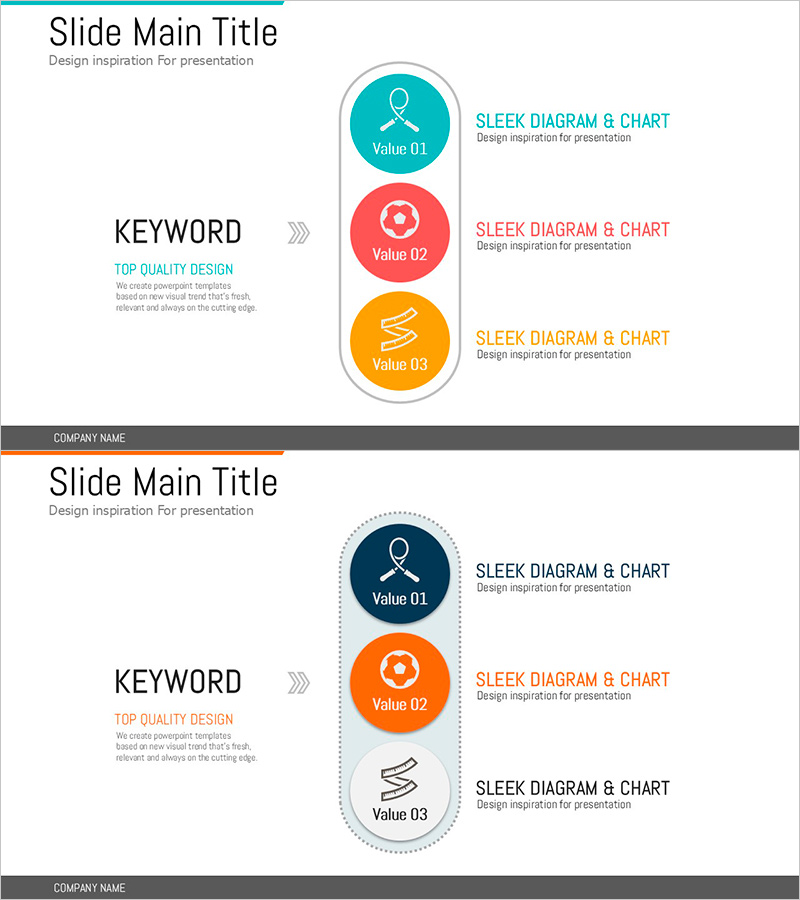
Keywords for Exercise Programs Slide – Beautiful Design and Innovative Flow
RJ0600086_15
- Last Update 07/13/2025
- File Size 0.2MB
- # of Slides 2
- File Format PPTX
- Slide Ratio 16:9
- Color
Keywords
- #Content-Based Slides
- #Design-Based Slides
- #Technical Approach
- #Diagram
- #Service Operation Plan
- #Service Components
- #Flow
- #Cluster
- #Linear Flow
- #Inclusive Cluster Diagram
- #16:9
- #nested circular diagram PowerPoint
- #3-step circular diagram slide
- #icon diagram PowerPoint template
- #diagram slide design
- #process flow presentation
About the Product
A nested circular diagram PowerPoint slide presenting three items in a vertical circular arrangement. Features turquoise, red, and orange circular nodes with icons, accompanied by descriptive text aligned to the right. The left keyword section and arrow elements emphasize visual flow, clearly communicating three-step concepts such as programs, projects, or organizational structures. Available in 16:9 PPTX format, fully editable and ready for presentations, planning documents, and reports.
Usage Points
-
Main Usage
Optimized for visually expressing hierarchical relationships or sequential steps among three items. Effectively communicates program structures, project phases, organizational hierarchies, value propositions, and key elements while enhancing audience comprehension.
-
How to Use
Enter your topic in the left keyword section, then replace the text and icons in the three circular nodes. Colors can be adjusted to match your corporate brand, and the right descriptive text area can be expanded for additional details. The 16:9 aspect ratio ensures optimal display across all screen sizes.
-
Recommended For
Ideal for marketing professionals, planners, project managers, educators, and executive presentations. Suitable for product launches, organizational restructuring, program introductions, strategy development, and educational course explanations.
-
Slide Structure
Vertical circular arrangement with three nodes, each approximately 80px in diameter with one icon per node. Node spacing is approximately 40px, with a 200px-wide text area on the right containing title and description for each item. The left keyword section (approximately 150px) connects to the nodes via arrow elements for visual flow.
Related Products
-
Efficient Slide for Flight Operation Plan
#Product/Service Introduction #Technical Approach #Diagram
-
Slide Visualizing 24-Hour Automobile Safety Management Service
#Technical Approach #Diagram #Service Operation Plan
-
5-Step Space Configuration Diagram – Business Strategy
#Business Strategy #Diagram #Production Plan
-
Comprehensive Strategy Derived from Keywords – Business Vision and Goals
#Business Vision and Strategy #Diagram #Business Strategy
