



4-Step Process Diagram – Cluster-Based Workflow Presentation
RJ0600077_17
- Last Update 07/10/2025
- File Size 6.2MB
- # of Slides 2
- File Format PPTX
- Slide Ratio 16:9
- Color
Keywords
- #Content-Based Slides
- #Design-Based Slides
- #Business Management
- #Operational Plan
- #Diagram
- #Execution Plan
- #Business Processes
- #Cluster
- #Closed Cluster Diagram
- #16:9
- #4-step process diagram PowerPoint
- #sequential workflow slide
- #business process flowchart
- #step-by-step diagram template
- #process flow PPT slide
About the Product
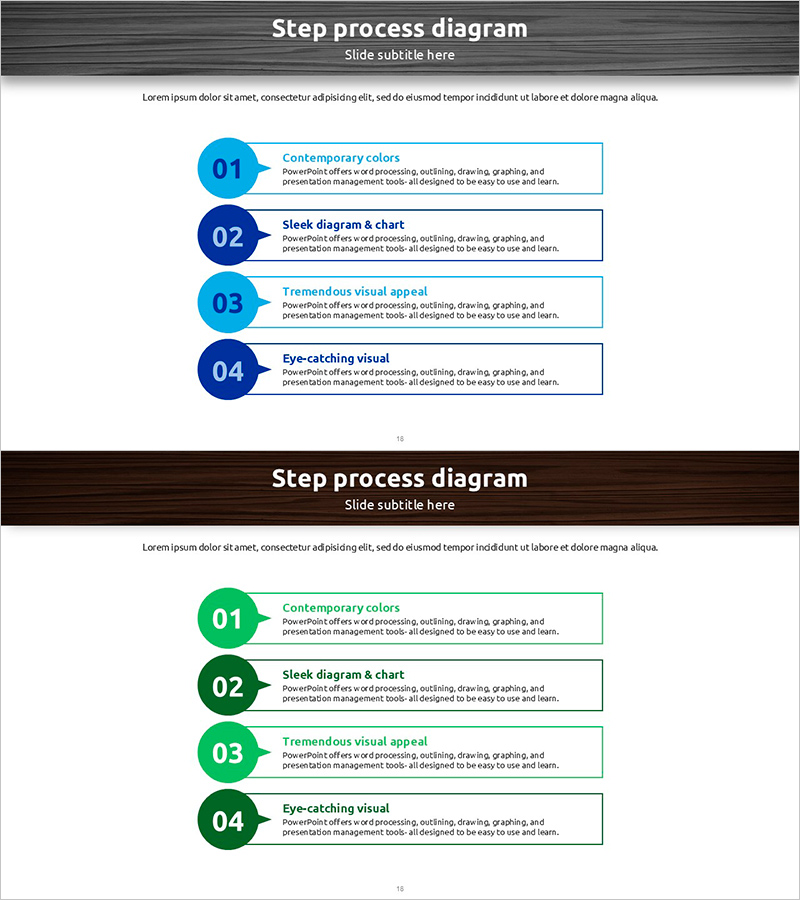
A PowerPoint slide that visualizes a 4-step sequential workflow process with clarity and visual hierarchy. Each step features a circular numbered node on the left connected to a text box on the right, creating a linear flow structure that guides viewers through the process stages. The design alternates between light blue and dark blue on the first slide, and light green and dark green on the second, ensuring clear step differentiation. This process diagram slide is ready to use in business presentations, operational plans, and workflow documentation. Simply edit the text boxes to match your specific process stages and integrate seamlessly into your PowerPoint deck.
Usage Points
-
Main Usage
Presents a 4-stage sequential workflow, operational procedure, or project timeline in a clear, visual format. Each step node and accompanying text box allow you to describe the purpose, activities, and outcomes of each stage, making complex processes easy for audiences to understand and follow.
-
How to Use
Replace the placeholder text in each step's text box with your process stage names and descriptions. Maintain the existing dual-tone color scheme or customize colors to match your organization's branding. Insert into business plans, reports, proposals, or presentations in the 'Strategy' or 'Implementation Plan' sections.
-
Recommended For
Business strategists, project managers, marketing professionals, consultants, and educators who need to explain multi-stage processes. Ideal for presentations where a 4-step workflow must be communicated clearly and memorably to stakeholders or team members.
-
Slide Structure
Two-slide set, each featuring 4 circular numbered nodes (01–04) arranged vertically on the left, with connected text boxes on the right. Slide 1 uses alternating light and dark blue; Slide 2 uses alternating light and dark green, providing color variation options for different presentation contexts.
Related Products
-

Imagination and Text Box – Maximize Visual Impact Slides
#Business Management #Operational Plan #Diagram
-
Design Flow Diagram – Optimization for Efficient Business Operations
#Business Management #Operational Plan #Diagram
-
Step-by-Step Climbing Preparation Guide – Designed for Seamless Execution
#Business Management #Operational Plan #Diagram
-
Premium Management Presentation Portfolio Example
#Business Strategy #Business Management #Diagram
