



Circular Strategy Diagram – Effectively Communicate Vision and Mission
RJ0600076_32
- Last Update 07/10/2025
- File Size 0.4MB
- # of Slides 2
- File Format PPTX
- Slide Ratio 16:9
- Color
Keywords
- #Content-Based Slides
- #Design-Based Slides
- #Company Introduction
- #Product/Service Introduction
- #Operational Plan
- #Diagram
- #Text Box
- #Core Values, Vision, and Mission
- #Differentiation Strategy for Products/Services
- #Organizational Structure and Staffing Plan
- #Spread
- #Centralized Diagram
- #16:9
- #radial strategy diagram PowerPoint
- #3-node hub diagram slide
- #vision mission presentation template
- #central hub diagram
- #business strategy PowerPoint slide
- #diagram PowerPoint template
About the Product
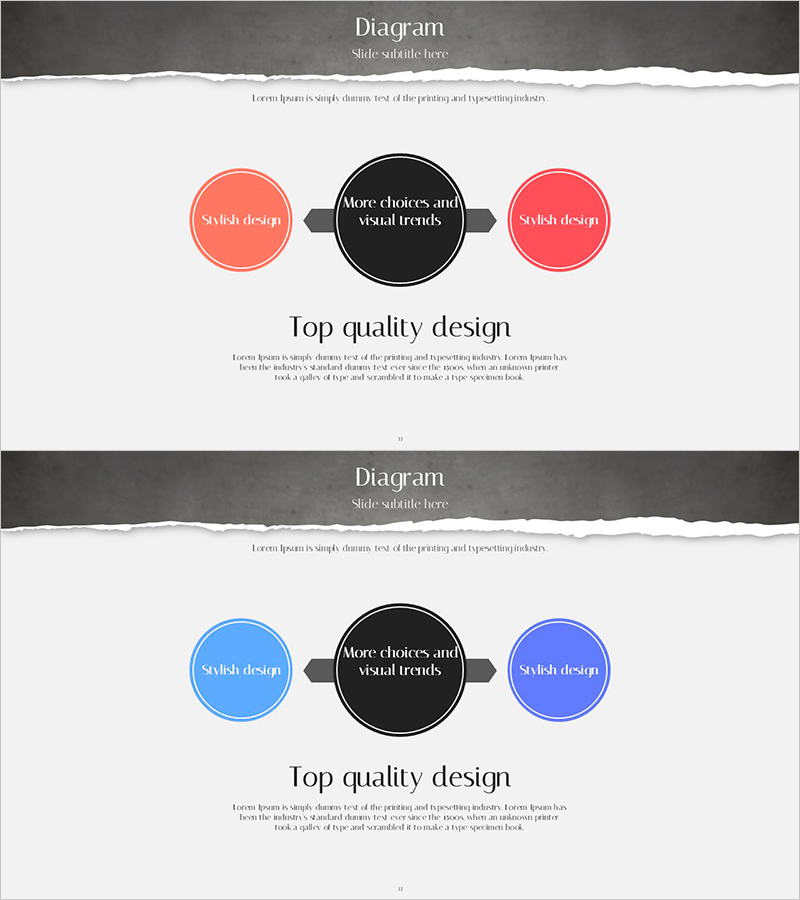
A radial diagram PowerPoint slide featuring a central black circular node connected to two side nodes in coral and pink tones via arrows, creating a three-node hub structure. This design effectively visualizes the relationship between core vision, mission, and strategic initiatives, making it ideal for company vision presentations, product management strategies, and operational planning. The 2-slide set includes color variations in coral-pink and blue tones, allowing you to select the appropriate palette for your presentation context. The arrow connections emphasize the flow from central concept to supporting elements.
Usage Points
-
Main Usage
Communicate organizational vision, mission, and core strategy by positioning the central concept in the hub and supporting initiatives on the side nodes. Ideal for product management strategy, operational planning, and organizational development presentations where you need to show the hierarchical relationship between core concepts and implementation items.
-
How to Use
Enter your core message (vision, mission, or strategy name) in the central black circle, then add supporting initiatives or related strategies in the left and right coral-pink nodes. The arrow connections clarify cause-and-effect relationships. Use the 2-slide color variations (coral-pink and blue) to adjust the tone across different presentation sections.
-
Recommended For
Executives, planning teams, product managers, and organizational development professionals presenting vision alignment, strategy development, and operational planning. Suitable for company overview presentations, business plans, product management reports, and operational planning decks where clear communication of core message and execution items is essential.
-
Slide Structure
2-slide set. Each slide features one central black circular node (text input area) connected via arrows to two side nodes (text input areas), creating a three-node radial structure. Slide 1 uses coral-pink tones; Slide 2 uses blue tones for color variation and presentation flexibility.
Related Products
-
Infographic Slide for 3 Strategic Options - Vision and Innovation
#Business Vision and Strategy #Operational Plan #Technical Approach
-
Keyword Strategy Diagram – Spreading Towards Business Goals
#Business Vision and Strategy #Operational Plan #Diagram
-
Expected Impact and Conclusion Slide for Sustainable Urban Development
#Company Introduction #Business Vision and Strategy #Text Box
-
Diagram Slide Visualizing Characteristics of Orange and Grapefruit
#Product/Service Introduction #Operational Plan #Diagram
