



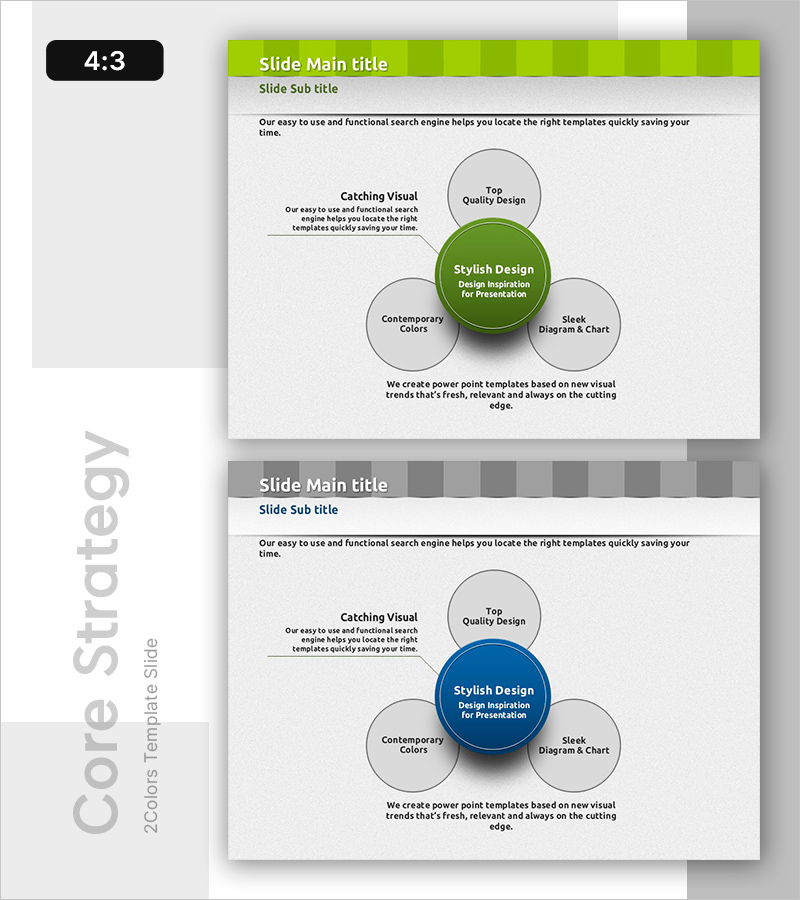
Infographic Slide for 3 Strategic Options - Vision and Innovation
RB0800017_14
- Last Update 03/21/2025
- File Size 1.7MB
- # of Slides 2
- File Format PPTX
- Slide Ratio 4:3
- Color
Keywords
- #Content-Based Slides
- #Design-Based Slides
- #Business Vision and Strategy
- #Operational Plan
- #Technical Approach
- #Diagram
- #Text Box
- #Business Strategy
- #Organizational Structure and Staffing Plan
- #Service Implementation Plan
- #Spread
- #Centralized Diagram
- #4:3
- #radial diagram PowerPoint
- #central concept slide
- #3-step strategy diagram
- #core vision expansion slide
- #strategic options PowerPoint template
About the Product
A radial diagram PowerPoint slide that expands from a central core concept to three surrounding elements, ideal for presenting strategic options and vision. The design features a lime green central circle with three gray peripheral nodes connected by directional arrows. Two slide layouts are included: the first emphasizes lime green tones, while the second uses deep navy blue for versatile presentation scenarios. Clear text input areas and intuitive arrow connectors make this an effective tool for communicating relationships and strategic pathways in business presentations.
Usage Points
-
Main Usage
Visualizes organizational core strategy, vision, and innovation by expanding from a central concept to three surrounding elements. Ideal for executive presentations, strategy meetings, and organizational change communications where decision options or strategic directions need clear visual representation.
-
How to Use
Enter your core concept in the central circle (e.g., Stylish Design) and add supporting strategies in the three peripheral nodes (e.g., Top Quality Design, Contemporary Colors, Sleek Diagrams). The arrow connectors automatically show relationships, and you can customize colors to match different presentation contexts and corporate branding.
-
Recommended For
Recommended for executives, strategy teams, marketing departments, and project leaders presenting organizational strategy, business direction, or innovation plans. Particularly effective for comparing three options, communicating core values, and introducing organizational capabilities.
-
Slide Structure
Two-slide set. Each slide features one central circle (lime green or deep navy) with three gray nodes positioned at top-left, top-right, and bottom. Directional arrows connect the center to each node, with dedicated text input areas within each shape for easy customization.
Related Products
-
Keyword Strategy Diagram – Spreading Towards Business Goals
#Business Vision and Strategy #Operational Plan #Diagram
-
Bookmark Template Strategy Diagram – Business Vision and Operational Planning
#Business Vision and Strategy #Operational Plan #Diagram
-
Modern Wide PowerPoint Template Circular Icons – Stylish Business Solution
#Product/Service Introduction #Business Vision and Strategy #Operational Plan
-
Key Drivers for Spreading Ideas – Centered Design
#Business Vision and Strategy #Technical Approach #Diagram
