



Event Planning and Background Visualization – The First Step to Successful Business Strategy
RJ0600058_17
- Last Update 07/06/2025
- File Size 1.7MB
- # of Slides 2
- File Format PPTX
- Slide Ratio 16:9
- Color
Keywords
- #Content-Based Slides
- #Design-Based Slides
- #Business Vision and Strategy
- #Business Strategy
- #Diagram
- #Business Background and Necessity
- #Flow
- #Cluster
- #Circular Flow
- #Closed Cluster Diagram
- #16:9
- #circular arrow diagram PowerPoint
- #3-step process slide
- #business cycle diagram
- #arrow diagram presentation template
- #how to create process flow in PowerPoint
About the Product
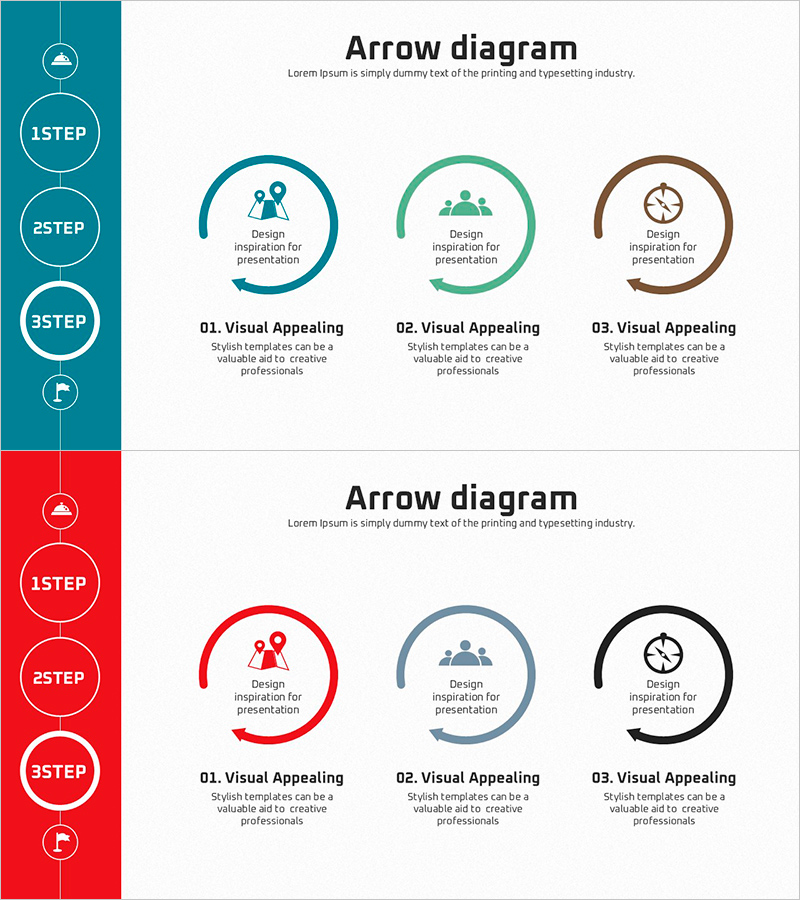
A 3-step circular arrow diagram PowerPoint slide designed to visualize business execution phases and process cycles. The layout features a vertical timeline on the left side with 1STEP, 2STEP, and 3STEP nodes connected by a vertical line, and three circular arrow diagrams on the right side corresponding to each step. Available in two color schemes: teal-green-brown gradient and red-gray-black palette, allowing customization to match corporate branding and presentation themes. Each circular arrow contains icon and text areas for inputting process details, making it ideal for presenting workflows, strategic cycles, and sequential business initiatives in presentations.
Usage Points
-
Main Usage
Effectively communicate cyclical business processes, continuous improvement cycles, and strategic execution phases through circular arrow visualization. The three-step structure with icon and text areas enables clear presentation of phase-specific objectives, activities, and outcomes to stakeholders and team members.
-
How to Use
Input step names in the left timeline nodes. Add relevant icons to the icon areas within each circular arrow diagram to represent key activities for that phase. Fill in the text boxes below each diagram with phase descriptions, goals, and deliverables tailored to your presentation content.
-
Recommended For
Ideal for business plans, strategy presentations, project management, PDCA cycle explanations, marketing campaign phases, organizational change management, and training program structures. Suitable for executives, project managers, marketing professionals, and educators presenting sequential processes.
-
Slide Structure
2-slide set. Title area at top, left vertical timeline with 3 circular step nodes (1STEP, 2STEP, 3STEP) connected by vertical line, right side with 3 circular arrow diagrams each containing icon area and text description box below. Two color variations: teal-green-brown palette and red-gray-black palette.
Related Products
-
Design Scheme and Final Stage Content – Structured and Intuitive Presentation
#Product/Service Introduction #Business Strategy #Diagram
-
Aerobic Exercise after Strength Training Diagram – Business Strategy Direction
#Business Strategy #Diagram #Business Direction
-
Business Strategy Slide with Cluster Diagram and Text Boxes
#Business Vision and Strategy #Business Strategy #Diagram
-
Slide Template for Korean Traditional Customs – Business Strategy and Vision
#Business Vision and Strategy #Business Strategy #Diagram
