



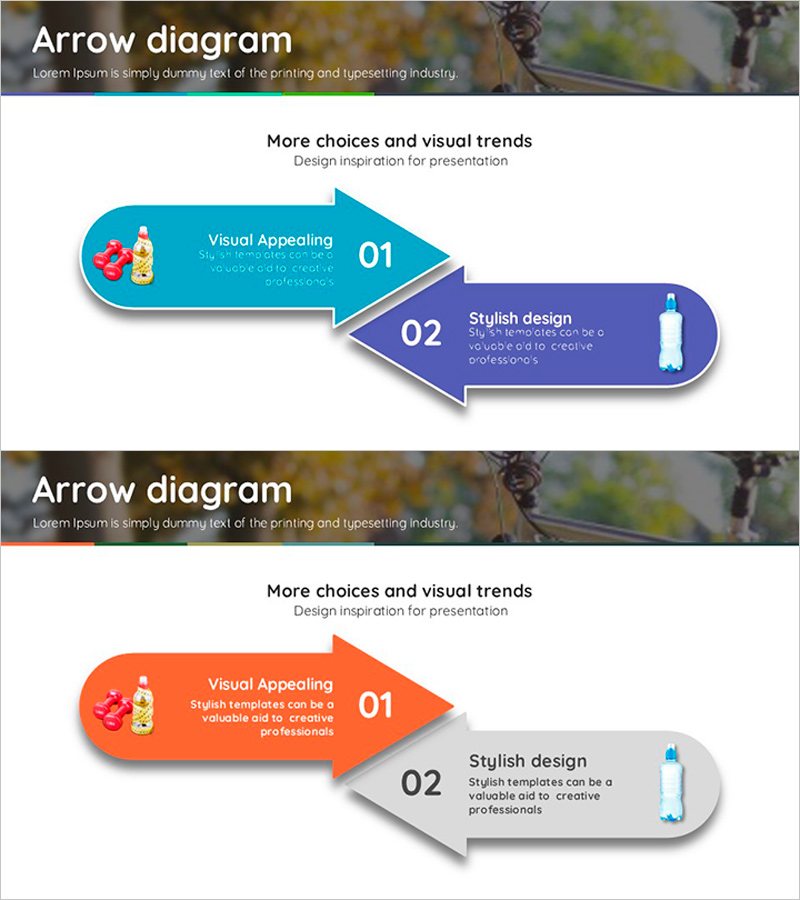
Emphasizing the Importance of Hydration with a Multidirectional Arrow Diagram
RJ0600013_9
- Last Update 06/24/2025
- File Size 2MB
- # of Slides 2
- File Format PPTX
- Slide Ratio 16:9
- Color
Keywords
- #Content-Based Slides
- #Design-Based Slides
- #Product/Service Introduction
- #Diagram
- #Text Box
- #Differentiation Strategy for Products/Services
- #Benefits and Advantages
- #Flow
- #Multidirectional Flow
- #Arrow
- #16:9
- #arrow diagram PowerPoint
- #2-step arrow slide
- #directional flow presentation
- #process diagram template
- #arrow diagram slide design
About the Product
A 2-slide PowerPoint presentation featuring arrow diagram designs with contrasting blue and orange directional arrows. Each arrow shape includes icon placeholders and text areas for presenting two-step processes, product comparisons, or sequential information flow. The slides are designed in 16:9 widescreen format and saved as PPTX for immediate editing. All elements—arrow colors, text boxes, and icons—are fully customizable to match your presentation theme. Ideal for business proposals, marketing presentations, process explanations, and educational materials.
Usage Points
-
Main Usage
Visualize two-step processes, cause-and-effect relationships, or sequential workflows using arrow shapes. Perfect for comparing product features, explaining marketing strategies, describing business processes, or presenting before-and-after scenarios in a clear, directional format.
-
How to Use
Insert titles, descriptions, and icons into each arrow section to build your narrative. Customize arrow colors, modify text content, replace icons, and adjust layouts to fit your presentation needs. Ready to integrate into slides, reports, proposals, and business documents.
-
Recommended For
Marketing professionals, business strategists, educators, sales representatives, and project managers presenting process flows, product comparisons, or step-by-step instructions. Effective for any presentation requiring clear two-stage progression or directional emphasis.
-
Slide Structure
2 slides total. Slide 1 features blue and orange arrows pointing rightward with icon and text input areas. Slide 2 repeats the structure with orange and gray arrows, providing alternative color combinations for design flexibility and visual variety.
Related Products
-
Pros and Cons Arrow Text Box – Data Visualization
#Product/Service Introduction #Operational Plan #Diagram
-
Sea Lighthouse Business Strategy Arrow – Toward Vision and Goals
#Product/Service Introduction #Business Vision and Strategy #Diagram
-
Farming Harvest Business Direction Arrow – Effective Path Setting
#Product/Service Introduction #Business Strategy #Diagram
-

Physical Fitness Diagram Slide – Product and Service Introduction
#Product/Service Introduction #Business Management #Diagram
