



Overview of Water Play Program - Capturing Fun and Excitement
RJ0500046_9
- Last Update 06/20/2025
- File Size 0.2MB
- # of Slides 2
- File Format PPTX
- Slide Ratio 16:9
- Color
Keywords
- #Content-Based Slides
- #Design-Based Slides
- #Product/Service Introduction
- #Diagram
- #Program Introduction
- #Product and Service Overview
- #Cluster
- #Closed Cluster Diagram
- #16:9
- #closed diagram PowerPoint slide
- #4-item icon slide template
- #program overview presentation
- #water activity project deck
- #diagram PowerPoint slide design
About the Product
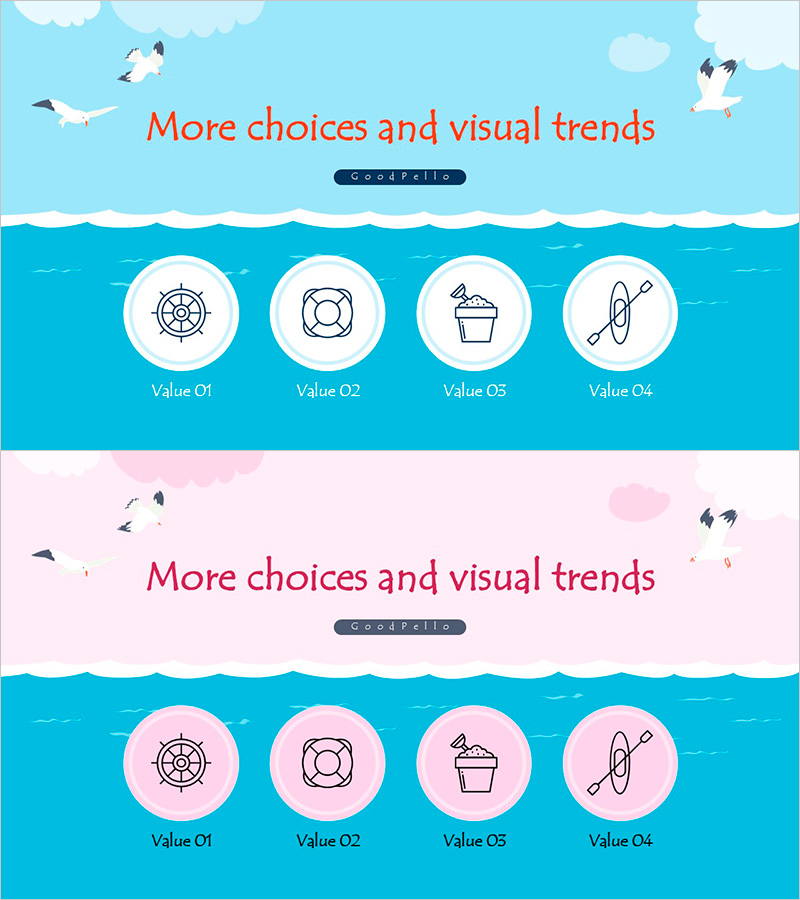
A 4-item closed-form diagram PowerPoint slide designed to visually communicate the overview of a water play program. The 2-slide deck features a bright sky-blue background with a turquoise water section, displaying ship wheel, life ring, beverage cup, and kayak icons arranged in circular nodes. Each item occupies an independent circular area, making data entry straightforward and suitable for immediate use in presentations, educational materials, and program introduction documents. Provided in 16:9 widescreen PPTX format for seamless integration into your PowerPoint workflow.
Usage Points
-
Main Usage
Visualizes four core program elements in a closed-form structure, presenting a clear overview to your audience. Each item holds equal importance and operates independently without interconnection, making it ideal for showcasing program components, activity areas, or key functions in a parallel arrangement.
-
How to Use
Enter program item names and descriptions in the text areas within each circular node. Icons can be retained or replaced to match your content. Customize background and node colors to align with your organization's branding. Use in program introduction presentations, educational seminars, or business plan slides for maximum impact.
-
Recommended For
Ideal for educators, cultural centers, and recreation facility managers presenting program overviews. Marketing teams benefit when introducing new project components, while planning departments can use it to visualize multi-element program structures. Effective for parent information sessions, employee training, and client presentations.
-
Slide Structure
Comprises 2 slides, each with a title area at the top (red text 'More choices and visual trends') and 4 circular nodes arranged horizontally below. The first slide uses sky-blue and white backgrounds; the second features soft pink and white tones, providing color variation options. Each node functions as an independent input area for flexible content customization.
Related Products
-

Aerospace Industry Introduction Diagram – Visualizing Cluster Information
#Product/Service Introduction #Diagram #Program Introduction
-
Introducing IoT Service Program with Diagrams – Modern Visual Presentation
#Product/Service Introduction #Diagram #Program Introduction
-

Introducing Mobile Business Services – Innovation and Convenience
#Product/Service Introduction #Diagram #Program Introduction
-
Introducing the Picture Work Tool – Creative Approach
#Product/Service Introduction #Diagram #Program Introduction
