



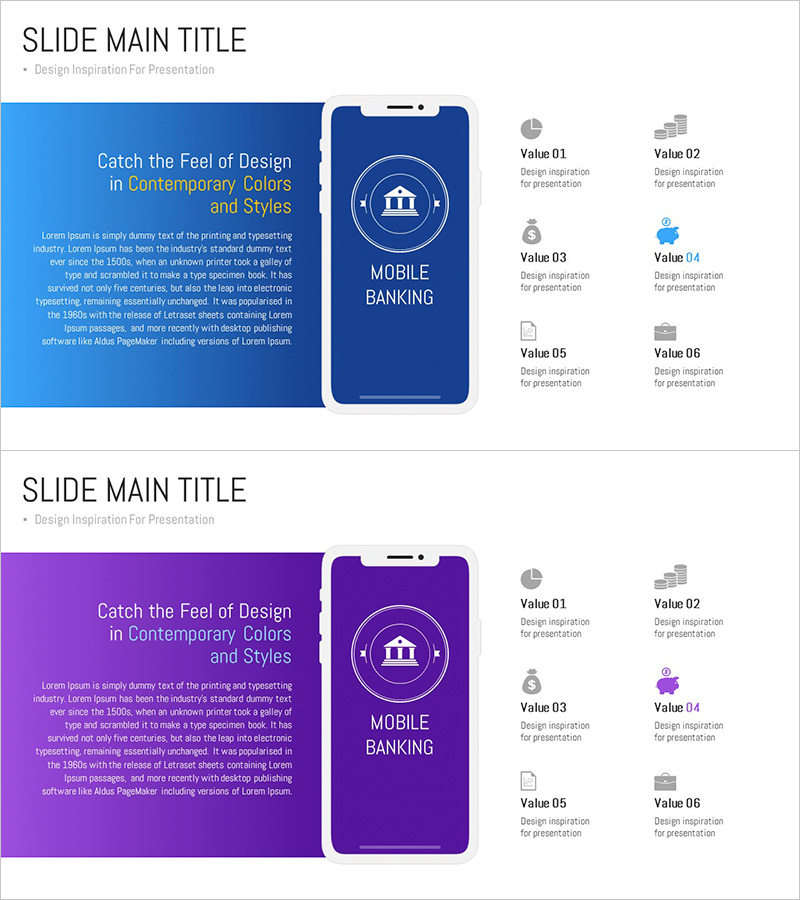
Overview of the Mobile Banking Service App – Contemporary Design and Colors
RJ0300081_14
- Last Update 05/11/2025
- File Size 0.1MB
- # of Slides 2
- File Format PPTX
- Slide Ratio 16:9
- Color
Keywords
- #Content-Based Slides
- #Design-Based Slides
- #Company Introduction
- #Product/Service Introduction
- #Diagram
- #Other
- #Company Overview
- #Composition
- #Cluster
- #Closed Cluster Diagram
- #Mockup
- #16:9
- #mobile banking app mockup PowerPoint
- #smartphone UI slide template
- #app interface presentation
- #fintech app slide design
- #mobile app feature diagram
- #how to present app features in PowerPoint
About the Product
A PowerPoint slide featuring a mobile banking app user interface displayed in realistic smartphone mockup frames. Available in two color versions—blue and purple—this slide deck is ideal for app overviews, feature introductions, and service presentations. Each slide combines a smartphone mockup on the left with a circular diagram at the center and six feature icons arranged in a grid layout on the right. Perfect for fintech companies, digital service platforms, and mobile app presentations that require professional UI visualization and functional clarity.
Usage Points
-
Main Usage
Visually present mobile banking apps, financial service platforms, and digital payment solutions with realistic smartphone interface mockups. The slide design helps audiences understand app functionality and user experience through authentic UI representation.
-
How to Use
Use in app overview presentations, service introduction decks, investor pitch materials, product planning meetings, and marketing strategy documents. Choose between blue or purple color schemes to match your corporate brand identity and customize content as needed.
-
Recommended For
Fintech companies, mobile app developers, digital service startups, banking and insurance marketing teams, app designers, product managers, and digital strategy professionals presenting app features and user experience design.
-
Slide Structure
Two-slide layout. Each slide features a smartphone mockup frame in the center-left area with blue or purple background, accompanied by a circular diagram icon and six feature icons (Value 01–06) arranged in a 2-column, 3-row grid on the right side. The design emphasizes app functionality through hierarchical visual organization.
Related Products
-
Mobile App Service Business Overview – Sleek Diagram
#Company Introduction #Business Introduction #Diagram
-

Introducing Mobile Application Services – The Start of Innovation
#Product/Service Introduction #Diagram #Other
-
Sports Icon Box and Mobile Mockup – Innovative Design and Information Delivery
#Product/Service Introduction #Diagram #Other
-
Business Solutions Analysis Objectives – Product/Service Introduction
#Product/Service Introduction #Diagram #Other
