



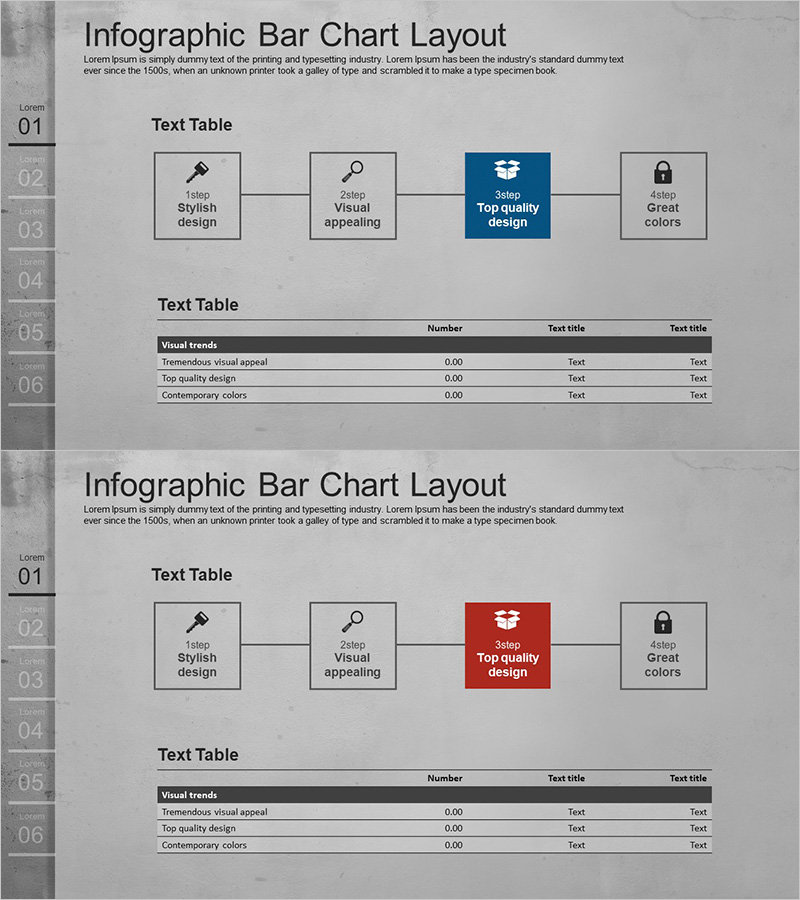
4STEP Business Process Diagram
RJ0300058_29
- Last Update 05/03/2025
- File Size 3MB
- # of Slides 2
- File Format PPTX
- Slide Ratio 16:9
- Color
Keywords
- #Content-Based Slides
- #Design-Based Slides
- #Business Strategy
- #Operational Plan
- #Diagram
- #Step-by-Step Schedule Plan
- #Business Processes
- #Cluster
- #Table
- #Chain Diagram
- #Standard Table
- #16:9
- #4-step diagram PowerPoint
- #business process flow chart template
- #linear workflow diagram
- #phased process slide
- #strategic planning PPT template
About the Product
A 2-slide PowerPoint set featuring a 4-step linear flow diagram for visualizing business processes, strategic initiatives, and phased project timelines. Each step includes an icon and text input area to clearly communicate sequential workflows. The dual-tone color scheme—blue and red accents—highlights key milestones and critical decision points. The arrow-connected node structure provides intuitive visual flow, making complex processes easy to understand at a glance. Optimized for 16:9 widescreen format in PPTX, with fully editable text, colors, and layout elements for seamless integration into presentations, reports, and strategic documents.
Usage Points
-
Main Usage
Clearly visualize business processes, strategic initiatives, and phased project timelines using a 4-step linear flow structure. Input specific details—process names, responsible parties, and timelines—into each step's text area to effectively communicate organizational decisions and project progress to stakeholders.
-
How to Use
Enter process names, owners, and dates into the text fields of each step box. Customize the blue accent step to highlight key milestones and the red step to indicate critical risks or decision points. The arrow connections and node layout remain fixed to maintain consistent visual structure across presentations.
-
Recommended For
Ideal for executives, project managers, and strategy teams presenting business plans, organizational restructuring, system implementations, and operational roadmaps. Perfect for board meetings, executive reports, client proposals, and training materials where clear process visualization is essential.
-
Slide Structure
Slide 1: Four nodes connected left-to-right with arrows, each containing an icon (tool, magnifying glass, checkmark, lock) and text input area. Slide 2: Identical structure with center node accent changed from blue to red for emphasis. 16:9 widescreen format, fully editable PPTX.
Related Products
-
Financial Business Process Diagram – Efficient Workflow
#Business Strategy #Operational Plan #Diagram
-
Diagram for Visualizing Business Process – Management Strategy
#Business Strategy #Operational Plan #Diagram
-

Astronaut Work Process Diagram – Effective Business Strategy
#Business Strategy #Operational Plan #Diagram
-
Business Process Connection Diagram – Effective Business Operation Strategy
#Business Strategy #Operational Plan #Diagram
