



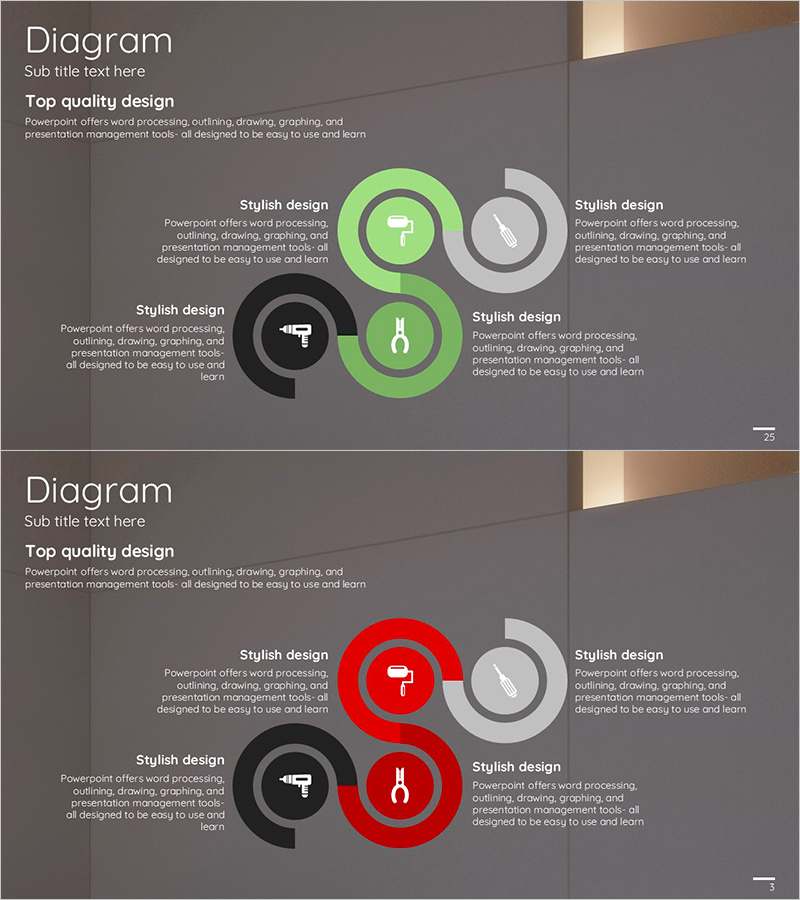
Product Usage Process Diagram – Operations and Technical Aspect
RJ0300028_24
- Last Update 04/25/2025
- File Size 2.1MB
- # of Slides 2
- File Format PPTX
- Slide Ratio 16:9
- Color
Keywords
- #Content-Based Slides
- #Design-Based Slides
- #Operational Plan
- #Technical Approach
- #Diagram
- #Production and Technology Development Strategy
- #Service Implementation Plan
- #Flow
- #Cluster
- #Chain Diagram
- #16:9
- #connection diagram PowerPoint
- #4-node process diagram
- #product usage process slide
- #operations planning diagram template
- #how to create process diagram in PowerPoint
About the Product
A PowerPoint slide template featuring a 4-node connection diagram that visualizes product usage processes and operational workflows. The circular nodes are positioned symmetrically around a central connection line, representing key functional areas such as operations planning, technical aspects, marketing, and support functions. The design uses a three-color scheme—green, gray, and black—to visually distinguish priorities and roles. Each node includes an icon placeholder and text area for customization. The 2-slide set provides both a green-accent version and a red-accent version, allowing flexible application across different document sections and presentation contexts.
Usage Points
-
Main Usage
Illustrates how a product or service operates across four interconnected functional areas—operations, technology, marketing, and support. The diagram breaks down complex processes into distinct roles and responsibilities, making it easy for stakeholders to understand departmental relationships and interdependencies at a glance.
-
How to Use
Use this slide during product overview presentations to establish the overall process framework, or in operational planning documents when explaining departmental roles and accountability. The green-accent version suits growth and positive messaging, while the red-accent version emphasizes risk management and critical priorities.
-
Recommended For
Product managers, operations leads, technical directors, and project managers explaining organizational processes and cross-functional workflows. Ideal for employee onboarding, partner briefings, and executive reports where clarity and visual simplicity are essential for communicating complex operational structures.
-
Slide Structure
Two-slide template with symmetrical layout. Each slide features four circular nodes positioned around a central connection line—top, bottom, left, and right. Slide 1 uses green, gray, and black nodes; Slide 2 uses red, gray, and black nodes for color-emphasis variation. Each node contains an icon placeholder and editable text area for custom content.
Related Products
-
Farm Service Diagram – Operational Strategies and Technical Approaches
#Operational Plan #Technical Approach #Diagram
-
Business Strategy Connected Diagram – Workflow and Technical Execution
#Operational Plan #Technical Approach #Diagram
-
Farm Development Strategy Diagram – Sequential Steps for Business Execution
#Business Strategy #Operational Plan #Diagram
-

Tree Circulation Connection Diagram
#Operational Plan #Technical Approach #Diagram
