



Business Process Overview Template – Innovation and Execution
RM0200017_8
- Last Update 10/07/2025
- File Size 0.4MB
- # of Slides 2
- File Format PPTX
- Slide Ratio 16:9
- Color
Keywords
- #Content-Based Slides
- #Design-Based Slides
- #Business Strategy
- #Operational Plan
- #Technical Approach
- #Text Box
- #Business Direction
- #Production and Technology Development Strategy
- #Service Development Plan
- #Rounded Rectangle Text Box
- #16:9
- #business process PowerPoint slide
- #3-step process diagram
- #icon infographic slide
- #business workflow PPT
- #process flow chart PowerPoint
About the Product
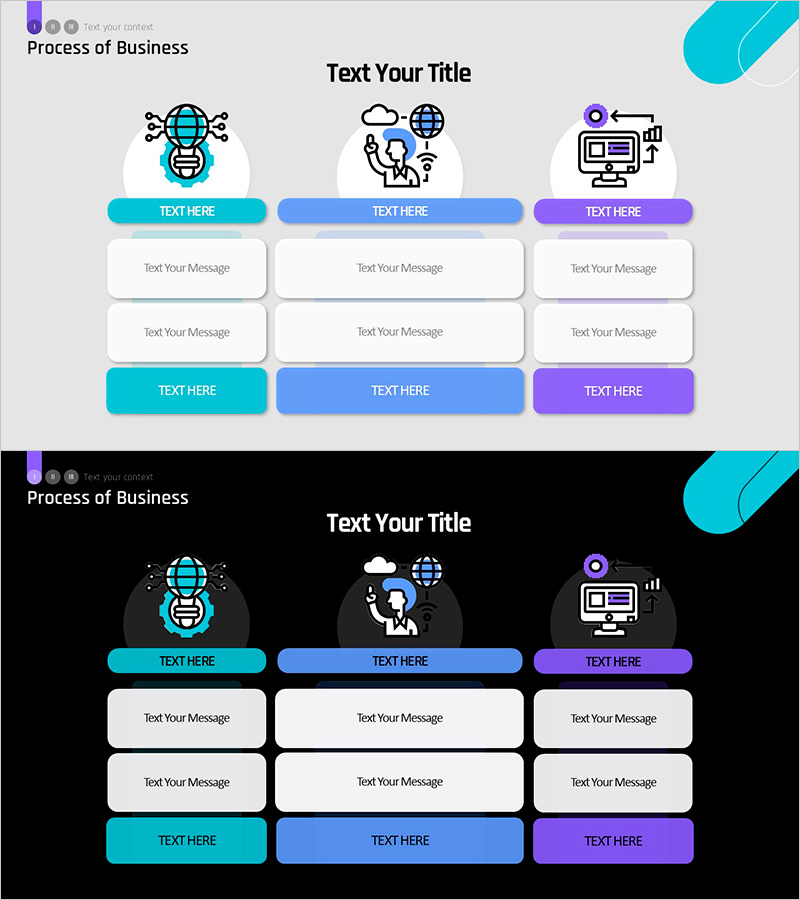
A PowerPoint slide that visualizes business process flow in three distinct stages using icon-based infographics. Each stage is represented by a colored button (cyan, blue, purple) and includes two message input areas for detailed descriptions. The slide features icons representing global networks, cloud collaboration, and digital marketing, making complex business processes intuitive and visually engaging. Two versions are provided: a light background for printing and distribution, and a dark background for projector presentations. This slide deck is ready to use in business proposals, strategy reports, and executive presentations to clearly communicate process workflows.
Usage Points
-
Main Usage
Communicate your organization's core business process to employees, investors, and partners by breaking it down into three clear stages. The icon-based design makes abstract business concepts like global networks, cloud services, and digital marketing immediately understandable to any audience.
-
How to Use
Enter stage names (e.g., Planning, Execution, Evaluation) in the colored buttons, then fill in the two message boxes below each stage with relevant details. Use the light background version for printed materials and PDFs, and switch to the dark background for live projector presentations.
-
Recommended For
Ideal for business plans, strategy reports, executive briefings, investor pitch decks, onboarding presentations, and organizational restructuring announcements. Suitable for management teams, planning departments, and marketing professionals across consulting, IT, finance, manufacturing, and other industries.
-
Slide Structure
The slide layout consists of a title area at the top, three icon columns in the center (each with a colored button and two message boxes), and three action buttons at the bottom. Each column is independently editable, and all icons, buttons, and text can be freely customized in color, size, and position.
Related Products
-
Paint Splash Template Diagram – Business Direction Presentation
#Business Strategy #Operational Plan #Diagram
-
Future Outlook and Strategic Proposals for Global Expansion
#Business Strategy #Text Box #Business Direction
-
Simple PowerPoint Wide Template for Business Strategy
#Business Strategy #Operational Plan #Diagram
-
Construction Management Chain System Slide – Structural Linkage and Integration
#Operational Plan #Technical Approach #Diagram
