



Modern Wide Template Text for Business Vision and Strategy
RJ0200050_19
- Last Update 04/12/2025
- File Size 0.1MB
- # of Slides 2
- File Format PPTX
- Slide Ratio 16:9
- Color
Keywords
About the Product
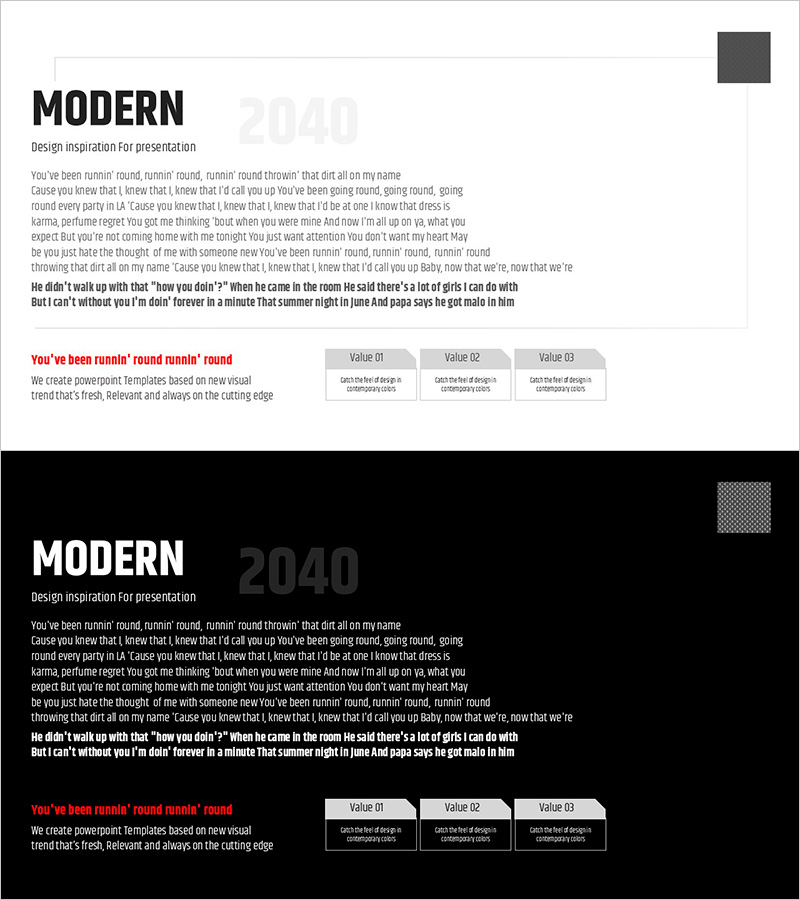
A 2-slide PowerPoint presentation designed to communicate business vision and strategy effectively. The slides feature a light and dark two-tone background that emphasizes contrast, with a left-side text area and right-side three-value box layout for clear information separation. Optimized for 16:9 widescreen format, it includes dedicated logo placement and accent color (red) to enhance brand credibility. Perfect for investor pitches, executive briefings, and strategic planning meetings, ready to use immediately.
Usage Points
-
Main Usage
Communicate business vision and core strategy clearly in executive briefings, investor presentations, and strategic planning sessions. The light and dark two-tone background creates visual contrast to emphasize information hierarchy, while the two-column structure (left text + right value boxes) presents both narrative and quantitative data simultaneously.
-
How to Use
Slide 1 uses a light background with text and logo placement for company introduction and vision statement. Slide 2 switches to dark background to highlight three strategic points. Edit the text areas and value boxes on each slide to input company-specific content and data.
-
Recommended For
Ideal for executives, business development teams, strategic planning departments, and investment professionals presenting at board meetings, shareholder meetings, investor pitches, and strategic announcements. Particularly effective for new business initiatives, mid-term management plans, and corporate innovation strategy presentations.
-
Slide Structure
Slide 1: Light background + left text area (title and subtitle) + right logo space + accent color box. Slide 2: Dark background + left text area + right three value boxes (Value 01, 02, 03) + descriptive text below each box. Two-column comparative layout with two main input areas.
Related Products
-
Well-Being Check-In Slide – Mental Health Tracker UI
#Business Vision and Strategy #Technical Approach #Business Vision
-
Numerical Summary of Drug Component Experiments - Based on Innovative Technology
#Business Strategy #Technical Approach #Diagram
-
Four-Section Slide for Operational Plans and Innovative Technologies
#Operational Plan #Technical Approach #Business Support Plan
-
Operational Breakdown in Donut Chart – Innovative Data Visualization
#Product/Service Introduction #Technical Approach #Graph
