



Colors Theme Presentation Template Puzzle Diagram – Captivating Program Introduction
RJ0200043_10
- Last Update 04/10/2025
- File Size 0.3MB
- # of Slides 2
- File Format PPTX
- Slide Ratio 16:9
- Color
Keywords
- #Content-Based Slides
- #Design-Based Slides
- #Product/Service Introduction
- #Diagram
- #Program Introduction
- #Product and Service Overview
- #Cluster
- #Chain Diagram
- #16:9
- #puzzle diagram PowerPoint
- #5-step process slide
- #connected diagram presentation
- #program introduction PPT
- #step-by-step structure diagram
About the Product
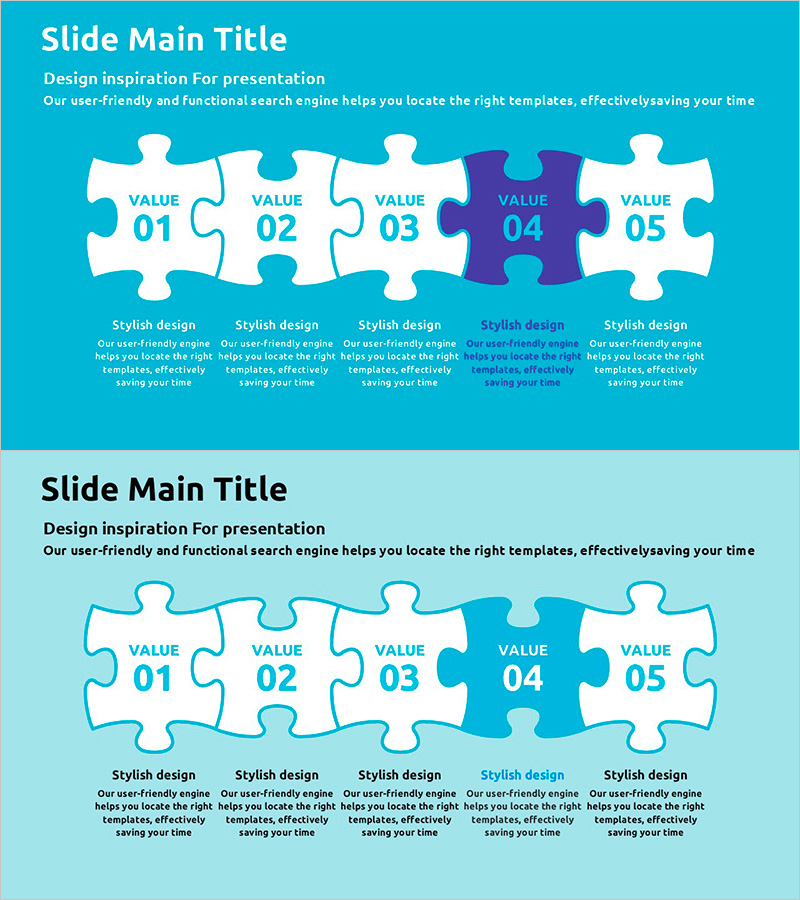
A horizontal puzzle diagram with five interconnected nodes that visualizes step-by-step processes and program structures in PowerPoint presentations. The turquoise background with white and purple accent colors highlights key stages and draws attention to critical phases. Each puzzle piece provides an independent text area for flexible content input, making it ideal for project phases, service components, organizational functions, and program structures. The two-slide set includes layout variations to adapt to different presentation flows and narrative sequences. Delivered in 16:9 widescreen PPTX format, fully editable in all modern PowerPoint versions.
Usage Points
-
Main Usage
Represents five-stage project processes, service component breakdowns, organizational function classifications, and program operation frameworks through an interconnected puzzle structure, making relationships and sequence intuitive and visually clear.
-
How to Use
Enter stage names, descriptions, and responsible departments in each puzzle piece's text area. Customize colors to emphasize priority levels. Use the two layout variations to present the same content from different perspectives and maintain visual interest.
-
Recommended For
Business plans and proposals requiring step-by-step strategy explanation, service introduction presentations showing component classification, organizational restructuring announcements, and program launch presentations.
-
Slide Structure
Horizontal connected puzzle diagram with five pieces. Each piece contains an independent text input area. The fourth piece is highlighted in purple to emphasize the key stage. Both slides share the same structure with layout variations for visual diversity.
Related Products
-
Educational Puzzle Connected Diagram – Program Introduction and Service Overview
#Product/Service Introduction #Diagram #Program Introduction
-
Business Services Introduction Slides - Utilizing Cluster Diagrams
#Product/Service Introduction #Diagram #Program Introduction
-
Mobile Service Configuration Introduction – Visualized with Cluster Format
#Product/Service Introduction #Diagram #Other
-
Logistics Business Product Overview – Market Competition Analysis
#Product/Service Introduction #Market and Competitor Analysis #Diagram
