



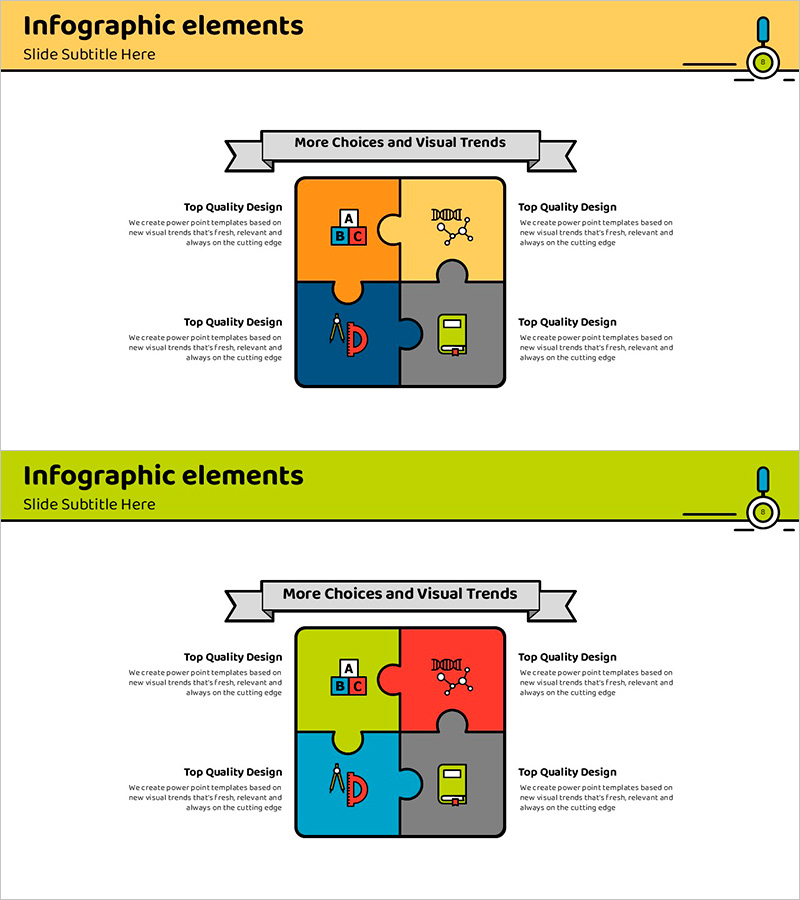
Educational Puzzle Connected Diagram – Program Introduction and Service Overview
RJ0500012_7
- Last Update 08/27/2025
- File Size 0.4MB
- # of Slides 2
- File Format PPTX
- Slide Ratio 16:9
- Color
Keywords
- #Content-Based Slides
- #Design-Based Slides
- #Product/Service Introduction
- #Diagram
- #Program Introduction
- #Product and Service Overview
- #Cluster
- #Chain Diagram
- #16:9
- #puzzle diagram PowerPoint
- #connected diagram slide
- #4-piece diagram template
- #educational program introduction PPT
- #service overview diagram PowerPoint
About the Product
A 4-piece puzzle connected diagram PowerPoint slide designed to present educational programs and service overviews. Four puzzle pieces in orange, yellow, blue, and gray interlock at the center, with space for program elements (ABC education, program name, technology icons, device mockup) in each section. The 2-slide set offers two color variations (orange-yellow-blue-gray and yellow-red-blue-gray) for immediate use in presentations and educational materials. Each puzzle piece is independently editable, allowing flexible text and icon customization for your specific program content.
Usage Points
-
Main Usage
Visually integrates four core elements of an educational program to create a cohesive overview. The interlocking puzzle structure intuitively represents interconnection and collaboration between components, enabling learners and stakeholders to grasp the complete program structure at a glance.
-
How to Use
Enter program names, learning objectives, target audiences, and technology platforms in each puzzle piece section. Add the program title in the center banner and detailed descriptions in the left and right text boxes. Use both color versions to create distinct sections or comparative slides within your presentation.
-
Recommended For
Educational institutions, online learning platforms, corporate training teams, program planners, and education consultants presenting new programs, course overviews, learning pathways, and service component breakdowns.
-
Slide Structure
2-slide set. Each slide features a center banner (title area), 4 independently editable puzzle pieces, and left-right text boxes. Slide 1 uses orange-yellow-blue-gray; Slide 2 uses yellow-red-blue-gray. Color variations enable flexible adaptation to different presentation contexts and audience needs.
Related Products
-
Business Services Introduction Slides - Utilizing Cluster Diagrams
#Product/Service Introduction #Diagram #Program Introduction
-
Colors Theme Presentation Template Puzzle Diagram – Captivating Program Introduction
#Product/Service Introduction #Diagram #Program Introduction
-
Mobile Service Configuration Introduction – Visualized with Cluster Format
#Product/Service Introduction #Diagram #Other
-
Program Management List for College Students
#Product/Service Introduction #Technical Approach #Diagram
