



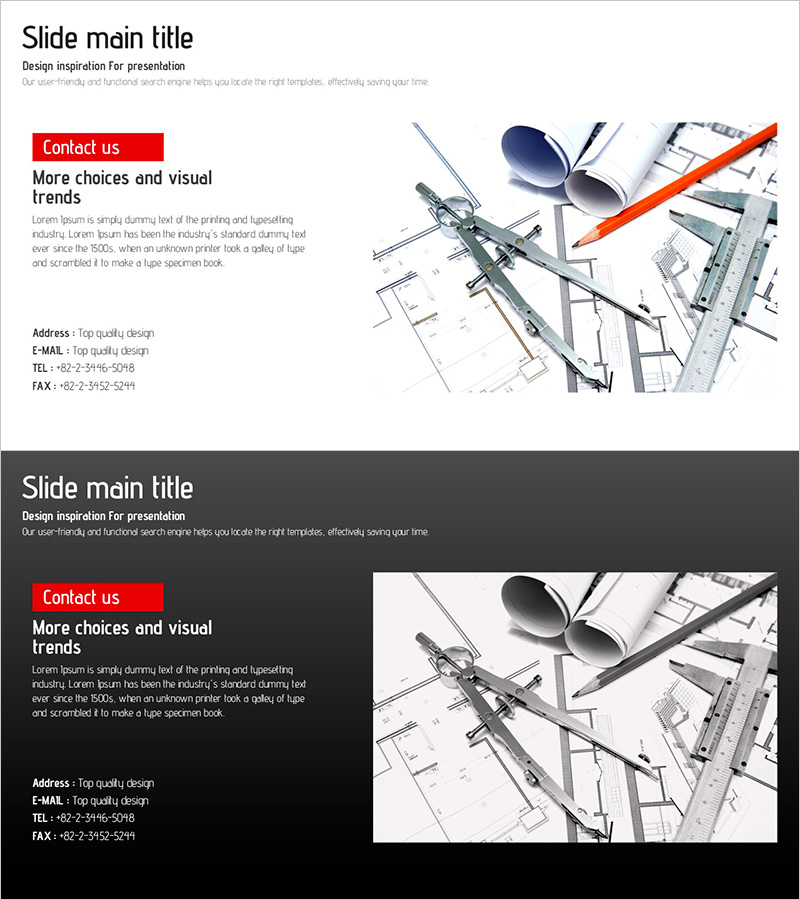
Company Profile Presentation Template - Contact Section
RJ0200042_29
- Last Update 04/10/2025
- File Size 2.3MB
- # of Slides 2
- File Format PPTX
- Slide Ratio 16:9
- Color
Keywords
About the Product
A professional 2-slide contact section set designed to conclude your company profile presentation. This PowerPoint template offers two design variations: a clean white background version and a sophisticated dark gray background version, allowing you to match your presentation style and meeting context. The left side features a prominent 'Contact us' button with dedicated text areas for address, email, telephone, and fax information. The right side displays architectural blueprints, pens, and colored pencils, conveying professionalism and trustworthiness. Fully editable in PPTX format, all text and image elements can be customized to reflect your company's branding and contact details.
Usage Points
-
Main Usage
Serves as the closing section of company profile presentations, providing clients, partners, and investors with clear contact information. Suitable for architecture and design firms as well as general corporate presentations, creating a trustworthy final impression.
-
How to Use
Place this slide at the end of your presentation to ensure all contact details (address, email, phone, fax) are visible to your audience. Use the white version for bright-toned presentations and the dark version for evening meetings or darker presentation themes.
-
Recommended For
Ideal for company profiles, business plans, proposals, and investor presentations. Recommended for sales professionals, marketing teams, executives, and project managers who need a credible closing slide. Perfect for client meetings, partnership discussions, and investment pitch events.
-
Slide Structure
Two-slide set with white background and dark gray background versions. Each slide features a two-column layout: left side with text input areas (title, address, email, phone, fax) and right side with professional imagery (blueprints, design tools) for visual impact.
Related Products
-
Contact Page in Jogging Background – A Start to Health and Communication
#Company Introduction #Contact Information
-
Smartwatch Development Team Contact Slide – Professionalism and Clarity
#Company Introduction #Contact Information
-
Medical Business Representative Introduction Slide – Trust and Professionalism
#Company Introduction #Introduction of Executives #Contact Information
-
Dynamic Drone Company Overview – Clean and Stylish Design
#Company Introduction #Company Overview #Contact Information
