



Rainbow Paper Presentation Template Text Box
RJ0200024_17
- Last Update 04/04/2025
- File Size 3.9MB
- # of Slides 2
- File Format PPTX
- Slide Ratio 16:9
- Color
Keywords
- #Content-Based Slides
- #Design-Based Slides
- #Product/Service Introduction
- #Operational Plan
- #Text Box
- #Program Introduction
- #Business Processes
- #Sticky Note
- #16:9
- #text box PowerPoint slide
- #5-step presentation design
- #rainbow color slide template
- #sequential information PPT
- #ribbon text box template
About the Product
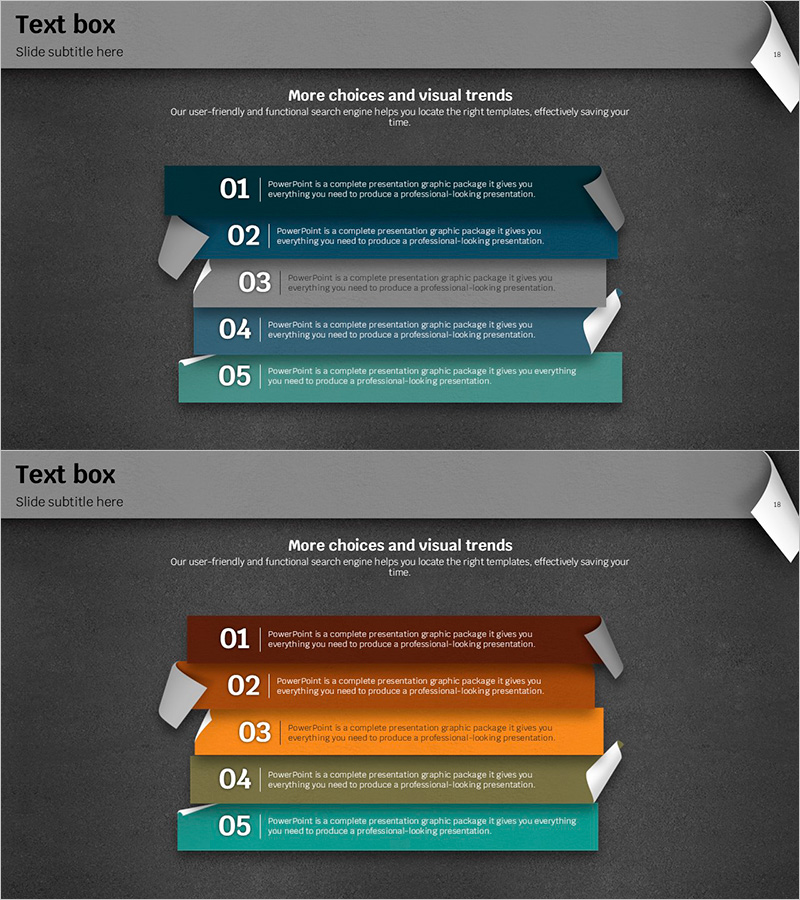
A visually striking PowerPoint slide featuring five sequential text boxes in rainbow ribbon design. Set against a dark gray background, the slide displays teal, blue, gray, orange, and green ribbon-shaped boxes arranged vertically with numbered labels and dedicated text input areas. This 16:9 widescreen 2-slide deck enables quick presentation creation for process flows, comparative analysis, and multi-point information delivery. Each slide includes a title section and five independent text entry spaces, allowing you to populate content efficiently without redesigning the layout.
Usage Points
-
Main Usage
Presents five items, steps, or options with distinct color coding for visual clarity and audience comprehension. Each stage receives its own color to enhance differentiation and reinforce information hierarchy. Ideal for business presentations, educational materials, marketing proposals, and strategic planning documents where multi-step processes or comparative analysis is central.
-
How to Use
Simply input your content into the numbered text areas within each ribbon box. Add a section title at the top, then populate the five boxes with step descriptions, features, benefits, or comparative points. The color scheme is fixed, so you only need to edit text to complete your presentation quickly.
-
Recommended For
Perfect for business strategy presentations, marketing plans, project management updates, educational seminars, and product introductions. Especially effective when presenting five equally weighted items or comparing five alternatives. Suitable for executive briefings, investor pitches, and client proposals requiring structured multi-point communication.
-
Slide Structure
Both slides follow identical layout structure. Title input area at the top, followed by five vertically stacked ribbon-shaped text boxes in the center. Each box includes a number label (01–05) and dedicated text space, with dark gray background and white borders creating clear visual hierarchy and information separation.
Related Products
-
Effective Water Resources Wide Presentation Template Diagram
#Product/Service Introduction #Operational Plan #Diagram
-
Introduction to IT Financial Services Business Program – Modern Visual Diagrams
#Product/Service Introduction #Operational Plan #Program Introduction
-
Education 3Step Diagram – Effective Program Introduction
#Product/Service Introduction #Operational Plan #Diagram
-
Fintech System Process Slide – Innovation in Information Delivery
#Product/Service Introduction #Operational Plan #Diagram
