



Square Frame Template – Cluster Diagram for Strategic Progress
RJ0200010_28
- Last Update 09/28/2025
- File Size 0.5MB
- # of Slides 2
- File Format PPTX
- Slide Ratio 16:9
- Color
Keywords
- #Content-Based Slides
- #Design-Based Slides
- #Business Strategy
- #Business Management
- #Diagram
- #Step-by-Step Schedule Plan
- #Execution Plan
- #Cluster
- #Closed Cluster Diagram
- #16:9
- #cluster diagram PowerPoint
- #square frame slide template
- #3-node diagram slide
- #business strategy visualization
- #PowerPoint diagram slide
About the Product
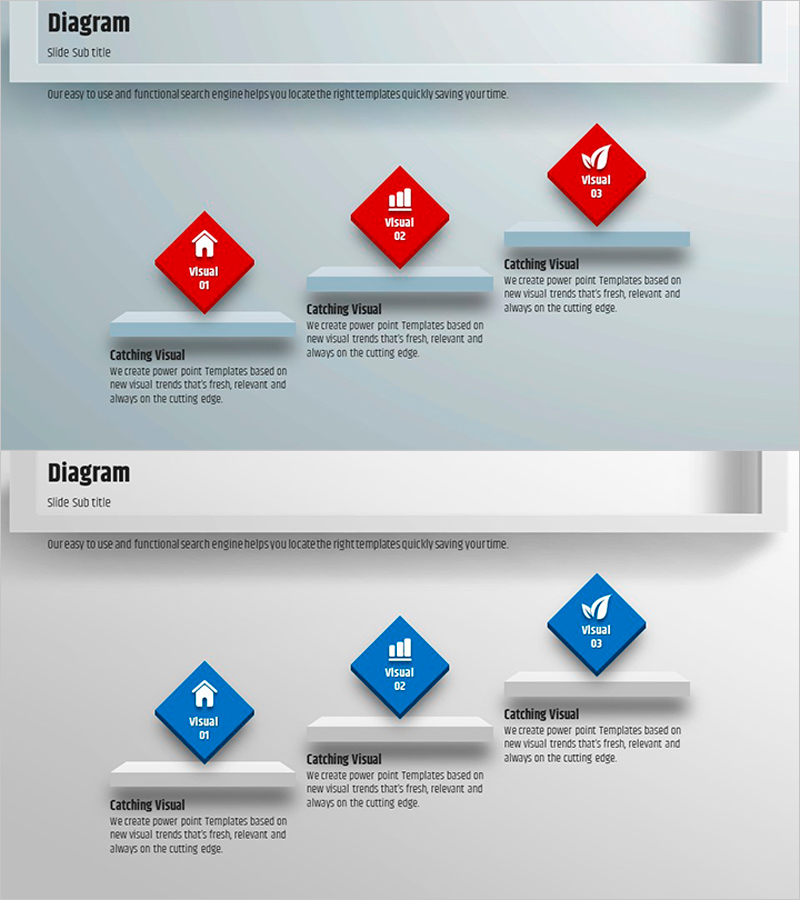
A three-node cluster diagram PowerPoint slide designed to visualize business strategy progression and phased implementation. The slide features rotated square frames in red and blue colors, with icons and text placeholders in each node to highlight key strategic elements. This diagram effectively represents three major components such as vision, execution plan, and performance metrics, with accompanying text areas for detailed descriptions. The 16:9 widescreen format includes 2 slides that integrate seamlessly into your presentation flow, allowing you to communicate complex strategic relationships in a clear, hierarchical manner.
Usage Points
-
Main Usage
Communicate three core strategic elements (vision, execution, performance) through a cluster structure that shows both independence and interconnection. This visual approach helps audiences understand integrated business management concepts and organizational direction with clarity and impact.
-
How to Use
Use in executive presentations, business planning sessions, and strategy alignment meetings. Enter department names, strategic initiatives, or performance indicators in each square node, then add detailed explanations in the adjacent text areas to enhance audience comprehension and engagement.
-
Recommended For
Ideal for executives, strategy managers, and project leaders presenting business implementation plans. Particularly effective when explaining three equally important strategic elements, and serves as a valuable tool for internal strategy communication and organizational alignment.
-
Slide Structure
Two-slide set with rotated square nodes (3 per slide in alternating red and blue) arranged left to right. Each node is paired with a 'Catching Visual' text area on the right for detailed descriptions. Optimized for 16:9 widescreen format to fit modern presentation standards.
Related Products
-
Marketing Activity Schedule Planning Diagram – Efficient Project Management
#Business Strategy #Business Management #Diagram
-
Strategic Roadmap for Action – Effective Business Implementation Plan
#Business Strategy #Business Management #Diagram
-
Step-by-Step Action Plan Slide for Achieving Mountaineering Goals
#Business Strategy #Business Management #Diagram
-

Basic Physical Exercise Sequence – Simple Step-by-Step Activities
#Business Strategy #Business Management #Diagram
