



Square Frame Template for Presenting Customer Success Stories – Speaking Effect
RJ0200010_14
- Last Update 03/31/2025
- File Size 0.5MB
- # of Slides 2
- File Format PPTX
- Slide Ratio 16:9
- Color
Keywords
- #Content-Based Slides
- #Design-Based Slides
- #Customer Success Stories
- #Text Box
- #Other
- #Customer Testimonials and Feedback
- #Speech Bubble
- #Silhouette
- #16:9
- #customer success case PowerPoint slide
- #silhouette PowerPoint design
- #square frame slide template
- #customer case presentation
- #business success story PPT
About the Product
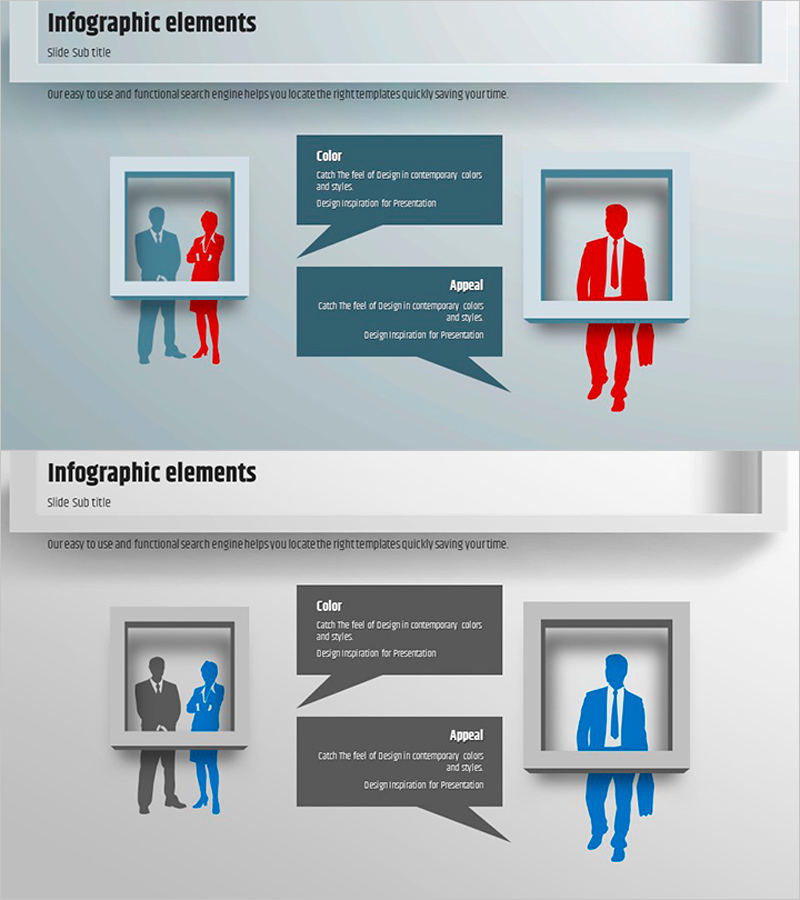
A 2-slide PowerPoint presentation template designed to showcase customer success stories with visual impact. The slides feature a light gray background with square frames highlighting silhouetted figures in contrasting colors—blue, red, and gray—to differentiate customer types. Each slide combines a framed silhouette area on the left with a text description section on the right, supporting the speaker's narrative effectively. This presentation template is ideal for communicating customer case studies, business achievements, and client testimonials in professional settings.
Usage Points
-
Main Usage
This slide set emphasizes customer success stories, business achievements, and client testimonials through visual design. The square frames and color-contrasted silhouettes clearly differentiate customer segments or case types, while the layout supports the speaker's narrative and strengthens audience engagement.
-
How to Use
Insert customer photos or logos within the square frames on each slide, and add customer name, industry, and achievement details in the text areas. Use the color scheme (blue, red, gray) to segment customer types or case categories, enabling the audience to quickly grasp diverse customer success examples.
-
Recommended For
Perfect for company profile presentations, product launch events, investor pitch decks, and sales presentations. Particularly effective for B2B companies showcasing customer portfolios, partnership results, and client testimonials to build credibility and persuasiveness.
-
Slide Structure
The 2-slide set divides each slide into a left section with a square frame (for customer images) and a right section for text descriptions. Silhouettes within frames are color-coded in blue, red, and gray for easy customer type differentiation, while the right text box is optimized for entering customer information and achievement details.
Related Products
-
Customer Reviews and Feedback Slides
#Customer Success Stories #Text Box #Other
-
Education Scene Silhouette Slide – Customer Success Story
#Customer Success Stories #Text Box #Other
-
Modern Business Plan Template – Visualizing Customer Success Stories
#Customer Success Stories #Text Box #Other
-

Optimized Template for Presentations – Efficient Information Delivery
#Market and Competitor Analysis #Customer Success Stories #Text Box
