



Touch Diagram for Business Strategy Visualization – Clear Flow Communication
RJ0200008_11
- Last Update 03/30/2025
- File Size 3.4MB
- # of Slides 2
- File Format PPTX
- Slide Ratio 16:9
- Color
Keywords
- #Content-Based Slides
- #Design-Based Slides
- #Product/Service Introduction
- #Business Vision and Strategy
- #Diagram
- #Benefits and Advantages
- #Business Strategy
- #Flow
- #Multidirectional Flow
- #16:9
- #bidirectional diagram PowerPoint
- #interaction flow slide template
- #2-step process diagram
- #arrow diagram template
- #business relationship chart PPT
About the Product
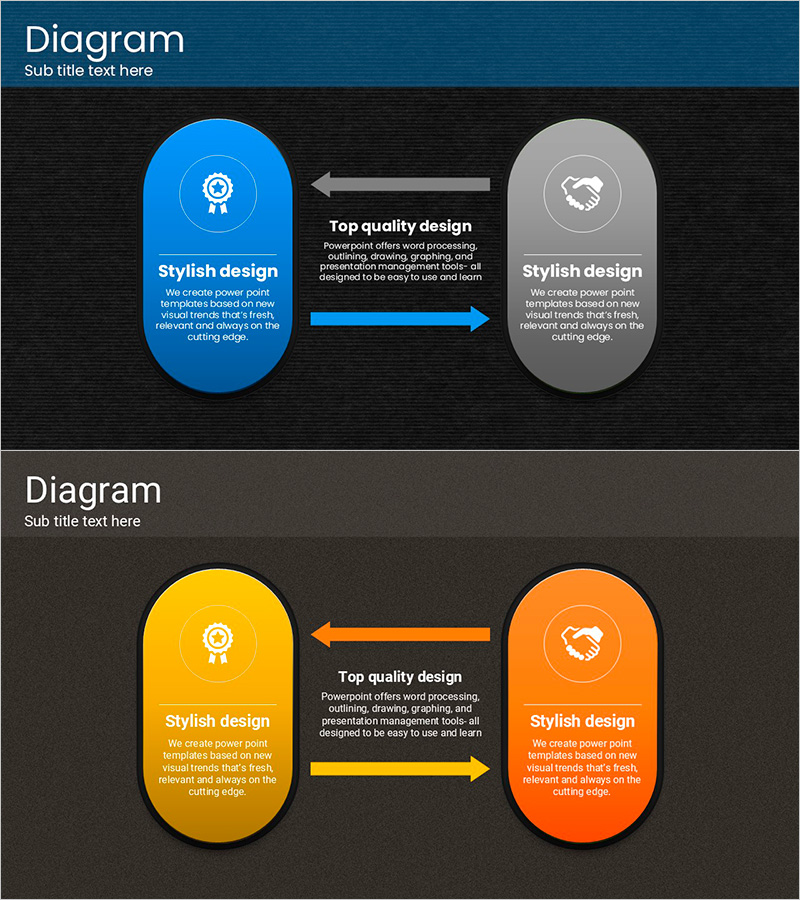
A 2-slide bidirectional arrow diagram PowerPoint template featuring contrasting color combinations: blue and gray, orange and yellow. Each slide displays two circular nodes connected by bidirectional arrows, effectively visualizing mutual relationships, collaborative structures, and two-way processes. Icons and text areas are positioned within the nodes to represent interconnected elements. The PPTX format in 16:9 widescreen ratio is fully editable and ready for immediate use in business strategy presentations, product introductions, partnership proposals, and organizational communication.
Usage Points
-
Main Usage
Illustrate mutual relationships, collaborative structures, and two-way processes between two elements or entities. The bidirectional arrows clearly communicate reciprocal influence, interdependence, and partnership dynamics in business strategy, organizational relationships, and process flows.
-
How to Use
Edit the text within circular nodes to add department names, roles, or concepts, and customize the description areas. Modify colors and icons to match your organization's branding. Use in business strategy presentations, product overviews, organizational structure explanations, partnership diagrams, and stakeholder relationship maps.
-
Recommended For
Executives, business development professionals, marketing managers, consultants, and educators presenting strategy meetings, proposal pitches, organizational structures, and partnership introductions. Ideal for topics emphasizing mutual cooperation and interdependence.
-
Slide Structure
2 slides total. Slide 1 features two blue and gray circular nodes connected by bidirectional arrows with centered text. Slide 2 displays two orange and yellow circular nodes with the same bidirectional arrow layout. Each node includes an icon placeholder and editable text area, with arrows emphasizing the interactive relationship.
Related Products
-
Service Characteristics Diagram – Vision and Direction
#Business Vision and Strategy #Business Strategy #Diagram
-
Marketing Strategy Diagram - Visualizing Business Vision
#Business Vision and Strategy #Marketing Plan and Strategy #Diagram
-

Gear Diagram & Table – Business Strategy and Marketing Plan
#Business Vision and Strategy #Marketing Plan and Strategy #Diagram
-

Diagram Slide Introducing Rules of Running – Vision and Strategy
#Product/Service Introduction #Business Vision and Strategy #Diagram
