



User Interviews & Personas Slide – Essential Tool for Customer Analysis
RB0800021_7
- Last Update 03/22/2025
- File Size 0.9MB
- # of Slides 2
- File Format PPTX
- Slide Ratio 4:3
- Color
Keywords
- #Content-Based Slides
- #Design-Based Slides
- #Market and Competitor Analysis
- #Customer Success Stories
- #Diagram
- #Customer Analysis
- #Customer Testimonials and Feedback
- #Cluster
- #Closed Cluster Diagram
- #4:3
- #closed cluster diagram PowerPoint
- #customer analysis slide template
- #persona analysis PowerPoint
- #user interview template
- #three-section diagram slide
- #customer segmentation PPT
About the Product
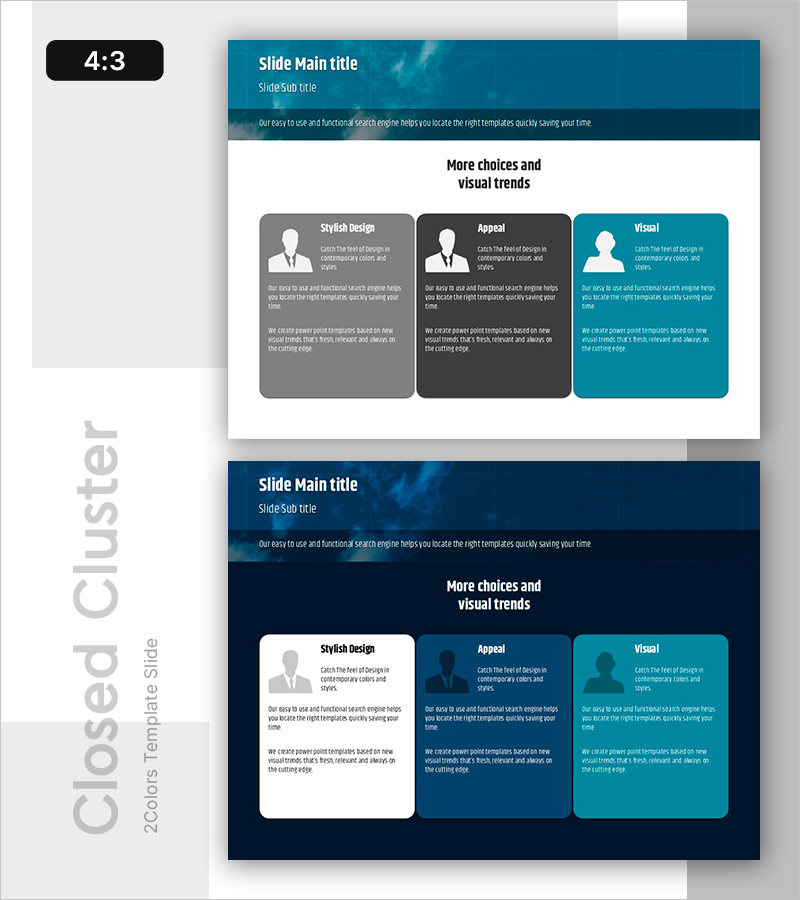
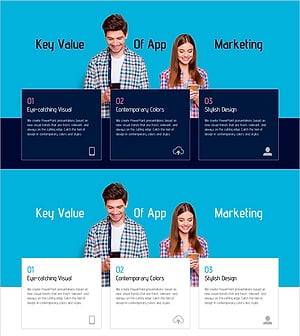
A three-section closed cluster diagram PowerPoint slide designed for user interview and persona analysis. This template visually separates three perspectives—Stylish Design, Appeal, and Visual—making it ideal for customer analysis projects and ready to use immediately. Provided in 4:3 aspect ratio with 2 slides featuring both light and dark background versions. Each section includes icon and text input areas, allowing seamless integration into presentations, planning documents, and reports.
Usage Points
-
Main Usage
Organizes user interview results and persona information into three analytical perspectives (design style, appeal, visual impact) to systematically structure and visualize customer analysis data. Supports marketing strategy development, product planning, and UX research reporting by communicating key customer insights effectively.
-
How to Use
Input customer characteristics, preferences, and behavioral patterns into the icon and text boxes within each section. Use the light background version for printed materials and the dark background version for projector presentations. Colors and fonts are fully editable to match corporate branding guidelines.
-
Recommended For
Marketing managers, product strategists, UX researchers, and business development professionals presenting customer analysis findings. Ideal for startup pitches, marketing planning documents, business proposals, and customer segmentation strategy presentations.
-
Slide Structure
Two-slide layout with slide 1 featuring a light background (white and light blue tones) and slide 2 with a dark background (dark blue and navy). Each slide contains three closed-form boxes arranged horizontally—left section in gray, center in dark gray, right in turquoise—with icon placement, title area, and descriptive text fields in each box.
Related Products
-
Kids Horoscope Card – Customer Analysis and Success Stories
#Market and Competitor Analysis #Customer Success Stories #Diagram
-
Customer Type Analysis Bar Graph – Data Visualization for Customer Success
#Company Introduction #Market and Competitor Analysis #Customer Success Stories
-
Visualizing Customer Feedback – Market Analysis and Success Stories
#Market and Competitor Analysis #Customer Success Stories #Diagram
-
Adolescent Student App Marketing Slide Template – Competitive Data Analysis
#Market and Competitor Analysis #Customer Success Stories #Diagram
